Tool-Using AI Agents: From Text Generation to Real-World Action
Do you have 6 months of programming experience and want to build AI that doesn’t just chat, but actually does things—like querying databases, sending emails, or updating records? You’re in the right place.
Most AI tutorials stop at “how to prompt GPT for clever text.” That’s like teaching someone to read a recipe but never letting them touch the stove. This tutorial covers the full picture: how to connect an AI agent to databases, APIs, and external services so it moves from generating words to performing actions.
We’ll demystify every concept, define every term, and provide concrete code examples you can run today. By the end, you’ll understand how agentic AI tool use actually works—no gaps, no jargon, no hand-waving.
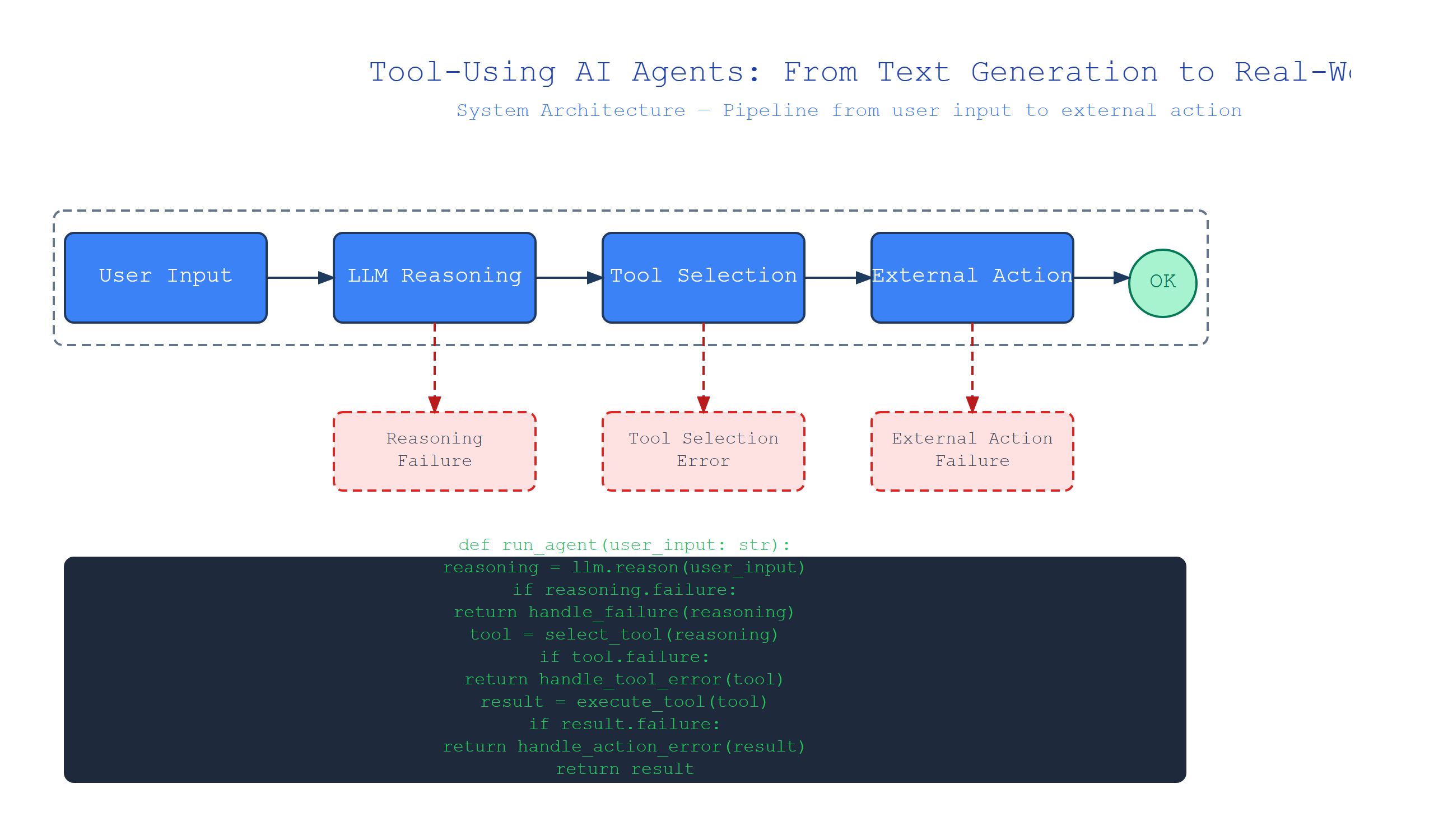
What Is Agentic AI Tool Use? (The Big Picture)
Plain-English definition: Agentic AI tool use means giving an AI the ability to call external services—like databases, web search, or calculators—as part of its reasoning process. The AI doesn’t just produce text; it performs actions.
How it works under the hood: An agent receives a user request, generates a plan involving tool calls, executes those calls (e.g., an API request), interprets the results, and continues reasoning. This loop—think, act, observe, repeat—is what makes it “agentic.”
Analogy: Think of a chef. A plain LLM is a recipe book: it knows ingredients and techniques but can’t touch pans. An agentic AI with tools is the chef: it reads the recipe, reaches for a knife, chops an onion, and adjusts based on what it sees and tastes.
# Conceptual example: agent with a weather tool
def get_weather(city: str) -> str:
    # In real code, this calls a weather API
    return f"20°C, cloudy in {city}"

def agent(user_request: str) -> str:
    if "weather in" in user_request.lower():
        city = user_request.split("weather in")[-1].strip()
        result = get_weather(city)
        return f"I checked the weather: {result}"
    return "I can't do that without tools."

# User says: "What's the weather in Berlin?"
print(agent("What's the weather in Berlin?"))
# Output: "I checked the weather: 20°C, cloudy in Berlin"
The agent detected a capability it had (weather lookup) and used it. That’s the seed of tool use.
The Architecture: How Agents Decompose Tasks
Definition: Task decomposition is the process where an agent breaks a complex request into smaller, manageable sub-tasks that it can solve using available tools.
How it works: The agent’s language model generates a sequence of steps. Each step might be “call database API to find user,” followed by “call email API to send message.” The agent executes them in order, passing outputs between steps.
Analogy: Building a bookshelf. You don’t try to assemble all at once. You follow steps: attach left side to bottom panel, then add shelves, then attach right side. Each step uses a specific tool (screwdriver, level). The agent does the same with logical steps and API calls.
Non-obvious insight: Task decomposition works surprisingly well because language models are trained on instructions and workflows. A model that can “understand” a recipe can also generate step-by-step plans for tool use—provided the plan’s structure matches its training data.
import json

# Simulated agent with task decomposition
def get_user_email(user_id: str) -> str:
    return f"{user_id}@example.com"

def send_email(to: str, body: str) -> str:
    return f"Email sent to {to}: '{body}'"

def execute_plan(plan: list[dict]) -> list[str]:
    results = []
    for step in plan:
        if step["tool"] == "get_email":
            result = get_user_email(step["params"]["user_id"])
        elif step["tool"] == "send_email":
            result = send_email(step["params"]["to"], step["params"]["body"])
        else:
            result = f"Unknown tool: {step['tool']}"
        results.append(result)
    return results

# Agent creates a plan from user request "Email the report to user 42"
plan = [
    {"tool": "get_email", "params": {"user_id": "42"}},
    {"tool": "send_email", "params": {"to": "placeholder", "body": "Here is your report."}}
]

# Execute step by step, passing data between steps
results = execute_plan(plan)
print(results)  # ['42@example.com', 'Email sent to 42@example.com: \'Here is your report.\'']
The plan’s second step didn’t have the actual email address. A production agent would pipe the output of step 1 into step 2’s parameter.
Function Calling: Making the Agent Choose the Right Tool
Definition: Function calling (or tool calling) is where the language model outputs a structured request to invoke a specific function with specific arguments. The calling code then executes that function and returns the result.
How it works: You define available functions with names, descriptions, and parameter schemas. When the agent decides it needs to use a tool, it generates a JSON object like {"name": "get_weather", "arguments": {"city": "Berlin"}}. Your code intercepts this, calls the real function, and feeds the result back to the model.
Analogy: A receptionist with a directory of specialists. You say “I have a headache,” and the receptionist looks up the right doctor (neurologist), checks their availability, and transfers your call. The AI is the receptionist; the function definitions are the directory.
Non-obvious insight: Function descriptions matter enormously. A poorly worded description will cause the model to never call a function or to call the wrong one. Use clear, specific language: “Returns current temperature for a given city name” beats “Gets weather data.”
from typing import Any
import json

# Define tool with schema
def get_weather(city: str) -> str:
    return f"20°C, {city}"

tools = [
    {
        "name": "get_weather",
        "description": "Get current weather for a city",
        "parameters": {
            "type": "object",
            "properties": {
                "city": {
                    "type": "string",
                    "description": "City name, e.g., Berlin"
                }
            },
            "required": ["city"]
        }
    }
]

# Simulated model output (in reality, the model generates this)
model_output = {
    "name": "get_weather",
    "arguments": json.dumps({"city": "Berlin"})
}

# Execute
args = json.loads(model_output["arguments"])
result = get_weather(**args)
print(result)  # "20°C, Berlin"
The tool definition told the model exactly what parameters to provide. The calling code handled execution.
The Tool-Use Loop: Think, Act, Observe, Repeat
Definition: The tool-use loop is the iterative process where an agent: (1) reasons about what to do next, (2) calls a tool if needed, (3) observes the result, and (4) decides next steps—possibly calling additional tools until the task is complete.
How it works: The loop continues until the agent produces a final answer without a tool call. This makes it “agentic”—it can adapt based on intermediate results. If a database query returns nothing, the agent might search differently or try a different API.
Analogy: A detective investigating a case. They get initial information (think), go to a witness (act), hear the witness’s statement (observe), then decide whether to visit the crime scene or interview another person (repeat). They stop when they have enough evidence for a conclusion.
import json

# Available tools
def search_database(query: str) -> str:
    if query == "price of milk":
        return "3.50"
    return "Not found"

def calculate_total(price: float, quantity: int) -> float:
    return price * quantity

tools = {
    "search_database": {"func": search_database, "params": ["query"]},
    "calculate_total": {"func": calculate_total, "params": ["price", "quantity"]}
}

def agent_loop(user_request: str) -> str:
    context = [{"role": "user", "content": user_request}]

    for _ in range(5):  # Max 5 iterations
        # Step 1: Generate action (simplified)
        if "price of milk" in user_request and "total for 3" in user_request:
            price = tools["search_database"]["func"]("price of milk")
            total = tools["calculate_total"]["func"](float(price), 3)
            return f"Total for 3 milks: ${total}"
        elif "price of milk" in user_request:
            price = tools["search_database"]["func"]("price of milk")
            return f"Price of milk: ${price}"
        else:
            return "I need more information."

    return "Maximum steps reached"

print(agent_loop("What's the total for 3 milks?"))
# "Total for 3 milks: $10.5"
The agent called the database, observed the result ($3.50), then chose to call a second tool to calculate the total.
Comparison: Agent Types and Their Tooling Capabilities
| Type | Tool Awareness | Has Tool-Use Loop | Handles Multi-Step Plans |
|---|---|---|---|
| Simple LLM | None | No | No |
| LLM with single tool call | Knows one function | No (call once) | No |
| Basic agent | Knows multiple functions | Yes (limited iterations) | No |
| Advanced agent | Extensive tool catalog | Yes (adaptive) | Yes |
Understanding these distinctions helps you scope your project. A basic agent handling database queries might need only one tool call per request. An autonomous research assistant needs the full loop with multiple iterations.
Key Takeaways
- Agentic AI tool use extends beyond text generation to executing real actions via APIs and databases
- Task decomposition breaks user requests into logical, executable steps
- Function calling is the mechanism where the model selects and structures tool invocation
- The tool-use loop (think → act → observe → repeat) enables adaptive and multi-step completion
- Function descriptions significantly impact reliability—clear descriptions prevent tool misuse
- Iteration limits prevent infinite loops in production systems

Comments