Understanding Multi-Agent AI: Coordinating Specialized Systems for Complex Workflows
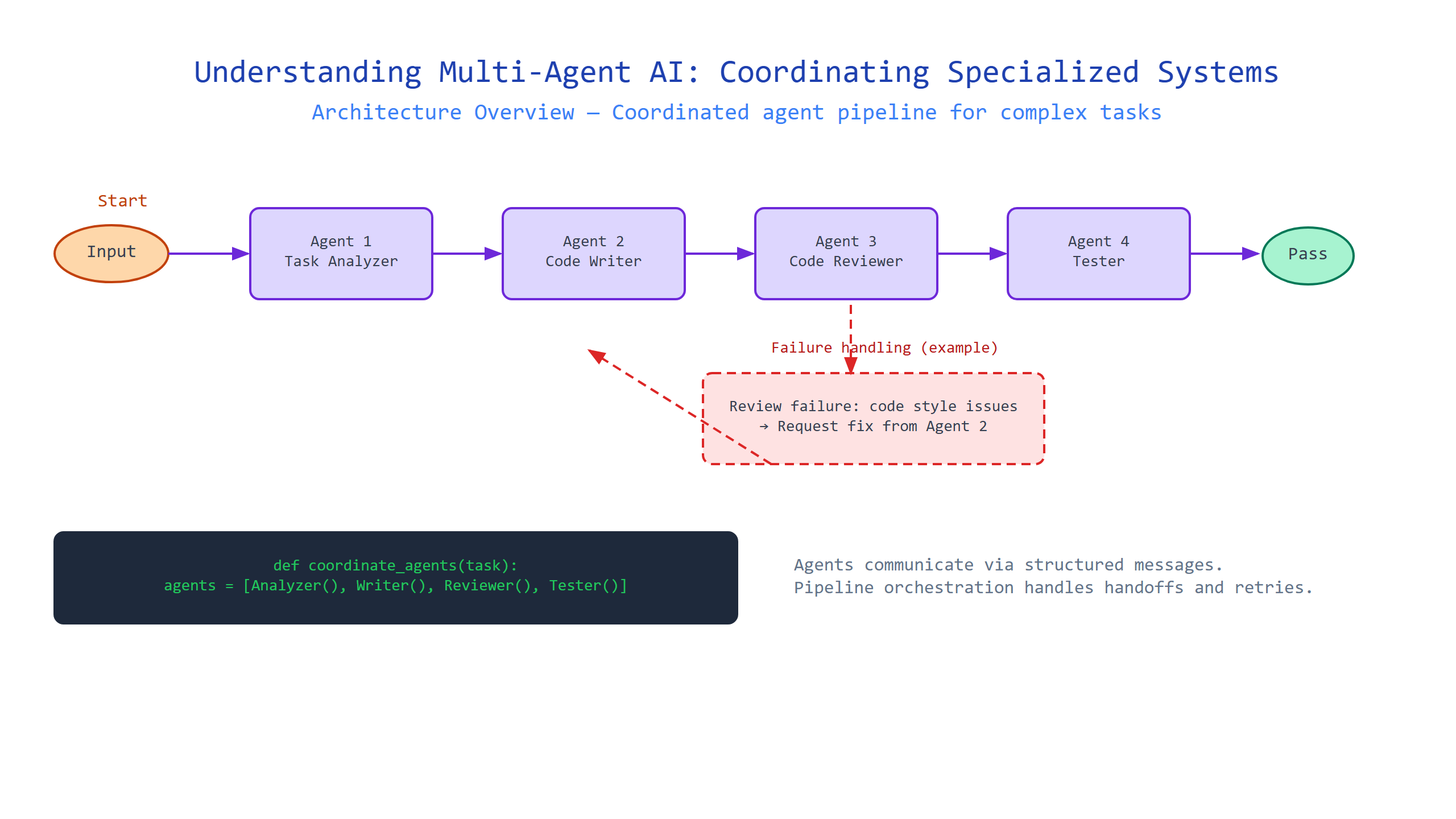
Introduction
Imagine trying to build a house alone—you’d need to be a master electrician, plumber, carpenter, and roofer all at once. That’s how most single AI systems operate today: one model tries to do everything, from understanding your question to fetching data to generating the final response. But that approach breaks down fast when workflows get complicated.
In this tutorial, you’ll learn how multi-agent AI works—a pattern where you coordinate multiple specialized AI systems (agents) to handle different parts of a complex task. We’ll cover what an agent is, how agents communicate, how to design a workflow for them, and the practical tools (like LangChain and CrewAI) you can use to build your own. No jargon left unexplained. By the end, you’ll be able to design a multi-agent system that could automate a multi-step business process—all with readable Python code.
What Is an Agent? (The Building Block)
Plain-English definition: An agent is an AI system that can autonomously perform a specific task—like summarizing a document, querying a database, or writing code. Think of it as a digital worker with a single, well-defined job description.
How it works under the hood: An agent typically wraps a large language model (LLM) with a set of instructions (a “system prompt”) and possibly access to tools (like a web search API or a calculator). When given a goal, the agent uses the LLM to reason about the next action, execute it (possibly via a tool), and repeat until the task is done.
Real-world analogy: A customer support agent in a call center. Their job is to handle billing questions. They don’t fix tech issues—they escalate those. Multitasking makes them slower and less accurate.
Code example:
# A minimal agent definition using LangChain
from langchain.agents import initialize_agent, Tool
from langchain.llms import OpenAI

# Define a tool: a function the agent can call
def calculate(expression: str) -> str:
    """Evaluate a mathematical expression."""
    try:
        result = eval(expression)
        return str(result)
    except:
        return "I couldn't compute that."

tools = [
    Tool(name="Calculator", func=calculate, description="Useful for math questions"),
]

# Create the agent
agent = initialize_agent(
    tools=tools,
    llm=OpenAI(temperature=0),
    agent="zero-shot-react-description",  # prompts the LLM to reason step-by-step
    verbose=True
)

# Ask the agent something
response = agent.run("What is 23 * 47?")
print(response)  # Output: 1081 (via the calculator tool)
Key insight: The agent’s “thinking” happens in the LLM’s context window. If the context gets too long (maybe after many steps), the agent starts losing track—a subtle performance killer.
How Do Agents Coordinate with Each Other? (The Orchestration Layer)
Plain-English definition: Coordination is the mechanism by which agents pass messages, share results, and decide who does what next. Without it, you’d have chaos.
How it works under the hood: Orchestration can be centralized (one “manager” agent assigns tasks to worker agents) or decentralized (agents negotiate via a shared message bus). Most practical systems use a centralized pattern—a pipeline or a graph.
Real-world analogy: A restaurant kitchen. The head chef (manager) reads the ticket and tells the grill cook to start the steak, the salad station to prep the greens. They don’t talk to each other directly—the manager orchestrates the flow.
Code example:
# Simple centralized orchestration with two agents
from langchain.chains import LLMChain
from langchain.llms import OpenAI
from langchain.prompts import PromptTemplate

# Agent 1: Summarizer
summarizer_chain = LLMChain(
    llm=OpenAI(temperature=0.3),
    prompt=PromptTemplate(
        input_variables=["text"],
        template="Summarize this in one sentence: {text}"
    )
)

# Agent 2: Translator
translator_chain = LLMChain(
    llm=OpenAI(temperature=0.3),
    prompt=PromptTemplate(
        input_variables=["summary"],
        template="Translate this into French: {summary}"
    )
)

# Orchestrate the workflow
def process_document(text: str) -> str:
    summary = summarizer_chain.run(text)
    french_translation = translator_chain.run(summary=summary)
    return french_translation

# Try it
result = process_document("LangChain makes building AI apps easier.")
print(result)  # Output: "LangChain rend la création d'applications IA plus facile."
Gotcha: Each agent call is an API request. If you have 10 agents in a chain, you’re waiting on 10 sequential round trips to the LLM. That latency adds up fast. Consider batching or parallelizing where possible.
Designing a Multi-Agent Workflow (The Blueprint)
Plain-English definition: A workflow is the sequence and logic that determines which agent runs when, what inputs it receives, and what it does with its output. It’s the recipe your multi-agent system follows.
How it works: Workflows can be sequential (Step 1 → Step 2 → Step 3), parallel (run several agents simultaneously on different data), or conditional (if result is X, go to Agent A; else Agent B). Frameworks like CrewAI and AutoGen support these patterns via a graph or pipeline structure.
Real-world analogy: A software build pipeline: lint → test → compile → deploy. Each stage has a specialized tool. If tests fail, the pipeline stops—no deploy.
Code example (using CrewAI):
from crewai import Agent, Task, Crew, Process

# Define agents
researcher = Agent(
    role="Research Analyst",
    goal="Find the latest trends in AI",
    backstory="You're a tech journalist who reads 100 articles a day.",
    verbose=True
)

writer = Agent(
    role="Content Writer",
    goal="Write a 200-word blog post based on research notes",
    backstory="You distill complex ideas into clear, engaging prose.",
    verbose=True
)

# Define tasks
research_task = Task(
    description="Find three recent AI trends and summarize each in one sentence.",
    agent=researcher,
    expected_output="A list of three trends with one-sentence descriptions."
)

write_task = Task(
    description="Based on the research, write a short blog post outline.",
    agent=writer,
    expected_output="A three-paragraph outline."
)

# Create the crew (workflow)
crew = Crew(
    agents=[researcher, writer],
    tasks=[research_task, write_task],
    process=Process.sequential  # Run one after the other
)

# Execute
result = crew.kickoff()
print(result)
Non-obvious insight: Workflows that look sequential can sometimes be parallelized—if the first agent’s output isn’t needed by the second until the end. Breaking a task into truly independent sub-tasks maximizes throughput.
Comparison Table: The Multi-Agent System Anatomy
| Concept | Analogous To | Mechanism | Key Challenge |
|---|---|---|---|
| Agent | A specialized worker | Wraps LLM with instructions and tools | Context window limits |
| Orchestration | A project manager | Centralized/sequential or parallel flow | Latency from sequential calls |
| Workflow | A recipe | Defines tasks and their order | Hard to debug when it fails |
| Tool | A worker’s toolkit | External functions (API, calc, DB) | Tool output errors can cascade |
This table maps the roles to real-world jobs—engineers switching from system design to multi-agent AI often find this pattern familiar.
Key Takeaways
- Agent: A wrapper around an LLM with a goal, instructions, and optionally tools.
- Orchestration: The communication layer—sequential or parallel—that coordinates agents.
- Workflow: A structured plan mapping tasks to agents, with possible branching.
- Real tools: LangChain (agent framework), CrewAI (multi-agent orchestration), AutoGen (Microsoft’s conversational agent framework).
- Performance caveat: Sequential calls multiply latency; plan for parallel execution where possible.
- Debugging tip: Log every agent’s input and output—failures are rarely in the LLM itself but in how data is passed between steps.
You now have the foundation to build your own multi-agent system. Start with a two-agent pipeline—maybe summarization followed by formatting—and grow from there. The house won’t build itself, but with the right team, it can build itself faster.

Comments