Async Python for Multi-Agent Systems: A Practical Guide
Building a system where multiple AI agents coordinate, fetch data, and respond in real-time is hard. Really hard. The naive approach—run one task, wait, run the next—creates bottlenecks that kill performance. Your agents end up staring at each other, waiting for I/O. But there’s a better way.
By the end of this tutorial, you’ll understand the core primitives that make high-throughput multi-agent systems possible. We’ll demystify asyncio, concurrency, race conditions, task management, async tool execution, high-throughput pipelines, and ThreadPoolExecutor. No jargon without explanation. Just clear, practical knowledge you can apply today.
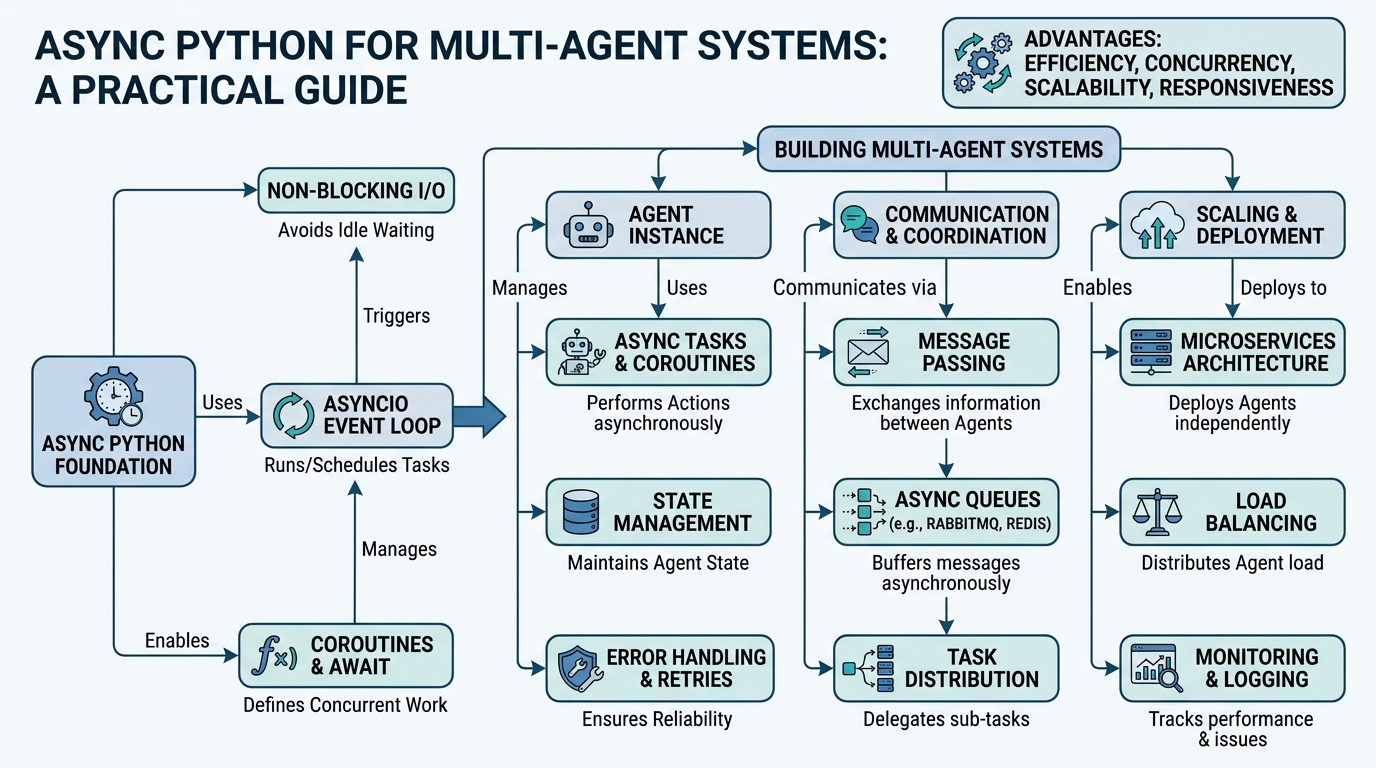
Asyncio: The Traffic Controller for Your Code
Plain-English definition: Asyncio is Python’s built-in library for writing concurrent code using the async and await syntax. It lets your program do other work while waiting for slow operations (like network requests or file reads) to finish.
How it works: When you call an async function, it returns a coroutine object. This coroutine can be scheduled to run on an event loop. The event loop is like a traffic controller—it keeps track of all the coroutines, runs them one at a time, and when one coroutine reaches an await (a point where it’s waiting for something), the event loop pauses it and switches to another coroutine that’s ready to run.
Analogy: Imagine you’re a chef with four burners. You don’t wait for water to boil on one before lighting another. You start all four, check the first, then the second, constantly switching. That’s the event loop.
Code example:
import asyncio

async def fetch_data(url):
    # Simulate an I/O operation
    await asyncio.sleep(1)
    return f"Data from {url}"

async def main():
    # Run two fetch operations concurrently
    result1, result2 = await asyncio.gather(
        fetch_data("https://api.example.com/user"),
        fetch_data("https://api.example.com/orders")
    )
    print(f"Results: {result1}, {result2}")

asyncio.run(main())
Non-obvious insight: asyncio.gather() runs coroutines concurrently, but not in parallel. Only one coroutine executes at a time. The speed boost comes from not blocking on I/O waits.
Concurrency vs. Parallelism: The Critical Distinction
Plain-English definition: Concurrency is about dealing with many things at once. Parallelism is about doing many things at once. For I/O-bound tasks (waiting for networks, databases, files), concurrency is often sufficient and more efficient.
How it works: Concurrency achieves this by interleaving tasks. When one task waits, another runs. Parallelism requires multiple CPU cores and executes tasks simultaneously. Async Python gives you concurrency, not parallelism (unless you use multiprocessing).
Analogy: Concurrency is one person flipping between two books, reading a paragraph from each. Parallelism is two people reading their own books at the same time.
Code example:
import asyncio
import time

async def wait_and_print(n):
    await asyncio.sleep(1)
    print(f"Task {n} done")

async def concurrent_example():
    # Concurrent: both tasks start, interleave during sleep
    start = time.time()
    await asyncio.gather(wait_and_print(1), wait_and_print(2))
    print(f"Concurrent took {time.time() - start:.2f}s")

async def sequential_example():
    # Sequential: one after the other
    start = time.time()
    await wait_and_print(1)
    await wait_and_print(2)
    print(f"Sequential took {time.time() - start:.2f}s")

asyncio.run(concurrent_example())  # ~1 second
asyncio.run(sequential_example())  # ~2 seconds
Non-obvious insight: Concurrency doesn’t speed up CPU-bound tasks. In fact, it adds overhead. Use it only where your program spends time waiting.
Async Tool Execution: Making Agents Wait Efficiently
Plain-English definition: Async tool execution means calling external functions (APIs, databases, search engines) in a non-blocking way within an async workflow. Your agent doesn’t freeze while waiting for a search result.
How it works: You wrap synchronous tool calls in asyncio.to_thread() or use async-native libraries. This offloads the blocking operation to a separate thread, freeing the event loop to handle other tasks.
Analogy: You’re cooking and need flour from the pantry. Instead of walking there and back (blocking), you ask someone (a thread) to bring it while you continue cooking.
Code example:
import asyncio
import requests  # Synchronous library

async def get_temperature(city):
    # Run the blocking requests.get in a separate thread
    response = await asyncio.to_thread(
        requests.get, f"https://api.weather.com/{city}"
    )
    return response.json()["temperature"]

async def main():
    cities = ["London", "Tokyo", "New York"]
    # Fetch all temperatures concurrently
    temps = await asyncio.gather(*[get_temperature(c) for c in cities])
    print(temps)
Non-obvious insight: asyncio.to_thread creates a thread per call. For hundreds of calls, consider a thread pool (see ThreadPoolExecutor section).
Race Conditions: When Async Bites Back
Plain-English definition: A race condition occurs when the outcome of a program depends on the timing of uncontrollable events. In async code, two coroutines might read and write a shared variable in an unexpected order.
How it works: The event loop can switch between coroutines at any await point. If coroutine A reads a variable, then the event loop switches to coroutine B which modifies it, then A writes back using its stale read—you have a race.
Analogy: Two people updating a shared spreadsheet. You read the balance as 100, then someone else deducts 50, then you write 150 (100 + 50) instead of 100. The deduction is lost.
Code example:
import asyncio

counter = 0

async def increment():
    global counter
    for _ in range(1000):
        temp = counter  # Read
        await asyncio.sleep(0)  # Switch point—race here!
        counter = temp + 1  # Write

async def main():
    await asyncio.gather(increment(), increment())
    print(f"Expected: 2000, Got: {counter}")  # ~1000-2000

asyncio.run(main())
Fix:
import asyncio
from asyncio import Lock

counter = 0
lock = Lock()

async def safe_increment():
    global counter
    for _ in range(1000):
        async with lock:  # Prevent other coroutines from accessing
            temp = counter
            await asyncio.sleep(0)  # Safe now—locked
            counter = temp + 1

async def main():
    await asyncio.gather(safe_increment(), safe_increment())
    print(f"Expected: 2000, Got: {counter}")  # 2000

asyncio.run(main())
Non-obvious insight: await asyncio.sleep(0) is an explicit yield point. It’s useful for testing race conditions but dangerous in production without proper locking.
Task Management: Keeping Track of Chaos
Plain-English definition: Task management refers to creating, tracking, and controlling groups of async tasks. This includes handling timeouts, cancellations, and error propagation.
How it works: You create tasks with asyncio.create_task(), which schedules them on the event loop. You can then wait for them, cancel them, or set timeouts using asyncio.wait_for() or asyncio.timeout().
Analogy: You’re a project manager. You assign tasks to team members (create_task), set deadlines (timeout), and when one fails, you decide whether to cancel the rest (error handling).
Code example:
import asyncio

async def process_agent(agent_id, data):
    try:
        result = await asyncio.wait_for(
            agent_work(agent_id, data),
            timeout=5.0  # Agent must finish in 5 seconds
        )
        return result
    except asyncio.TimeoutError:
        print(f"Agent {agent_id} timed out")
        return None

async def main():
    tasks = [
        asyncio.create_task(process_agent(i, f"data_{i}"))
        for i in range(10)
    ]
    results = await asyncio.gather(*tasks, return_exceptions=True)
Non-obvious insight: return_exceptions=True prevents one failed task from crashing the entire gather. This is crucial in multi-agent systems where partial results are acceptable.
ThreadPoolExecutor: Bridging Sync and Async Worlds
Plain-English definition: ThreadPoolExecutor is a thread pool from the concurrent.futures module. It manages a pool of worker threads that can execute synchronous functions without blocking the async event loop.
How it works: You create a pool with a fixed number of threads. Submit synchronous functions to the pool. Inside async code, you await the result using loop.run_in_executor(). This offloads blocking work to threads, keeping the event loop responsive.
Analogy: You have five assistants (threads). You can give them ten tasks. They work in parallel, and you collect results as they finish—while you continue moving on to other work.
Code example:
import asyncio
from concurrent.futures import ThreadPoolExecutor
import requests

def fetch_sync(url):
    return requests.get(url).json()

async def main():
    urls = [f"https://api.example.com/page/{i}" for i in range(100)]

    with ThreadPoolExecutor(max_workers=10) as executor:
        loop = asyncio.get_event_loop()
        tasks = [
            loop.run_in_executor(executor, fetch_sync, url)
            for url in urls
        ]
        results = await asyncio.gather(*tasks)
        print(f"Fetched {len(results)} pages")
Non-obvious insight: CPU-bound tasks in threads? No. Python’s GIL limits true parallelism. For CPU-heavy work, use ProcessPoolExecutor.
Comparison Table: Primitive Decision Guide
| Primitive | When to Use | Key Limitation | Gotcha |
|---|---|---|---|
asyncio |
I/O-bound, many connections | No CPU parallelism | Event loop overhead for few tasks |
asyncio.gather() |
Run coroutines concurrently | Fails if any task fails (use return_exceptions=True) |
Order not guaranteed |
asyncio.Lock |
Protect shared mutable state | Can cause deadlocks | Always use async with |
asyncio.create_task() |
Fire-and-forget or background work | Must track tasks or they get garbage collected | Store references or use gather |
ThreadPoolExecutor |
Bridge sync code into async | Thread pool size limited | Watch for thread-safety in shared memory |
asyncio.to_thread() |
Simple sync-to-async bridge | Creates thread per call | For many calls, use a pool instead |
Key Takeaways
- Asyncio lets you write concurrent I/O-bound code without threads—use it for network-heavy tasks.
- Concurrency is interleaving tasks, not simultaneous execution. Perfect for I/O waits.
- Async tool execution wraps sync calls in
to_thread()or uses async-native libraries. - Race conditions happen at
awaitpoints. UseLockorQueueto protect shared state. - Task management with
create_task,gather, andtimeoutkeeps your system from hanging. - ThreadPoolExecutor bridges sync libraries into async workflows efficiently.
- High-throughput pipelines combine these primitives: gather tasks, manage timeouts, use pools for sync work.
Build smart. Let your agents work in parallel. Don’t let I/O hold them back.

Comments