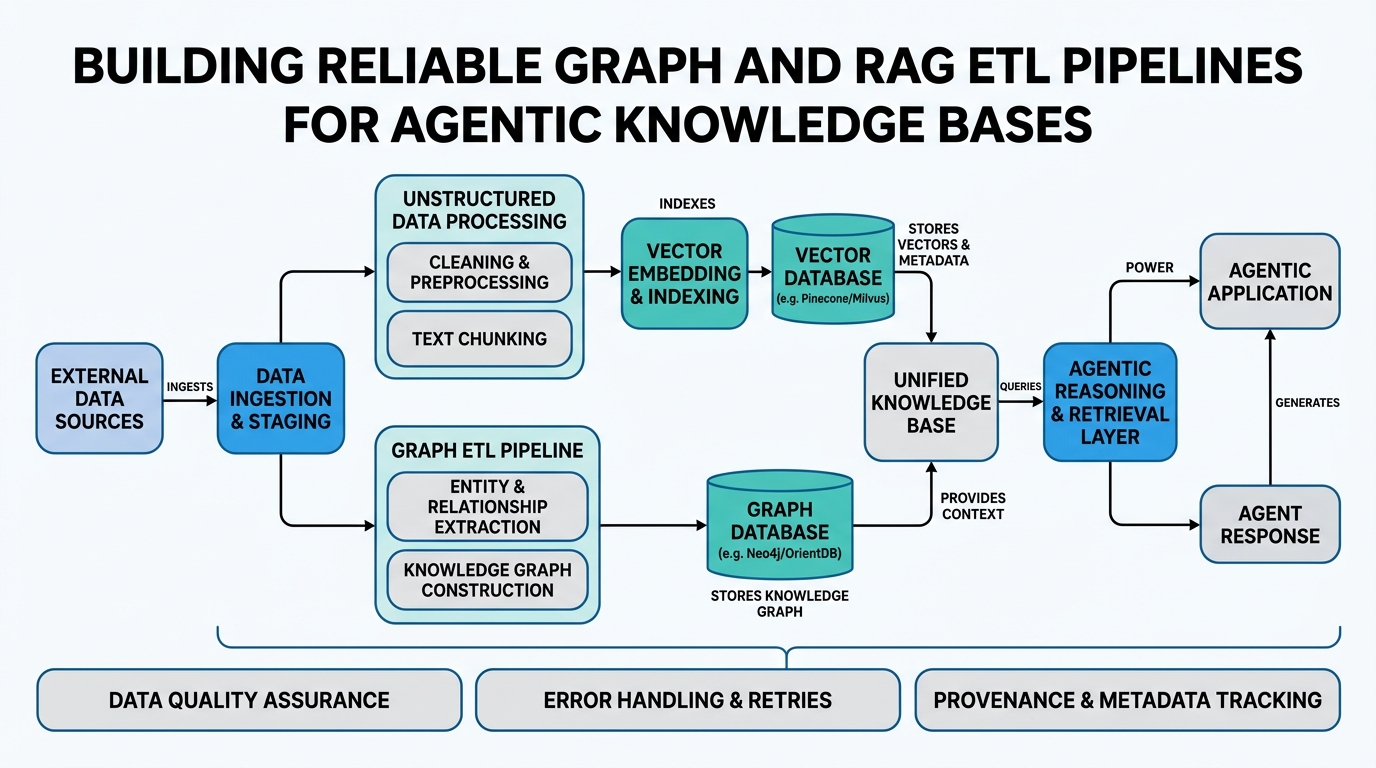
Building Reliable Graph and RAG ETL Pipelines for Agentic Knowledge Bases
Introduction
If you’re building AI agents that need to answer questions based on your company’s internal documents, you’ve likely bumped into a frustrating truth: the quality of your agent’s answers depends entirely on the quality of your data pipeline. In this tutorial, we’ll demystify six crucial concepts: Knowledge Bases, ETL Pipelines, Document Stores, ElasticSearch, S3 Data Persistence, and Data Engineering. By the end, you’ll understand how to build a reliable pipeline that transforms raw documents into a searchable knowledge base your agents can actually trust. No more hallucinating answers or returning irrelevant results.
Understanding Knowledge Bases
A Knowledge Base is simply a structured collection of information that an AI agent can query to answer questions. Think of it as your company’s brain—every document, FAQ, code comment, and meeting note lives here. But here’s the catch: your knowledge base is only as good as your data engineering pipeline.
How It Works Under the Hood
Under the hood, a knowledge base isn’t just a folder of PDFs. It’s a living system where documents get chunked, embedded into vector representations, and indexed for fast retrieval. When your agent receives a question, it converts that question into a vector, finds similar vectors in the base, and returns the matching documents.
Real-World Analogy
Imagine a library. Your knowledge base is the entire collection. But without a card catalog (the index), finding anything takes forever. Modern knowledge bases are like having a librarian who can instantly recall every book containing the word “authentication.”
Annotated Code Example
from langchain.embeddings import OpenAIEmbeddings
from langchain.text_splitter import RecursiveCharacterTextSplitter

# First, chunk your documents
text_splitter = RecursiveCharacterTextSplitter(
    chunk_size=1000,
    chunk_overlap=200  # Critical: prevents context loss
)

documents = text_splitter.split_documents(raw_docs)

# Then embed each chunk
embeddings = OpenAIEmbeddings()
vector_store = Chroma.from_documents(documents, embeddings)
Gotcha: Most tutorials skip the chunk overlap. Without it, your agent might miss answers that span chunk boundaries.
Building ETL Pipelines for Knowledge
ETL Pipelines (Extract, Transform, Load) are the automated workflows that take raw data from various sources and prepare it for your knowledge base. Think of it as a factory assembly line for data.
How It Works Under the Hood
First, you extract data from sources (S3 buckets, databases, web pages). Next, you transform it—removing formatting, handling duplicates, splitting into chunks. Finally, you load the processed data into your document store or vector database. This all happens on a schedule or triggered by events.
Real-World Analogy
ETL is like preparing ingredients for a restaurant kitchen. You receive shipments (extract), wash and chop vegetables (transform), and stock the pantry (load). Bad prep today means bad meals tomorrow.
Annotated Code Example
import boto3
from datetime import datetime

def etl_pipeline_run():
    # EXTRACT: Pull new files from S3
    s3 = boto3.client('s3')
    new_files = s3.list_objects_v2(Bucket='my-docs',
                                   Prefix=f'raw/{datetime.today():%Y-%m-%d}')

    # TRANSFORM: Clean and chunk
    for file in new_files['Contents']:
        raw_text = s3.get_object(Bucket='my-docs', Key=file['Key'])['Body'].read()
        cleaned_text = raw_text.decode('utf-8').replace('\r\n', '\n')
        chunks = split_into_chunks(cleaned_text)

        # LOAD: Upsert into the vector store
        vector_store.add_texts(chunks,
                              metadatas=[{'source': file['Key']}]*len(chunks))
Non-obvious insight: Always run deduplication during transformation. Same document uploaded twice creates identical vectors that pollute your search results.
Choosing the Right Document Store
A Document Store is a database designed to hold and query entire documents—or their chunks—as first-class citizens. Unlike relational databases that store rows in tables, document stores handle unstructured text natively.
How It Works Under the Hood
Document stores use specialized indexes (inverted indexes for keyword search, vector indexes for semantic search) to find matching content quickly. They also handle metadata—timestamps, authors, categories—which you can use to filter results.
Real-World Analogy
Picture a filing cabinet where each folder is a document. A document store is that cabinet plus a super-smart assistant who can find every folder containing “budget forecast” within seconds, regardless of how messy the filing system is.
Comparison: Document Stores vs Traditional Databases
| Feature | Document Store | Traditional Relational DB |
|---|---|---|
| Schema | Flexible, can change on the fly | Rigid, needs migrations |
| Query Type | Full-text + semantic search | Exact matches, joins |
| Best For | Unstructured text, knowledge bases | Structured business data |
| Example | Elasticsearch, MongoDB Atlas | PostgreSQL, MySQL |
Performance gotcha: Don’t store every chunk in a single index. Split by document type (e.g., tickets_index, docs_index) to keep query times low.
Powering Search with ElasticSearch
ElasticSearch is the most popular open-source search and analytics engine. It’s the go-to tool for building document stores that need fast, fuzzy, and full-text search capabilities.
How It Works Under the Hood
ElasticSearch indexes your documents by creating inverted indexes. When you search “authentication failure,” it uses TF-IDF (term frequency-inverse document frequency) to rank documents by relevance. But it can also do vector search for semantic matching.
Real-World Analogy
Think of ElasticSearch as a librarian who has memorized the entire library’s card catalog—and can read your mind. You type “pass,” and it suggests “password reset flow” before you finish the word.
Annotated Code Example
from elasticsearch import Elasticsearch

# Connect to your ElasticSearch instance
es = Elasticsearch(['http://localhost:9200'])

# Index a document chunk
doc_chunk = {
    'text': 'When a user encounters error 403, they should check their API key...',
    'metadata': {'source': 'docs/troubleshooting.md', 'date': '2024-01-15'}
}

es.index(index='knowledge_base', document=doc_chunk)

# Search with fuzzy matching
results = es.search(
    index='knowledge_base',
    query={
        'match': {
            'text': {
                'query': 'authorization error',
                'fuzziness': 'AUTO'  # Handles typos
            }
        }
    }
)
Expert insight: ElasticSearch shines at hybrid search—combining keyword precision with semantic understanding. Most setups use it alongside a vector database, not as a replacement.
Storing Data Reliably with S3 Data Persistence
S3 Data Persistence means storing your raw and processed data in Amazon S3 (Simple Storage Service) or compatible object storage. This is your source of truth—where the original documents live before they’re transformed.
How It Works Under the Hood
S3 stores objects (files) in buckets. Each object has a key (path) and metadata. You can version objects, set expiration policies, and control access with IAM policies. For ETL pipelines, S3 serves as both the input source and the backup target.
Real-World Analogy
S3 is like a massive, secure warehouse. You don’t have to organize boxes perfectly (S3 handles that). You just need to know the aisle and shelf number (object key) to retrieve any box instantly.
Why It Matters for Knowledge Bases
Your knowledge base needs to recover from failures. If your vector database crashes, you need to re-index from your original documents. S3 provides that source of truth.
import boto3

s3 = boto3.client('s3')

# Save processed chunks to S3 for backup
def backup_to_s3(chunk_id, chunk_text, metadata, bucket='knowledge-backups'):
    backup_data = {
        'id': chunk_id,
        'text': chunk_text,
        'metadata': metadata,
        'created_at': datetime.utcnow().isoformat()
    }

    # Store as JSON in S3
    s3.put_object(
        Bucket=bucket,
        Key=f'chunks/{chunk_id}.json',
        Body=json.dumps(backup_data).encode()
    )
Gotcha: S3 has a 5TB per object limit. For massive documents, chunk them before storage, not after.
The Role of Data Engineering
Data Engineering is the discipline of building, testing, and maintaining the pipelines that move and transform data. For knowledge bases, it’s the unsung hero—without it, your agent’s answers are garbage.
How It Works Under the Hood
Data engineers design DAGs (directed acyclic graphs) that define pipeline dependencies. They monitor data quality, handle failures, and optimize for cost. For knowledge bases, this means ensuring new documents get indexed within minutes, not days.
Real-World Analogy
Data engineering is like being the plumber for your AI’s brain. If the pipes leak (data loss) or get clogged (slow indexing), the whole system fails. But when they work perfectly, nobody notices.
Annotated Code Example
# Using Prefect for pipeline orchestration
from prefect import flow, task

@task(retries=3, retry_delay_seconds=60)
def extract_from_s3(bucket, prefix):
    """Extract new documents from S3"""
    # With retry, this survives transient network failures
    pass

@task
def transform_document(raw_text):
    """Clean and chunk the document"""
    pass

@flow(name="knowledge-base-ingestion")
def daily_kb_update():
    """Orchestrate the entire pipeline"""
    raw_docs = extract_from_s3("company-docs", "raw/")
    for doc in raw_docs:
        chunks = transform_document(doc)
        load_to_vector_store(chunks)
        backup_to_s3(chunks)
Expert insight: The real work of data engineering for knowledge bases is handling schema drift—when your document format changes, your pipeline must adapt without breaking.
Key Takeaways
- Knowledge Bases need structured pipelines, not just raw file dumps
- ETL Pipelines automate the extract-transform-load process and must handle failures gracefully
- Document Stores like ElasticSearch provide fast search but need careful indexing design
- ElasticSearch excels at full-text and fuzzy search; use it for keyword-heavy queries
- S3 Data Persistence ensures you have a recoverable source of truth
- Data Engineering is the discipline that makes all the above work reliably in production
Build your pipeline carefully, and your agents will answer accurately. Cut corners, and you’ll be debugging mysterious answers at 3 AM.

Comments