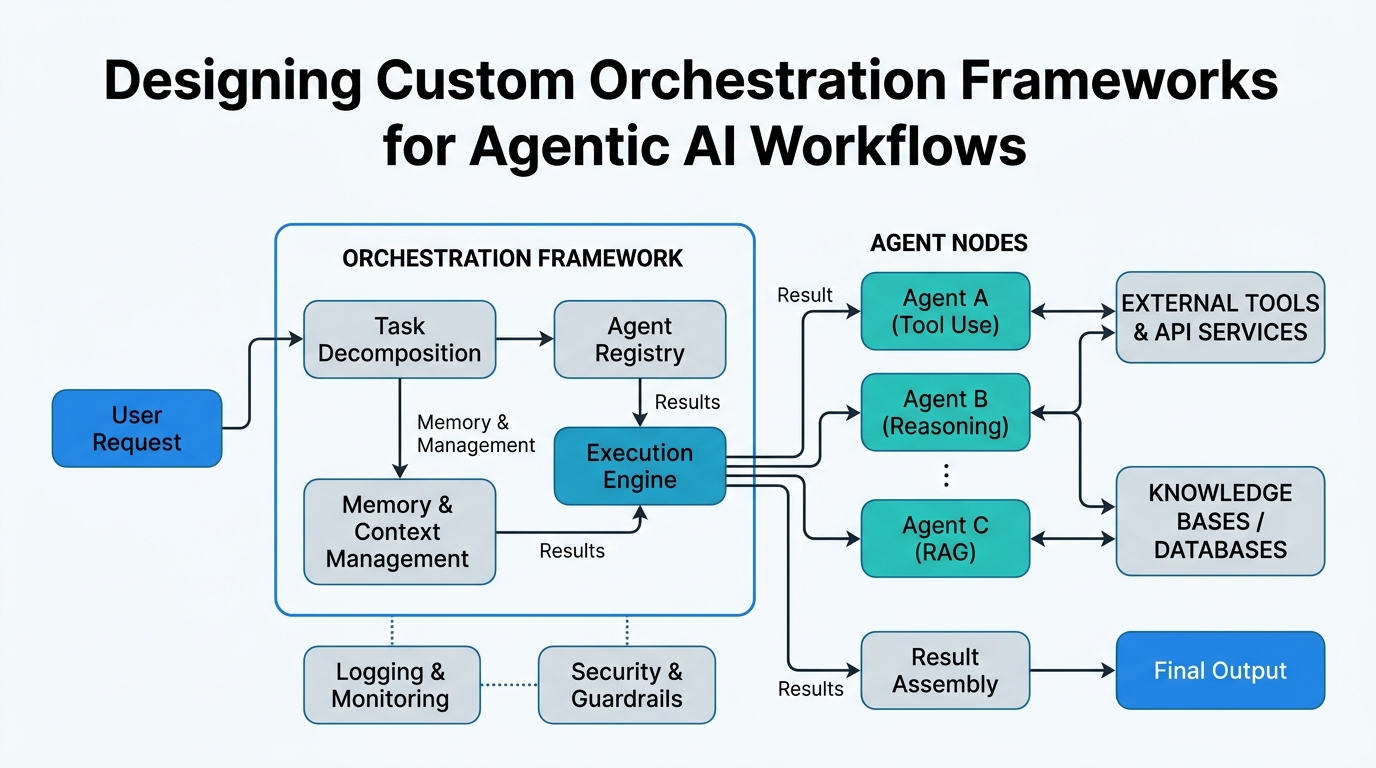
Designing Custom Orchestration Frameworks for Agentic AI Workflows
You’re building an AI agent that needs to book flights, check calendars, and send confirmation emails — all in one sequence. Each step depends on the last, any could fail, and every call needs proper authentication. This is where most developers hit a wall.
In this tutorial, I’ll teach you how to design a custom orchestration framework that handles exactly these challenges. We’ll demystify multi-step workflows, retry logic with reliable execution, and two critical security concepts: IAM tokens for machine-to-machine auth and connect tokens for user-specific permissions. By the end, you’ll have a mental model and working code you can adapt to your own projects.
What is a Custom Orchestration Framework?
Plain-English definition: A custom orchestration framework is like a stage manager for a theater production. You write the script (your workflow steps), and the framework handles the curtains, lighting, and scene changes — making sure everything happens in the right order, even when something goes wrong.
How it works: Under the hood, the framework maintains a state machine. Each step is a state that can succeed, fail, or need retry. The framework tracks where you are, what data each step produced, and what should happen next.
Real-world analogy: Think of a restaurant kitchen. The custom orchestration framework is the head chef who coordinates: “Fire table 3’s appetizers, then start the pasta, but hold the steak until the appetizers go out.” They track what’s cooking, what’s done, and what’s backed up.
# Simple orchestration framework skeleton
class OrchestrationFramework:
    def __init__(self):
        self.steps = []
        self.context = {}  # Shared state between steps

    def add_step(self, name, function):
        self.steps.append({
            'name': name,
            'function': function,
            'retries': 0
        })

    def execute(self):
        for step in self.steps:
            print(f"Executing: {step['name']}")
            result = step['function'](self.context)
            self.context[step['name']] = result
        return self.context
Multi-Step Workflows: The Recipe for Complex Tasks
Plain-English definition: A multi-step workflow is a sequence of operations where each step depends on the output of previous steps. It’s a recipe, not a random collection of actions.
How it works: Each step receives the accumulated context from all prior steps. This context includes data, error states, and timing information. The framework orchestrates the flow, passing the right data between steps and handling branching logic.
Real-world analogy: Filing your taxes. You need to: (1) gather W-2s, (2) calculate deductions, (3) fill forms, (4) submit. Step 3 can’t start until step 2 is complete. The workflow ensures this sequence.
Workflow: Process Order
├── Step 1: Validate Payment → returns {payment_id, amount}
├── Step 2: Check Inventory → uses payment_id, returns {stock_status}
├── Step 3: Generate Invoice → uses amount, stock_status, returns {invoice_url}
└── Step 4: Send Confirmation → uses invoice_url, sends email
Non-obvious insight: Most tutorials forget about parallel branching. Real workflows often have steps that can run simultaneously — like checking inventory and verifying the customer’s address at the same time. Your framework should support this.
Retry Logic and Reliable Execution: Don’t Let One Failure Kill Everything
Plain-English definition: Retry logic is the system’s ability to automatically re-attempt a failed step. Reliable execution means the framework guarantees your workflow will eventually complete or clearly tell you why it couldn’t.
How it works: When a step throws an error, the framework checks if it should retry (based on your configuration) or fail permanently. Each retry might use exponential backoff — waiting longer between attempts to give external services time to recover.
Real-world analogy: You’re calling a friend. First try: busy. You wait 30 seconds, try again. Busy again. Wait 2 minutes. Try once more. After three attempts, you leave a voicemail (the failure handler).
import time
import random

def retry_with_backoff(function, max_retries=3):
    for attempt in range(max_retries):
        try:
            return function()
        except Exception as e:
            if attempt == max_retries - 1:
                raise  # Give up on last attempt
            wait_time = (2 ** attempt) + random.uniform(0, 1)
            print(f"Retry {attempt + 1} in {wait_time:.1f}s...")
            time.sleep(wait_time)
Non-obvious insight: The most common mistake is retrying idempotent operations (like read requests) the same way as non-idempotent ones (like charging a credit card). Your retry logic must understand which operations are safe to repeat and which need idempotency keys.
IAM Tokens: Machine-to-Machine Handshakes
Plain-English definition: An IAM (Identity and Access Management) token is like a VIP badge for computer programs. One service shows this badge to another service to prove it’s authorized to make requests.
How it works: AWS, Azure, or GCP issue these tokens after verifying the requesting service’s identity. The token contains claims about the service’s role and permissions. It’s passed in HTTP headers and typically expires after 1 hour.
Real-world analogy: Your office keycard. The building doesn’t care who you are personally — it cares that your card is valid and has access to floors 3 and 7. IAM tokens work the same way for services.
# Getting an IAM token (example for AWS)
def get_iam_token(aws_role_arn):
    """Get temporary credentials for cross-service calls."""
    import boto3
    sts = boto3.client('sts')
    response = sts.assume_role(RoleArn=aws_role_arn, RoleSessionName='orchestrator')
    return response['Credentials']
Non-obvious insight: IAM tokens have a critical gotcha: they expire. If your workflow takes longer than the token’s lifetime, you need token refresh logic built into your orchestration. Most tutorials set this as an afterthought — design for it from the start.
Connect Tokens: User-Specific Authorization
Plain-English definition: A connect token is like a permission slip that a user signs, giving your application access to their specific resources. Unlike IAM tokens (for machine-to-machine), connect tokens represent user consent.
How it works: When a user authorizes your app (say, granting calendar access), the OAuth flow produces a connect token. This token is scoped to that user’s resources and often includes a refresh token for extending access.
Real-world analogy: You give a house sitter a key to your home (a connect token). They can only access your house, not your neighbor’s. When your trip extends, you might send them another key via email (token refresh).
| Concept | Who Authorizes | Duration | Scope | Failure Mode |
|---|---|---|---|---|
| IAM Token | Service administrator | ~1 hour | Service-wide | Token expires mid-workflow |
| Connect Token | End user | Hours to days | User-specific | User revokes access |
| Retry Logic | Your code | Per attempt | Single step | Exceeds max retries |
| Orchestration | Your framework | Workflow duration | Entire sequence | Unhandled state transition |
Key Takeaways
- Custom orchestration framework: A state machine that coordinates step execution and data flow
- Multi-step workflows: Sequences where each step builds on the previous — branching and parallelism are design requirements
- Retry logic: Automatic re-attempts with exponential backoff; watch for idempotency issues
- Reliable execution: Guarantees complete or fail, not hang; handle token expiration
- IAM tokens: Machine-to-machine auth from cloud providers; plan for token refresh
- Connect tokens: User-specific OAuth tokens; handle revocation gracefully
You now have the building blocks to design orchestration that doesn’t just move data around — it moves it reliably, securely, and with the intelligence to handle real-world failures. Build something resilient.

Comments