Understanding Context Window Preservation
Introduction
Your program’s conversation just broke. The AI forgot what you said three messages ago. You’re not alone — and it’s not your fault. Every LLM has a limited “context window,” and once you flood it, the oldest memories get kicked out.
This tutorial teaches you exactly how to stop that from happening. You’ll learn six specific techniques used by professional AI engineers to keep long conversations coherent: Auto-Compaction, Context Window Optimization, Token Budgeting, Session Summarization, Sliding Window Memory, and Long-Context Engineering.
By the end, you’ll know how and when to apply each one. No vague theory — only concrete code and clear analogies.
Auto-Compaction — The Digital Pack Rat
Plain English definition: Auto-Compaction is a strategy that automatically removes old or redundant information from the context window without you lifting a finger.
How it works under the hood: The system tracks each piece of text’s “recency” and “relevance.” When the total token count hits a threshold (say 80% of the max window), the oldest or least-relevant turns are deleted. Some systems score messages by recency (most recent wins) and relevance (how much the user has referenced it).
Real-world analogy: Think of a physical bulletin board. You pin up new notes. When the board fills up, you automatically toss the oldest flyer to make room for the new one. Auto-Compaction is the janitor doing that for you.
Annotated code example (Python with LangChain):
from langchain.memory import ConversationBufferMemory
from langchain.memory import ConversationSummaryMemory

# Auto-Compaction with a simple buffer
memory = ConversationBufferMemory(
    memory_key="chat_history",
    return_messages=True,
    # Enable compaction by setting a token limit
    # Under the hood, LangChain tracks token count
)
memory.chat_memory.add_user_message("Hello!")
memory.chat_memory.add_ai_message("Hi there!")
# When you add messages beyond the max_token_limit,
# auto-compaction deletes the oldest ones.
# This happens implicitly in some memory types.
Non-obvious insight: Auto-Compaction can silently lose important context if you rely solely on recency. A crucial detail from the conversation’s start might vanish.
Context Window Optimization — Squeezing the Sponge
Plain English definition: Context Window Optimization means carefully crafting your prompts and messages to use as few tokens as possible while keeping all meaning intact.
How it works under the hood: You trim whitespace, remove unnecessary adjectives, merge redundant instructions, and use the most token-efficient phrasing for your model. Some advanced techniques reorder message parts — putting critical instructions at the very start or end (the “primacy and recency” effect).
Real-world analogy: Imagine packing a suitcase for a trip. You fold clothes tightly, roll socks inside shoes, and leave the heavy winter coat behind if the forecast says 80°F. You pack the same items but in far less space.
Annotated code example:
# Inefficient prompt (wastes tokens)
prompt = "Ummm, could you please, if it's not too much trouble, kind of explain how token optimization works in a long conversation? I'd really appreciate it."

# Optimized prompt
prompt = "Explain token optimization in long conversations. Be concise."

# Track tokens
import tiktoken
encoding = tiktoken.encoding_for_model("gpt-4")
print(len(encoding.encode(inefficient_prompt)))  # 21 tokens
print(len(encoding.encode(optimized_prompt)))    # 8 tokens
# Saved 13 tokens per turn — adds up fast!
Non-obvious insight: Optimizing your system prompt is often 10x more impactful than optimizing user messages. You can save hundreds of tokens per session by trimming your meta-instructions.
Session Summarization — The Cliff Notes
Plain English definition: Session Summarization replaces a long block of conversation history with a much shorter summary of the key points discussed.
How it works under the hood: A separate call to the LLM (or a dedicated summarization model) reads the entire history and produces a condensed version. That summary is then placed back into the context window. The raw history is discarded or stored externally for future reference.
Real-world analogy: You read a 300-page book. Instead of re-reading the whole thing, you write a one-page summary — “Main character Bob discovers the hidden key, defeats the dragon, saves the kingdom.” The gist is preserved, the words are not.
Annotated code example:
from langchain.memory import ConversationSummaryMemory
from langchain.llms import OpenAI

llm = OpenAI(temperature=0)
memory = ConversationSummaryMemory(
    llm=llm,
    memory_key="chat_history",
    return_messages=True
)

memory.save_context(
    {"input": "What is the capital of France?"},
    {"output": "The capital of France is Paris."}
)
# Under the hood, memory stores a *summary* of the conversation,
# not the raw text. This uses far fewer tokens.
print(memory.buffer)
# Output: "The human asks about the capital of France. The AI replies it is Paris."
Non-obvious insight: Summarization can introduce hallucination creep. The LLM might unintentionally “correct” ambiguous details when summarizing, losing factual accuracy over multiple rounds.
Sliding Window Memory — The Moving Viewport
Plain English definition: A Sliding Window Memory keeps only the most recent N messages in the context window, discarding everything older than that.
How it works under the hood: You define a window size (say 10 messages). The system stores the last 10 messages in a buffer. When message #11 arrives, message #1 is removed. The window slides forward by one position.
Real-world analogy: A train car with a window. You look out and see the current landscape. The scenery five miles back is gone; you remember the last few landmarks, but the details fade as the window moves.
Annotated code example:
class SlidingWindowMemory:
    def __init__(self, window_size=5):
        self.window_size = window_size
        self.buffer = []

    def add_message(self, message):
        self.buffer.append(message)
        # Slide the window: keep only the last N messages
        if len(self.buffer) > self.window_size:
            removed = self.buffer.pop(0)
            print(f"Removed: {removed}")  # Oldest message is dropped

    def get_context(self):
        return self.buffer

mem = SlidingWindowMemory(window_size=3)
mem.add_message("A")
mem.add_message("B")
mem.add_message("C")
mem.add_message("D")  # A is removed
print(mem.get_context())  # ['B', 'C', 'D']
Non-obvious insight: The window size is a trade-off. Too small, and you lose long-term context. Too large, and you hit the token limit. A common gotcha is setting a window based on messages when tokens per message vary wildly — always calculate by tokens, not messages.
Token Budgeting — The CFO of Your Chat
Plain English definition: Token Budgeting means deliberately allocating a fixed number of tokens to each part of your conversation (system prompt, user input, AI response, history) to avoid overspending.
How it works under the hood: You set a maximum token budget (say 4,000 tokens out of 8,000 total). You then pre-calculate how many tokens each piece will consume. The AI’s response gets the largest allocation. History gets a smaller one. You enforce strict limits — if history exceeds its budget, you trigger compaction or summarization.
Real-world analogy: You earn $8,000 per month. You allocate $4,000 for rent (non-negotiable), $1,000 for food, $1,000 for savings, and $2,000 for fun. If you overspend on food, you cut fun — you never touch the rent money.
Annotated code example:
def budget_tokens(system_prompt, user_input, history, max_tokens=4000):
    total_used = 0
    # Tokenize each component (pseudocode)
    system_tokens = count_tokens(system_prompt)
    user_tokens = count_tokens(user_input)
    history_tokens = count_tokens(history)
    response_tokens = max_tokens * 0.4  # Reserve 40% for AI response

    total_used = system_tokens + user_tokens + history_tokens
    if total_used > max_tokens * 0.6:  # 60% budget for input
        # Trigger auto-compaction on history
        history = compact_history(history)

    return system_prompt, user_input, history
Non-obvious insight: Most people budget only for input, forgetting the model’s reply. The model’s output also consumes tokens from the total context (for many APIs). This often causes silent truncation of the next user input.
Long-Context Engineering — The Architect’s Vision
Plain English definition: Long-Context Engineering is the meta-design of your entire system to handle very long conversations, combining multiple techniques (compaction, summarization, sliding windows, budgeting) into a unified strategy.
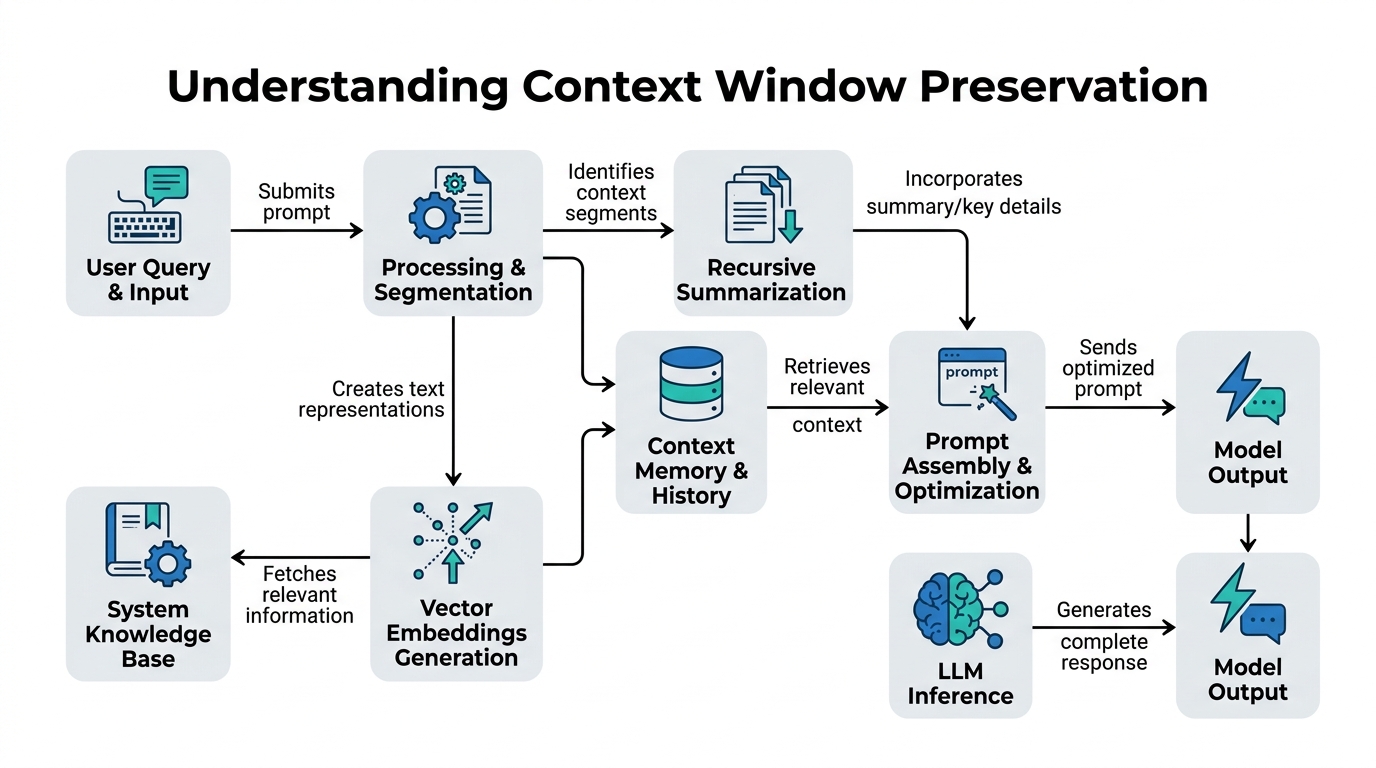
How it works under the hood: You build a pipeline: initial messages go to a raw buffer. When the buffer hits 70% of the token limit, a summarizer condenses the oldest 30% of history. A sliding window keeps the last 50 messages in full fidelity. Meanwhile, auto-compaction runs a background process to trim irrelevant logs. The entire pipeline is orchestrated by a token budget controller.
Real-world analogy: An architect designs a skyscraper. They don’t just pick a single building material; they combine steel (sliding window), concrete (compaction), elevators (budgeting), and ventilation (summarization) into a coherent structure.
Annotated code example (conceptual):
class LongContextPipeline:
    def __init__(self, max_tokens=8192):
        self.max_tokens = max_tokens
        self.full_context = []
        self.sliding_window = SlidingWindowMemory(window_size=20)
        self.summarizer = SessionSummarization(trigger_at=0.7)  # Trigger at 70%
        self.budget_controller = TokenBudgetController()

    def process_message(self, message):
        # 1. Add to raw buffer
        self.full_context.append(message)
        self.sliding_window.add_message(message)
        # 2. Check budget
        if self.budget_controller.over_budget(self.full_context, self.max_tokens):
            # 3. Trigger summarization on oldest part
            oldest = self.full_context[:-20]  # Everything before the sliding window
            summary = self.summarizer.summarize(oldest)
            # 4. Replace oldest with summary
            self.full_context = [summary] + self.full_context[-20:]
        # 5. Auto-compaction (background task)
        self.auto_compact_if_needed()
        return self.build_context()
Non-obvious insight: Over-engineering long-context solutions can introduce latency. The summarization call itself might cost more time than simply using a model with a larger context window (like 128k tokens). Always measure before you over-optimize.
Comparison Table: Context Preservation Techniques
| Technique | Token Efficiency | Context Fidelity | Complexity | Best Use Case |
|---|---|---|---|---|
| Auto-Compaction | High | Low | Low | Casual chats, short history |
| Session Summarization | Very High | Medium | Medium | Long research sessions |
| Sliding Window | Medium | High | Low | Real-time assistants |
| Token Budgeting | High | Medium | Medium | API cost-sensitive apps |
| Long-Context Engineering | Max | Adjustable | High | Production-grade chatbots |
Key Takeaways
- Auto-Compaction: Automatically trims old messages based on recency/relevance. Simple but can lose important context.
- Context Window Optimization: Craft prompts to use fewer tokens. Tiny gains compound across thousands of turns.
- Token Budgeting: Explicitly allocate tokens to each component. Prevents runaway history.
- Session Summarization: Replace long histories with compact summaries. High token savings, risk of hallucination.
- Sliding Window Memory: Keep only the latest N messages. Great for predictability, poor for long-term recall.
- Long-Context Engineering: Combine all techniques into a unified pipeline. The professional’s approach for production systems.
Now go preserve your context windows — your AI will thank you.

Comments