Serverless Functions vs. GPU-Accelerated Containers: A Practical Guide
When you’re building an AI-powered application, you face a fundamental choice: deploy serverless functions that scale automatically, or run GPU-accelerated containers for heavy computation. Both paths lead to production, but they serve radically different purposes. This guide will demystify the differences between serverless agents, AWS Lambda, Cloud Run, containerized microservices, GPU access, complex dependency management, and scalability — showing you exactly when to use each approach.
Serverless Agents: The Auto-Scaling Workhorses
Serverless agents are stateless compute units that run code in response to events, automatically scaling to zero when idle. Think of them as a fleet of food trucks — each truck (function) springs to life when an order arrives, cooks your meal, then disappears.
Under the hood, cloud providers like AWS Lambda or Google Cloud Run manage all infrastructure. Lambda uses a runtime environment (Node.js, Python, etc.) that spins up containers from a base image. Each invocation gets its own isolated execution context.
Here’s how a serverless agent works in practice:
import json
import boto3

def lambda_handler(event, context):
    # This function runs only when triggered (e.g., HTTP request)
    # AWS manages container lifecycle automatically
    try:
        # Parse incoming event
        data = json.loads(event['body'])

        # Lightweight processing — no GPU needed here
        result = process_text(data['input'])

        return {
            'statusCode': 200,
            'body': json.dumps({'response': result})
        }
    except Exception as e:
        return {
            'statusCode': 500,
            'body': json.dumps({'error': str(e)})
        }

# Lambda handles scaling: if 1000 requests arrive, 1000 instances spin up
The catch? Lambda has a 15-minute timeout and limited storage (512 MB for /tmp). Heavy GPU workloads simply won’t fit.
AWS Lambda: The Stateless Computing Platform
AWS Lambda is Amazon’s implementation of serverless functions. It runs your code in response to events — HTTP requests via API Gateway, file uploads to S3, database changes, you name it.
The key mechanism: Lambda creates ephemeral containers from a base runtime image. Each container handles one request, then sits idle for a few minutes before being recycled. This “cold start” penalty means first requests are slower (100-200ms), but subsequent ones reuse warm containers.
Here’s a common pattern — connecting Lambda to an S3 bucket:
const AWS = require('aws-sdk');
const s3 = new AWS.S3();

exports.handler = async (event) => {
    // Lambda triggers when file is uploaded to S3
    const bucket = event.Records[0].s3.bucket.name;
    const key = event.Records[0].s3.object.key;

    // Process the file (e.g., resize image, extract text)
    const file = await s3.getObject({Bucket: bucket, Key: key}).promise();

    // Return processed result or store it elsewhere
    return { statusCode: 200, body: 'File processed' };
};
Non-obvious gotcha: Lambda functions share IP addresses across invocations, which can trigger rate limits on external APIs. Design around this by using elastic IPs with NAT gateways.
Cloud Run: Serverless Containers with a Twist
Cloud Run takes a different approach — it runs full Docker containers on serverless infrastructure. Unlike Lambda’s function-level abstraction, Cloud Run gives you a container image that handles requests.
The magic: Cloud Run automatically scales from zero to thousands of instances based on incoming traffic. Each instance runs your container, which stays alive as long as there are incoming requests. If no traffic arrives for 15 minutes (configurable), instances shut down.
# Dockerfile for a Cloud Run service
FROM python:3.9-slim

WORKDIR /app
COPY requirements.txt .
RUN pip install --no-cache-dir -r requirements.txt

COPY . .

# Cloud Run expects a web server on PORT 8080
CMD exec gunicorn --bind :$PORT --workers 1 --threads 8 app:app
Cloud Run shines for stateful microservices that need custom runtimes or dependencies that won’t fit in Lambda’s environment. Gotcha: Cloud Run instances have a maximum of 4 vCPUs and 32 GB memory — not enough for serious GPU work.
Containerized Microservices: Full Control, Full Responsibility
Containerized microservices are independent, isolated processes running in Docker or OCI containers. Each service handles one specific business capability — user authentication, payment processing, or AI inference.
Under the hood: containers share the host OS kernel but isolate file systems, network stacks, and process trees. You manage everything through container orchestration platforms like Kubernetes or AWS ECS.
Here’s a Python microservice that loads a machine learning model:
from flask import Flask, request, jsonify
import pickle

app = Flask(__name__)

# Load model at startup — container stays warm
with open('model.pkl', 'rb') as f:
    model = pickle.load(f)

@app.route('/predict', methods=['POST'])
def predict():
    data = request.get_json()
    # Model inference happens in-memory — fast!
    prediction = model.predict(data['features'])
    return jsonify({'prediction': prediction.tolist()})

if __name__ == '__main__':
    app.run(host='0.0.0.0', port=5000)
The trade-off: you manage scaling, health checks, and deployment. But you get full control over resources, including GPU access.
GPU Access: The Heavy Lifter
GPU access means your container can use graphics processing units for massively parallel computation — essential for training neural networks or running inference on large models.
The mechanism: containers request GPU resources through orchestration tools. In Docker, you use --gpus all flag. In Kubernetes, you specify resources.limits.nvidia.com/gpu: 1 in your pod spec.
# Kubernetes pod with GPU access
apiVersion: v1
kind: Pod
metadata:
  name: gpu-pod
spec:
  containers:
  - name: gpu-container
    image: tensorflow/tensorflow:latest-gpu
    resources:
      limits:
        nvidia.com/gpu: 1  # Request 1 GPU
    command: ["python", "train_model.py"]
Serverless platforms like Lambda and Cloud Run don’t offer GPU access. If you need GPU compute, containers are your only option at the edge.
Complex Dependency Management: Container to the Rescue
Complex dependency management refers to the nightmare of installing and configuring libraries, runtimes, and system packages that your code needs. Think CUDA drivers, OpenCV, TensorFlow — the kind of setup that takes hours.
Containers solve this by packaging everything into an image. Your Dockerfile becomes a reproducible, declarative spec of the environment:
# Python + CUDA + PyTorch — all dependencies captured
FROM nvidia/cuda:11.8-runtime-ubuntu22.04

RUN apt-get update && apt-get install -y \
    python3-pip \
    libgl1-mesa-glx  # OpenCV dependency

COPY requirements.txt .
RUN pip install --no-cache-dir -r requirements.txt

# Everything your app needs, in one image
Serverless functions like Lambda have severe limits: you can only use pre-built runtimes or layers up to 250 MB. Complex dependencies often push you to containers.
Scalability: The Art of Growing Without Breaking
Scalability measures how well your system handles increased load. Serverless functions scale horizontally — each request spawns a new instance, up to the region’s concurrency limit (1,000 for Lambda).
Containers scale differently. Kubernetes or ECS auto-scaling creates new pods based on CPU, memory, or custom metrics. Cloud Run scales like Lambda but with container-level isolation.
Here’s the scalability comparison:
| Feature | Serverless (Lambda) | Cloud Run | Containers (K8s) |
|---|---|---|---|
| GPU Support | ❌ No | ❌ No | ✅ Yes |
| Cold Start | 100-200ms | 500ms-2s | 0 (always warm) |
| Max Timeout | 15 min | 60 min | Unlimited |
| Max Memory | 10 GB | 32 GB | Instance limit |
| Dependency Size | 250 MB limit | Container limit | Unlimited |
| Auto-scaling | Built-in | Built-in | Configurable |
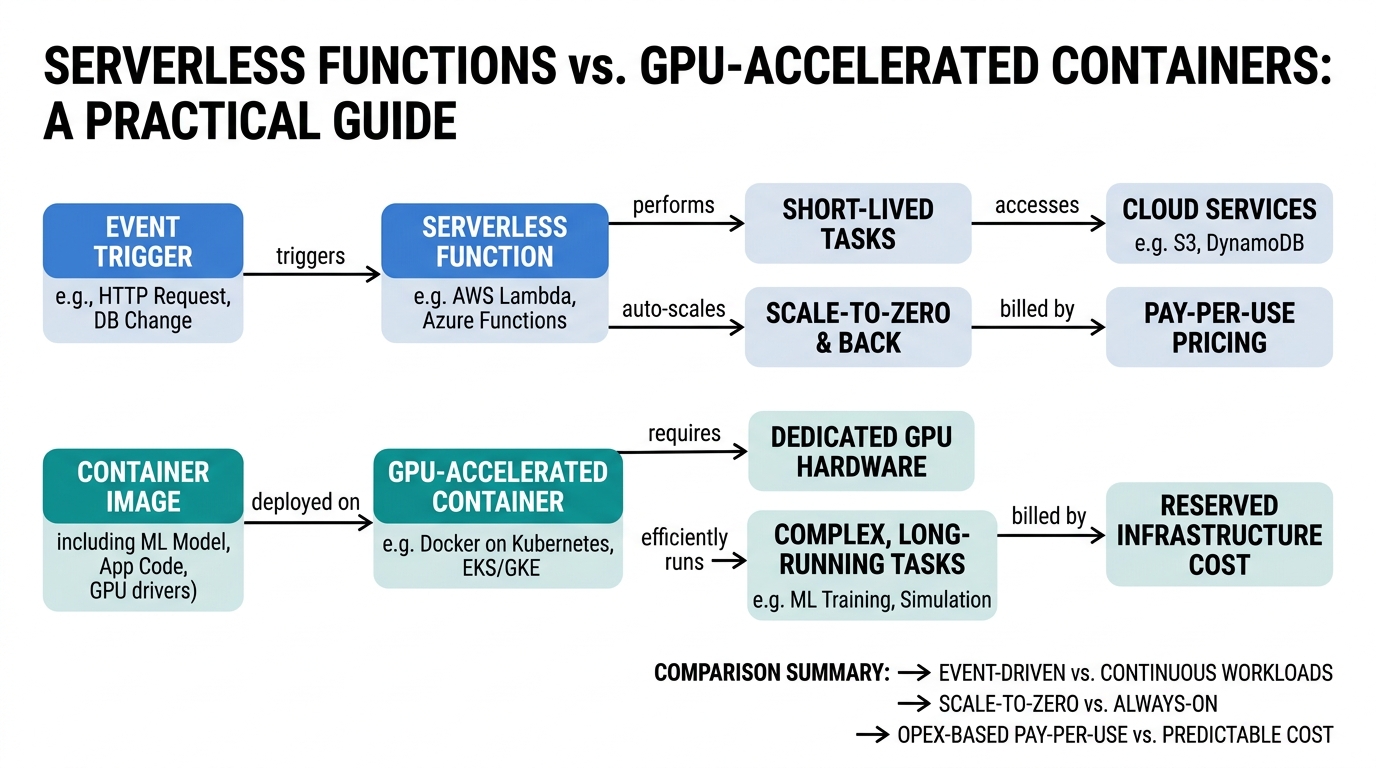
The practical insight: serverless excels at short-lived, event-driven workloads. Containers own everything GPU-related, long-running, or complex.
Key Takeaways
- Serverless agents (Lambda/Cloud Run) handle short, stateless requests with automatic scaling — perfect for API backends and event processors
- GPU access is only available in containers — serverless platforms don’t support it
- Complex dependency management forces you to containers when your app needs system libraries or CUDA
- Scalability is automatic in serverless but more flexible with containers
- Cloud Run bridges the gap — serverless containers without node management
- AWS Lambda excels at simple functions but struggles with stateful or GPU workloads
Choose your architecture based on your workload’s resource needs, not hype. Serverless for what fits in a function, containers for everything else.

Comments