Understanding Agent Observability: Benchmarking Tool-Selection Precision and Hallucination Rates
You’re building an AI agent that can pick the right tool for any job. Maybe it’s a coding assistant that chooses between a web scraper and a database query. Or a customer service bot that grabs order info from one API and shipping status from another.
How do you know your agent picks the correct tool every time? And how do you catch it when it invents a tool that doesn’t exist?
These questions lead straight into Agent Observability — watching what your agent does and measuring how well it performs. In this tutorial, you’ll learn the core concepts that make this possible:
- Evaluation Frameworks: How to define what “good” looks like
- Benchmark Pipelines: How to run tests automatically
- LangFuse: A real tool for tracking agent behavior
- Retrieval Accuracy: Does the agent find the right info?
- Tool-Selection Precision: Does it pick the right tool?
- Hallucination Rate: How often does it make stuff up?
- A/B Testing: How to compare two versions of your agent
You’ll see code examples, plain-English analogies, and get practical tips. Let’s start.
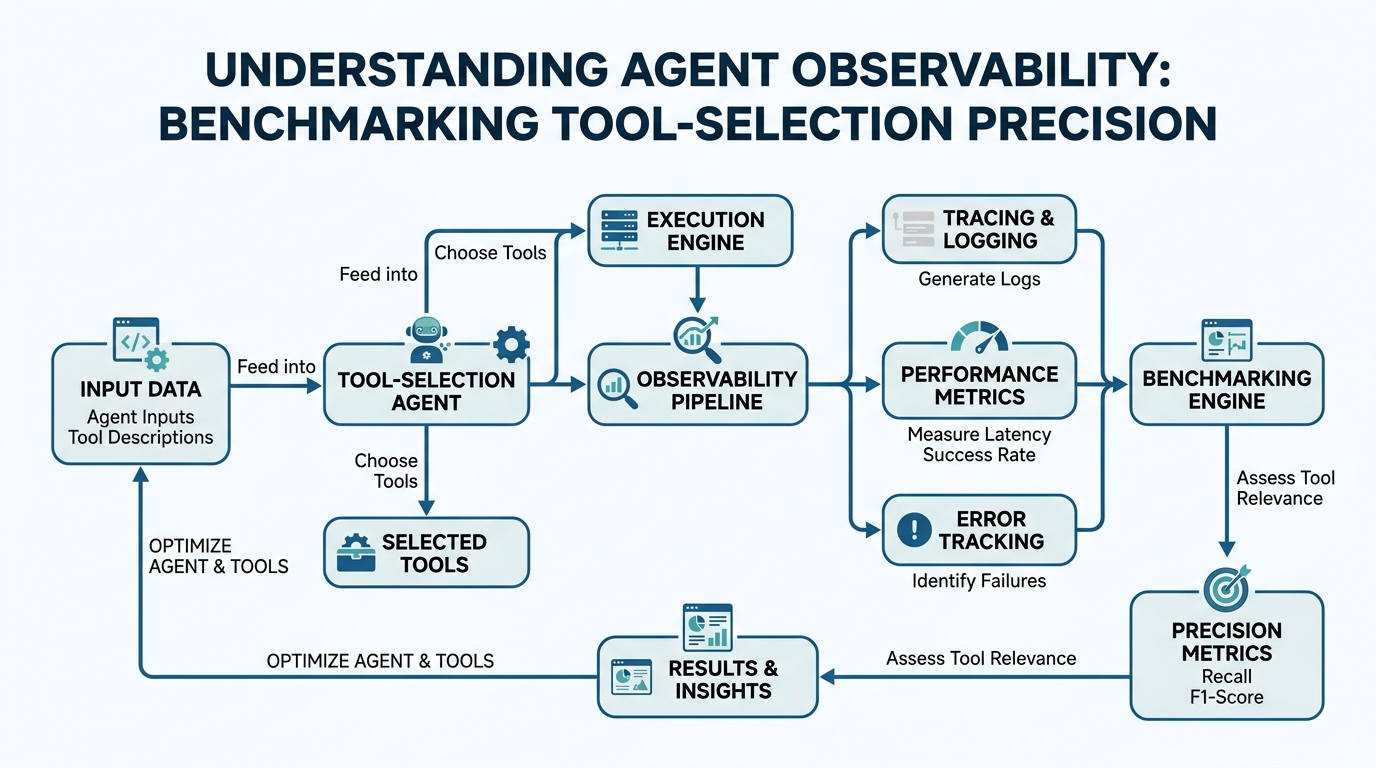
Evaluation Frameworks: Your Quality Yardstick
Plain-English definition: An evaluation framework is a set of rules and measurements that tells you if your agent is working correctly. Think of it like a report card with specific subjects.
How it works: You define metrics (like “tool chosen correctly” or “answer is factual”) and then run your agent against a test dataset. Each test case has a known correct answer. The framework compares the agent’s output to the expected result.
Real-world analogy: A basketball coach evaluates players on shooting percentage, assists, and turnovers. These are the metrics that matter. An evaluation framework is the score sheet that tracks them.
Code example:
# Simple evaluation framework for agent tool selection
def evaluate_tool_selection(agent_output, expected_tool):
    """Compare what the agent chose vs what it should have chosen"""
    actual_tool = agent_output['tool_used']
    is_correct = actual_tool == expected_tool

    return {
        'correct': is_correct,
        'expected': expected_tool,
        'actual': actual_tool,
        'score': 1.0 if is_correct else 0.0
    }

# Example usage
test_case_1 = {
    'agent_output': {'tool_used': 'search_database'},
    'expected_tool': 'search_database'
}
result = evaluate_tool_selection(test_case_1['agent_output'],
                                  test_case_1['expected_tool'])
print(result)
# Output: {'correct': True, 'expected': 'search_database', 'actual': 'search_database', 'score': 1.0}
The key insight most tutorials miss: your evaluation framework is only as good as your test data. Garbage in, garbage out. If your test cases don’t represent real-world scenarios, your metrics will lie to you.
Benchmark Pipelines: Automation for Honest Results
Plain-English definition: A benchmark pipeline runs your agent through hundreds or thousands of test cases automatically, collects the results, and gives you a summary score. It’s your testing factory.
How it works: You define a sequence of steps — load test data, run agent, evaluate results, store scores. The pipeline executes this sequence for every test case, usually in parallel for speed. It then aggregates the individual results into overall metrics.
Real-world analogy: A car factory has a quality control line. Every car drives through a series of checks — brakes, lights, alignment. The benchmark pipeline is that automated inspection line for your agent.
Code example:
import pytest

# A benchmark pipeline using pytest
class TestToolSelectionPipeline:
    test_cases = [
        {'input': "Find customer orders", 'expected_tool': 'query_orders'},
        {'input': "Calculate shipping cost", 'expected_tool': 'shipping_calculator'},
        {'input': "Look up user profile", 'expected_tool': 'user_api'},
    ]

    @pytest.mark.parametrize("test_case", test_cases)
    def test_tool_selection(self, test_case):
        agent_output = run_agent(test_case['input'])
        result = evaluate_tool_selection(agent_output, test_case['expected_tool'])
        assert result['correct'] == True, f"Failed on: {test_case['input']}"
Gotcha to watch for: Pipelines can mask inconsistency. If your agent gets 90% of cases right but fails catastrophically on one critical scenario, your average score hides that failure. Always check the failure distribution, not just the average.
LangFuse: Your Agent’s Black Box Recorder
Plain-English definition: LangFuse is an open-source tool that logs every decision your agent makes — which tool it chose, why it chose it, how long it took. Like a flight data recorder for your AI.
How it works: You wrap your agent’s code with LangFuse’s tracing API. Every call to your agent automatically generates a trace with metadata — tool selection, latency, input/output. These traces go to LangFuse’s dashboard where you can search, filter, and analyze them.
Real-world analogy: A website analytics tool shows you which pages visitors click. LangFuse shows you which tools your agent picks, and in what order.
Code example:
from langfuse import Langfuse

langfuse = Langfuse(public_key="your-key", secret_key="your-secret")

def query_agent_with_tracing(user_query):
    # Start a trace for this interaction
    trace = langfuse.trace(name="agent_interaction")

    # Record the tool selection step
    span = trace.span(name="tool_selection")
    try:
        selected_tool = agent.select_tool(user_query)
        span.set_output({"selected_tool": selected_tool})
    except Exception as e:
        span.set_output({"error": str(e)})
    finally:
        span.end()

    return agent.execute(user_query)
Non-obvious insight: LangFuse isn’t just for debugging. Use it to find patterns in when your agent fails. If hallucinations cluster around specific prompts, that’s a signal your training data or tool definitions need work.
Retrieval Accuracy: Did It Find the Right Information?
Plain-English definition: Retrieval accuracy measures whether your agent found the correct piece of information from its knowledge base or memory. Not whether it chose the right tool — whether it found the right data.
How it works: When your agent searches through documents or a vector database, retrieval accuracy checks if the top-ranked results contain the information needed to answer the user’s question. It’s a ranking problem: did the most relevant document appear at the top?
Real-world analogy: You’re searching for a recipe for “chocolate chip cookies” on a recipe website. Retrieval accuracy is whether the first page of results shows cookie recipes, not salad recipes.
Code example:
def calculate_retrieval_accuracy(relevant_docs, retrieved_docs, k=5):
    """Check if the correct document is in top-k retrieved results"""
    relevant_ids = {doc['id'] for doc in relevant_docs}
    top_k = retrieved_docs[:k]

    hits = sum(1 for doc in top_k if doc['id'] in relevant_ids)
    precision = hits / len(top_k) if top_k else 0

    return {
        'precision_at_k': precision,
        'hits': hits,
        'total_relevant': len(relevant_docs)
    }

# Example
relevant = [{'id': 'doc_123'}, {'id': 'doc_456'}]
retrieved = [{'id': 'doc_789'}, {'id': 'doc_123'}, {'id': 'doc_456'}]
print(calculate_retrieval_accuracy(relevant, retrieved, k=3))
# Output: {'precision_at_k': 0.666, 'hits': 2, 'total_relevant': 2}
Edge case: If your agent searches poorly but still answers correctly by luck, retrieval accuracy catches this while other metrics might miss it. This is crucial for finding reliability problems early.
Tool-Selection Precision: The Right Tool for the Job
Plain-English definition: Tool-selection precision is the fraction of times your agent chooses the correct tool when it tries to use one. High precision means your agent rarely picks the wrong tool.
How it works: For each user request, you know which tool should be used. Precision counts how many of the agent’s tool selections were correct. It’s calculated as: correct selections / total selections.
Real-world analogy: A chef choosing a knife — they should pick a chef’s knife for chopping vegetables, not a bread knife. Tool-selection precision is how often they grab the right one.
Code example:
def calculate_tool_selection_precision(results):
    """Precision = correct tool selections / total tool selections"""
    correct = sum(1 for r in results if r['tool_selection_correct'])
    total = len(results)

    return {
        'precision': correct / total if total > 0 else 0,
        'correct': correct,
        'total': total,
        'failed_cases': [r for r in results if not r['tool_selection_correct']]
    }

# Example
test_results = [
    {'tool_selection_correct': True, 'input': "Find orders"},
    {'tool_selection_correct': False, 'input': "Calculate cost"},
    {'tool_selection_correct': True, 'input': "Check inventory"}
]
print(calculate_tool_selection_precision(test_results))
# Output: {'precision': 0.666, 'correct': 2, 'total': 3, 'failed_cases': [...]}
Critical gotcha: Precision can look high if your agent rarely attempts to use tools. Combine precision with tool usage rate to get the full picture. An agent that never uses tools has perfect precision but is useless.
Hallucination Rate: How Often Does It Make Stuff Up?
Plain-English definition: Hallucination rate measures how often your agent generates information that isn’t true or uses tools that don’t exist. It’s your agent’s lying detector.
How it works: You compare the agent’s output against a ground truth. “Did that tool actually exist in my system?” “Was that fact verified?” Hallucination rate counts how many outputs contain fabricated information.
Real-world analogy: When a friend tells you a story, hallucination rate is how many details they just invented. A low rate means you can trust them.
Code example:
def detect_hallucination(agent_output, valid_tools):
    """Check if agent used a non-existent tool"""
    used_tool = agent_output.get('tool_used')

    if used_tool and used_tool not in valid_tools:
        return {
            'is_hallucination': True,
            'reason': f"Tool '{used_tool}' does not exist",
            'valid_tools': valid_tools
        }

    # Also check if response contains unverified facts
    for claim in agent_output.get('claims', []):
        if claim.get('source') == 'invented':
            return {
                'is_hallucination': True,
                'reason': f"Fabricated claim: {claim['text']}"
            }

    return {'is_hallucination': False}

# Example
valid_tools_list = ['search_db', 'calc_shipping']
response = {'tool_used': 'fake_api', 'claims': []}
print(detect_hallucination(response, valid_tools_list))
# Output: {'is_hallucination': True, 'reason': "Tool 'fake_api' does not exist", ...}
Why this matters most: Hallucinations erode trust fast. A single made-up tool or fact can cause serious downstream errors. Monitor this metric relentlessly.
A/B Testing: Making Informed Trade-offs
Plain-English definition: A/B testing compares two versions of your agent to see which performs better across your metrics. Version A (control) vs Version B (experiment).
How it works: You split your incoming requests randomly into two groups. Group A uses the current agent. Group B uses the new agent. You compare metrics — tool-selection precision, hallucination rate, latency — to determine which version wins.
Real-world analogy: A store changing its layout tests the old layout against a new one, tracking which leads to more sales. A/B testing is that same controlled experiment for your agent.
Code example:
class ABTest:
    def __init__(self, control_agent, variant_agent):
        self.control = control_agent
        self.variant = variant_agent
        self.traffic_split = 0.5

    def route_request(self, request):
        """Send 50% of traffic to each version"""
        if random.random() < self.traffic_split:
            return self.control.handle(request), 'control'
        else:
            return self.variant.handle(request), 'variant'

    def analyze_results(self, control_results, variant_results):
        """Compare precision and hallucination rates"""
        return {
            'control': {
                'precision': calculate_tool_selection_precision(control_results),
                'hallucination_rate': calculate_hallucination_rate(control_results)
            },
            'variant': {
                'precision': calculate_tool_selection_precision(variant_results),
                'hallucination_rate': calculate_hallucination_rate(variant_results)
            }
        }
Expert insight: A/B testing is powerful but noisy. Run tests long enough to reach statistical significance. A 5% improvement in precision might be noise if you only ran 100 requests per version.
Comparison: How These Concepts Fit Together
| Concept | What It Measures | Why It Matters | How to Improve |
|---|---|---|---|
| Evaluation Framework | Defines your metrics | Sets the standard for “good” | Include real-world edge cases |
| Benchmark Pipeline | Automates testing | Gives consistent, scalable evaluation | Parallelize, run frequently |
| LangFuse | Logs agent decisions | Provides debugging traceability | Integrate early, monitor dev and prod |
| Retrieval Accuracy | Information retrieval quality | Foundational for agent decision-making | Tune ranking, improve chunking |
| Tool-Selection Precision | Correct tool choice | Direct measure of agent reliability | Refine prompting, expand tool descriptions |
| Hallucination Rate | Truthfulness of output | Highest risk, hardest to fix | Add validation layers, limit tool scope |
| A/B Testing | Comparative performance | Optimizes trade-offs systematically | Use statistical tests, control for variables |
Key Takeaways
- Evaluation Frameworks: Define what “correct” means before you measure anything else
- Benchmark Pipelines: Automate testing to catch regressions early and often
- LangFuse: Trace every agent decision — it’s your best debugging tool
- Retrieval Accuracy: Your agent is only as smart as the information it can find
- Tool-Selection Precision: Pick the right tool, every time — that’s the core job
- Hallucination Rate: Treat this as your most important metric. One hallucination can break user trust
- A/B Testing: Make data-driven trade-offs. Don’t guess which version is better
You now have the framework to measure, debug, and improve your agent’s tool selection capabilities. Start with a simple evaluation framework, add LangFuse tracing, and benchmark against your most critical use cases. Your agent will thank you.

Comments