The Plumber Layer of AI: Advanced ETL and Document Stores
We treat AI like magic. We read about GPT-5, see demos where a model writes poetry, and assume the hard part is the neural architecture. That’s Hollywood AI. The real AI, the one that powers customer support at startups and medical research at hospitals, runs on something boring: data plumbing.
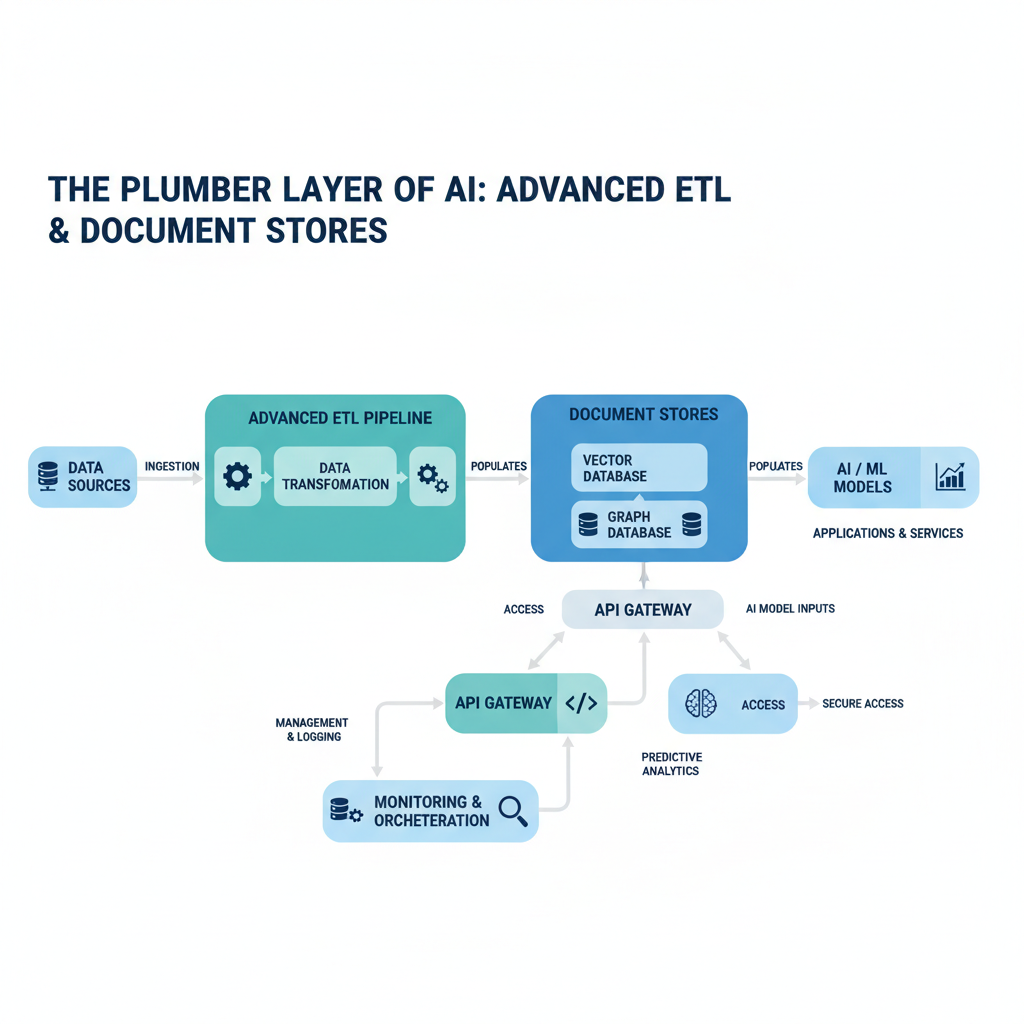
The most sophisticated language model in the world is useless if it can’t find the right customer transcript or product spec in time. This tutorial is about that plumbing layer — the pipes and storage tanks that make AI actually useful. You will learn exactly what Knowledge Bases, ETL Pipelines, and Document Stores are, how they connect through tools like ElasticSearch and S3, and why data engineering is the hidden bottleneck in every production AI system.
No magic. Just clear definitions, real analogies, and code you can run.
Knowledge Bases: The Library That Actually Answers Questions
Plain-English definition: A Knowledge Base is a structured collection of facts, documents, and data that an AI system can query to answer questions accurately.
How it works: The AI doesn’t store facts in its neural network. It can’t. Large language models are fancy word predictors. A Knowledge Base sits alongside the model like a well-indexed textbook. When you ask “What’s the return policy for damaged items?”, the system finds the relevant policy document in the Knowledge Base and feeds it to the model as context.
Real-world analogy: Imagine you’re a student in a closed-book exam. You have to answer everything from memory. That’s a pure language model. Now imagine the exam becomes open-book, and you have a librarian who instantly hands you the correct page. The librarian is your retrieval system. The open book is your Knowledge Base.
Annotated code example:
# Building a minimal knowledge base with LangChain and a vector store
from langchain.document_loaders import TextLoader
from langchain.text_splitter import RecursiveCharacterTextSplitter
from langchain.embeddings import OpenAIEmbeddings
from langchain.vectorstores import FAISS  # FAISS is a popular vector store

# 1. Load raw documents
loader = TextLoader("policies.txt")
documents = loader.load()

# 2. Split into chunks — smaller, searchable pieces
splitter = RecursiveCharacterTextSplitter(chunk_size=500, chunk_overlap=50)
chunks = splitter.split_documents(documents)

# 3. Convert chunks to vectors and store them
embeddings = OpenAIEmbeddings()
vectorstore = FAISS.from_documents(chunks, embeddings)

# 4. Query — find the most relevant chunk
query = "What's the return policy for damaged items?"
results = vectorstore.similarity_search(query, k=1)
print(results[0].page_content)  # Returns the exact policy paragraph
Non-obvious insight: The chunk size matters more than which model you use. Too large and you muddy the signal. Too small and you lack context. There’s a sweet spot around 300-600 tokens for most use cases.
ETL Pipelines: The Invisible Water Purifier
Plain-English definition: An ETL Pipeline (Extract, Transform, Load) is a system that pulls messy data from source systems, cleans it up, and stores it in a usable format.
How it works: Raw data is never neat. It’s in PDFs, CSV files, SQL databases, and Slack messages. ETL handles the grunt work: extract the raw bytes, transform them into a consistent structure (parsing text, removing duplicates, fixing formatting), and load them into a Knowledge Base or Document Store.
Real-world analogy: Think of ETL as the water treatment plant between the river and your kitchen tap. The river is your raw data (full of mud and fish). The treatment plant extracts, filters, and adds chemicals (transformations). The clean water that reaches your tap is your loaded data.
Annotated code example:
# A simple ETL pipeline that scrapes HTML, strips tags, and stores to JSON
import requests
from bs4 import BeautifulSoup
import json

# EXTRACT: fetch raw HTML
url = "https://example.com/support-policies"
response = requests.get(url)
raw_html = response.text

# TRANSFORM: parse into clean text
soup = BeautifulSoup(raw_html, "html.parser")
clean_text = soup.get_text(separator="\n")
# Remove excessive whitespace
clean_text = "\n".join([line.strip() for line in clean_text.splitlines() if line.strip()])

# LOAD: save to structured format for later ingestion
pipeline_result = {"source": url, "content": clean_text, "processed_at": "2025-03-15"}
with open("transformed_data.json", "w") as f:
    json.dump(pipeline_result, f)

print(f"Loaded {len(clean_text)} characters of clean text.")
Document Stores: Where Chunks Live
Plain-English definition: A Document Store is a database designed specifically to hold and retrieve documents or document chunks by content, not just by key.
How it works: Unlike a traditional relational database that stores rows in tables, a Document Store treats each document (or chunk) as an atomic unit. It indexes not just the document ID but the actual words inside it, enabling full-text and semantic search. ElasticSearch and S3 serve different roles here: ElasticSearch is the search index, S3 is the persistent object storage.
Real-world analogy: Your paper filing cabinet is a Document Store. The folder labels are the document IDs. The text on each page is the content. ElasticSearch is like a super-fast searchable index card system. S3 is the fireproof warehouse where the physical folders live. You search the index cards first, then pull the folders from the warehouse.
Annotated code example:
# Using ElasticSearch as a document store
from elasticsearch import Elasticsearch

es = Elasticsearch([{"host": "localhost", "port": 9200, "scheme": "http"}])

# Index a document
document = {
    "title": "Return Policy",
    "content": "Damaged items can be returned within 30 days...",
    "department": "Customer Support"
}
es.index(index="policies", id="1", body=document)

# Search it
result = es.search(index="policies", body={"query": {"match": {"content": "damaged"}}})
print(result['hits']['hits'][0]['_source']['content'])
ElasticSearch and S3: The Tag Team
Plain-English definition: ElasticSearch is a search engine that indexes text for instant retrieval. S3 is cloud object storage that holds the actual raw files.
How they work together: ElasticSearch is fast but not designed for storing raw files (PDFs, images). S3 is cheap and durable but slow for text search. Production systems use both: S3 holds the original documents, ElasticSearch indexes only the metadata and text. When you search, ElasticSearch returns the S3 path, and your app fetches the file.
Real-world analogy: ElasticSearch is the card catalog at your library. S3 is the actual bookshelves. You search the catalog to find a book’s location code, then walk to the shelves to grab it.
Annotated code example:
# Two-tier storage: ElasticSearch for search, S3 for raw files
import boto3
from elasticsearch import Elasticsearch

s3 = boto3.client("s3")
es = Elasticsearch(...)

# Upload raw PDF to S3
s3.upload_file(Filename="policy_v3.pdf", Bucket="my-docs", Key="policies/return.pdf")

# Index searchable metadata + S3 path in ElasticSearch
document = {
    "title": "Return Policy v3",
    "s3_path": "s3://my-docs/policies/return.pdf",
    "content_preview": "Damaged items can be returned within 30 days..."
}
es.index(index="policies", id="1", body=document)

# To retrieve: search ES first, then pull from S3
search_result = es.search(...)
s3_path = search_result['hits']['hits'][0]['_source']['s3_path']
bucket, key = s3_path.replace("s3://", "").split("/", 1)
file = s3.get_object(Bucket=bucket, Key=key)
Comparison Table: How It All Connects
| Concept | Role | Stores What | Query Method | Example Tool |
|---|---|---|---|---|
| Knowledge Base | Structured facts & documents | Text chunks + vectors | Semantic / keyword search | FAISS, Pinecone |
| ETL Pipeline | Data transformation | Intermediate results | N/A (batch process) | Apache Airflow, custom Python |
| Document Store | Raw documents | Full documents or chunks | Full-text search, IDs | ElasticSearch, MongoDB |
| ElasticSearch | Search index on document text | Indexed text excerpts | Query DSL (JSON) | ElasticSearch itself |
| S3 Data Persistence | Cheap, durable file storage | Raw files (PDFs, JSON, images) | HTTP / SDK key lookups | AWS S3, MinIO |
| Data Engineering | Infrastructure glue | N/A (process & orchestrate) | N/A | Apache Spark, Airflow |
| Knowledge Retrieval | Final answer assembly | Vector indices + text | Similarity + context injection | LangChain, LlamaIndex |
Key Takeaways
- Knowledge Bases are structured fact collections that AI queries for context, not built-in model memory.
- ETL Pipelines extract messy data from source systems, transform it into clean format, and load it into storage.
- Document Stores are databases built for content-based retrieval, not just key-value lookups.
- ElasticSearch indexes text for fast search; S3 stores raw files cheaply — they’re complementary.
- Data Engineering is the invisible layer that makes Knowledge Retrieval possible at scale.
- Non-obvious insight: Knowledge Base chunk size and ETL transformation quality matter more than model choice for most applications.
The hardest part of building an AI that actually works isn’t the AI. It’s the plumbing. Fix that, and everything else falls into place.

Comments