Beyond Pre-Built Frameworks: Forking Libraries and Customizing LangGraph
You know the feeling. You’re building an AI agent with LangGraph’s ReAct agent. It works. But there’s that one tiny feature it doesn’t support — a custom state persistence, a quirky tool input format — and the only way to fix it is to hack around the framework’s edges. You duct-tape a workaround, it breaks in production, and you’re left wondering: do I really have to build everything from scratch?
You don’t. In this tutorial, I’ll teach you a safer, more maintainable way to break free from framework constraints. You’ll learn the exact steps to fork a library, modify its source code, and package your custom version — all while keeping the ability to merge upstream updates later. By the end, you’ll be able to treat LangGraph not as a black box, but as a starting point for your own custom agent architecture.
Deep breath. You’re about to become a source code engineer. Let’s go.
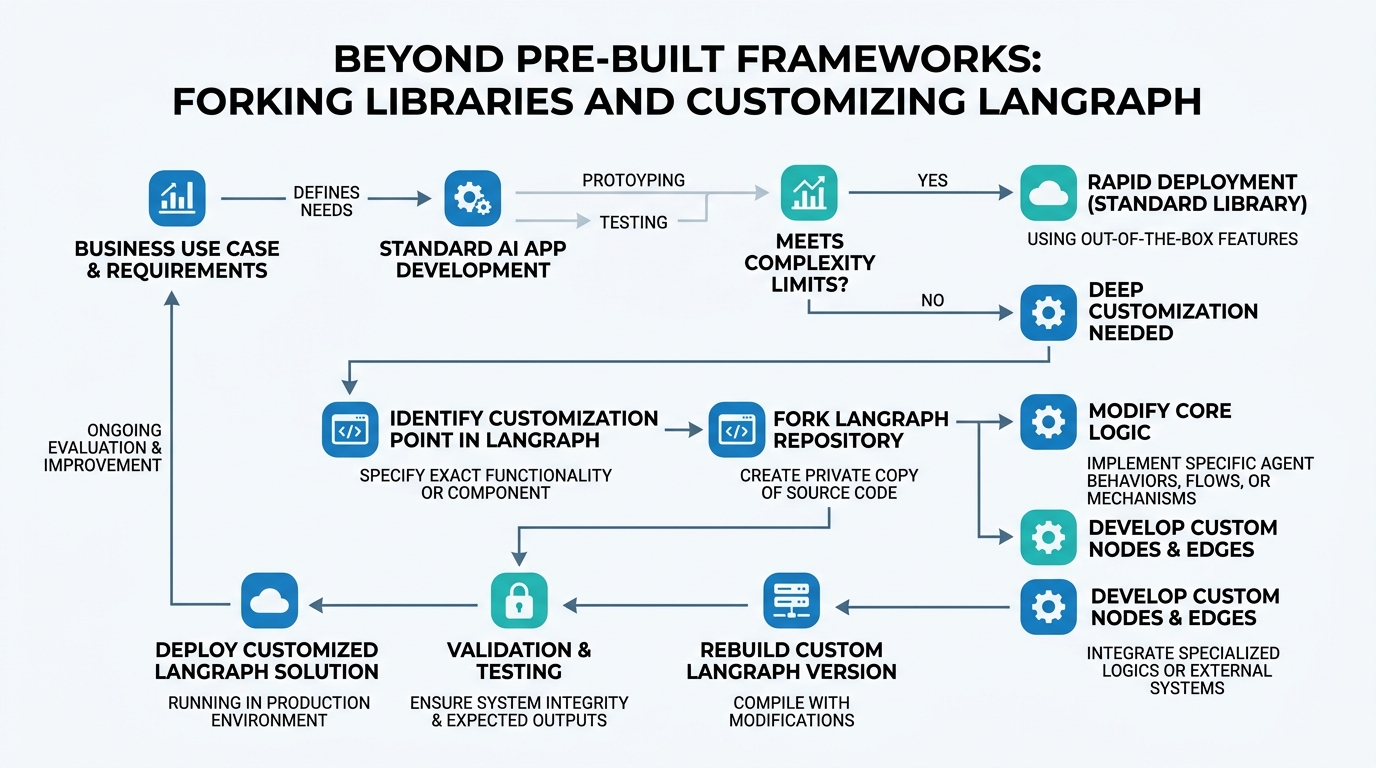
Framework Customization: Your Tool, Your Rules
Framework customization means modifying an existing library (like LangGraph) to do something its original authors didn’t intend, without losing the ability to update it later.
Under the hood, you’re changing the library’s behavior at three levels: (1) you can override a function it calls, (2) you can extend a class by adding methods, or (3) you can fork the whole repository and make direct edits to its source code.
Analogy: Imagine buying a reconfigurable toolbox. The manufacturer expects you to swap out screwdriver bits. That’s overriding. You can also attach a custom handle. That’s extending. But if the toolbox’s hinge is too flimsy for your heavy tools, you don’t throw it out — you weld a sturdier hinge yourself. That’s forking.
Here’s a practical example: LangGraph’s StateGraph expects a Channel object for state. What if you need to persist state to a custom database?
# langgraph/custom_graph.py
from langgraph.graph import StateGraph

class CustomPersistGraph(StateGraph):
    """A StateGraph that dumps state to a custom store on every step."""
    def __init__(self, state_schema, custom_store=None):
        super().__init__(state_schema)
        self.custom_store = custom_store or print  # fallback: just print

    def _update_state(self, updates):
        # call the parent's original logic
        new_state = super()._update_state(updates)
        # now inject our custom persistence
        if self.custom_store:
            self.custom_store(new_state)
        return new_state
Non-obvious insight: Before customizing, check if the framework exposes a hook or callback to inject logic. LangGraph’s Node has before and after hooks. If those exist, prefer them over a fork. You’ll save yourself merge headaches.
Source Code Engineering: Reading Before Rewriting
Source code engineering is the practice of reading, understanding, and safely modifying a library’s source code to extend its functionality.
The mechanism is simple but scary: you open the library’s installed directory (often site-packages/langgraph/), find the relevant file, trace through its logic with a debugger, and then make your change. But you must clone the entire git repo first, so you can track your changes.
Analogy: Think of a playwright who doesn’t just watch plays, but reads the script, makes notes in the margins, and eventually rewrites Act II. The audience still sees a play, but the ending is now different.
Here’s the first thing you’ll do:
git clone https://github.com/langchain-ai/langgraph.gitcd langgraph && pip install -e .(installs in “editable” mode — changes take effect instantly)
Now you can edit langgraph/checkpoint/base.py and your project sees the changes immediately. Dangerous? Yes. Powerful? Absolutely.
Gotcha: pip install -e . links to the repo location. If you delete the repo, your project breaks. Use virtual environments religiously.
Forking Libraries: Safety in Ownership
Forking a library means creating your own copy of its repository on GitHub (or any Git host) so you can make permanent changes without affecting the original.
The mechanism: you press “Fork” on GitHub, clone your fork, make changes, push to your repo, and then install your package using pip install git+https://github.com/YOUR_USERNAME/langgraph.git.
Analogy: The original library is a public restroom. Forking it is like building your own version in your backyard. Same blueprints, but you can install your favorite bidet.
Here’s the full workflow:
# Step 1: Fork on GitHub via the UI
# Step 2: Clone your fork
git clone https://github.com/YOUR_USERNAME/langgraph.git
cd langgraph

# Step 3: Add upstream (original) as a remote
git remote add upstream https://github.com/langchain-ai/langgraph.git

# Step 4: Make your changes
# ... edit files ...

# Step 5: Tag your version
git tag v0.0.1-custom

# Step 6: Push and install in your project
# (In your project's requirements.txt)
langgraph @ git+https://github.com/YOUR_USERNAME/langgraph.git@v0.0.1-custom
Non-obvious insight: When you git merge upstream/main, conflicts happen. The more you modify the framework’s core logic, the more conflicts you’ll get. Mitigate this by keeping custom logic in separate, new files when possible.
LangGraph ReAct: The Agent You’ll Customize
LangGraph ReAct is the specific agent architecture LangGraph provides that implements the “Reasoning + Acting” pattern — an LLM selects an action, calls a tool, then reasons about the tool’s output in a loop.
The mechanism is a StateGraph with three nodes: the LLM node, the tools node, and the “should we loop?” condition. The edges represent control flow.
Analogy: Picture a waiter (the LLM) who takes your order (the user’s request), checks with the chef (the tool), brings the food, then asks if you need anything else (the loop). LangGraph ReAct is the restaurant’s workflow for that exact sequence.
To customize it, you’d fork the repo and modify langgraph/agent/react.py. For instance, you might add a “summarize” step after every third tool call:
# In your forked langgraph/agent/react.py
class CustomReActAgent(ReActAgent):
    def should_summarize(self, state):
        return state["tool_call_count"] % 3 == 0

    def _step(self, state):
        state = super()._step(state)
        if self.should_summarize(state):
            state["messages"].append(summarize_conversation(state["messages"]))
        return state
Hybrid Base Agents: The Best of Two Worlds
Hybrid base agents combine properties from two different agent architectures into one. For example, you might want the tool-calling loop of LangGraph ReAct but the retrieval-augmented memory of a custom RAG agent.
The mechanism is class composition or multiple inheritance. You create a new class that inherits from both agents and overrides specific methods to blend behaviors.
Analogy: A hybrid car combines a gasoline engine with an electric motor. You get the range of gas and the efficiency of electric. Similarly, a hybrid agent gets LangGraph ReAct’s tight loop and your custom memory’s persistence.
Here’s a concrete example:
from langgraph.agent.react import ReActAgent
from my_custom_agent import RAGAgent

class HybridReActRAG(ReActAgent, RAGAgent):
    def __init__(self, llm, tools, retriever):
        ReActAgent.__init__(self, llm, tools)
        self.retriever = retriever

    def retrieve_context(self, query):
        # Use RAGAgent's retrieval method
        return RAGAgent.retrieve(self, query)

    def _update_state(self, updates):
        # Blend both agents' state logic
        combined = {**updates, "context": self.retrieve_context(updates.get("query", ""))}
        return ReActAgent._update_state(self, combined)
Gotcha: Method resolution order (MRO) matters. If both parents define _step, the first in the inheritance list wins. Use super().__init__ carefully.
Custom Packaging: Deploying Your Fork
Custom packaging means turning your forked library into a proper Python package that your team (or CI/CD pipeline) can install reliably.
The mechanism involves: (1) changing name and version in setup.py, (2) optionally adding your custom modules, (3) building with python -m build, and (4) publishing to a private PyPI server or installing directly.
Analogy: You’ve baked a custom cake using a store-bought cake mix. Instead of leaving the box on the counter, you put your cake in a branded box with your bakery’s name. That’s custom packaging.
Minimal steps:
- Edit
setup.py:setup( name="langgraph-custom", version="0.1.0+custom1", ... ) - Build:
python -m build - Install:
pip install dist/langgraph_custom-0.1.0+custom1-py3-none-any.whl
Non-obvious insight: Use +local as part of the version (PEP 440 local version identifiers) to signal that this is not an official release. It prevents accidental pip upgrades from clobbering your custom build.
Concept Comparison: When to Use Each Approach
| Concept | Why Use It | Risk Level | Best For |
|---|---|---|---|
| Framework Customization | Small tweaks to behavior | Low | Overriding a single method |
| Source Code Engineering | Understanding before modifying | Medium | Tracing bugs or learning internals |
| Forking Libraries | Persistent, shareable changes | High | Full agent overhauls |
| LangGraph ReAct | Starting point for agents | Low | Standard tool-calling agents |
| Hybrid Base Agents | Combining two patterns | Medium | Complex, domain-specific agents |
| Custom Packaging | Distributing your work | Low | Team deployment |
Key Takeaways
- Framework Customization is safe when you use hooks over forks — always check for callbacks first.
- Source Code Engineering starts with
pip install -e .and a clone — read before you rewrite. - Forking Libraries gives you safety and versioning, but brace for merge conflicts.
- LangGraph ReAct is your foundation — its
StateGraphis the skeleton you’ll modify. - Hybrid Base Agents mix inheritance with custom logic — watch your method resolution order.
- Custom Packaging uses PEP 440 local versions to keep your custom builds distinct.
You now have the roadmap. The next time a framework frustrates you, don’t hack around it. Fork it. Own it. And build the agent that you need.

Comments