Production DevOps for AI: Microservices, Kubernetes, and Helm Charts
You’re building AI models that work great on your laptop. But putting them into production? That’s where things get messy.
This tutorial demystifies production DevOps for AI applications. You’ll learn how containerized microservices, Kubernetes, Helm Charts, and CI/CD pipelines work together to deploy and scale AI systems reliably. No fluff, no assumed knowledge — just clear explanations with working examples.
We’re covering: Production DevOps, Containerized Microservices, Kubernetes, Docker Images, Helm Charts, CI/CD Pipelines, and Autoscaling. By the end, you’ll understand how these pieces fit together in real-world AI deployments.
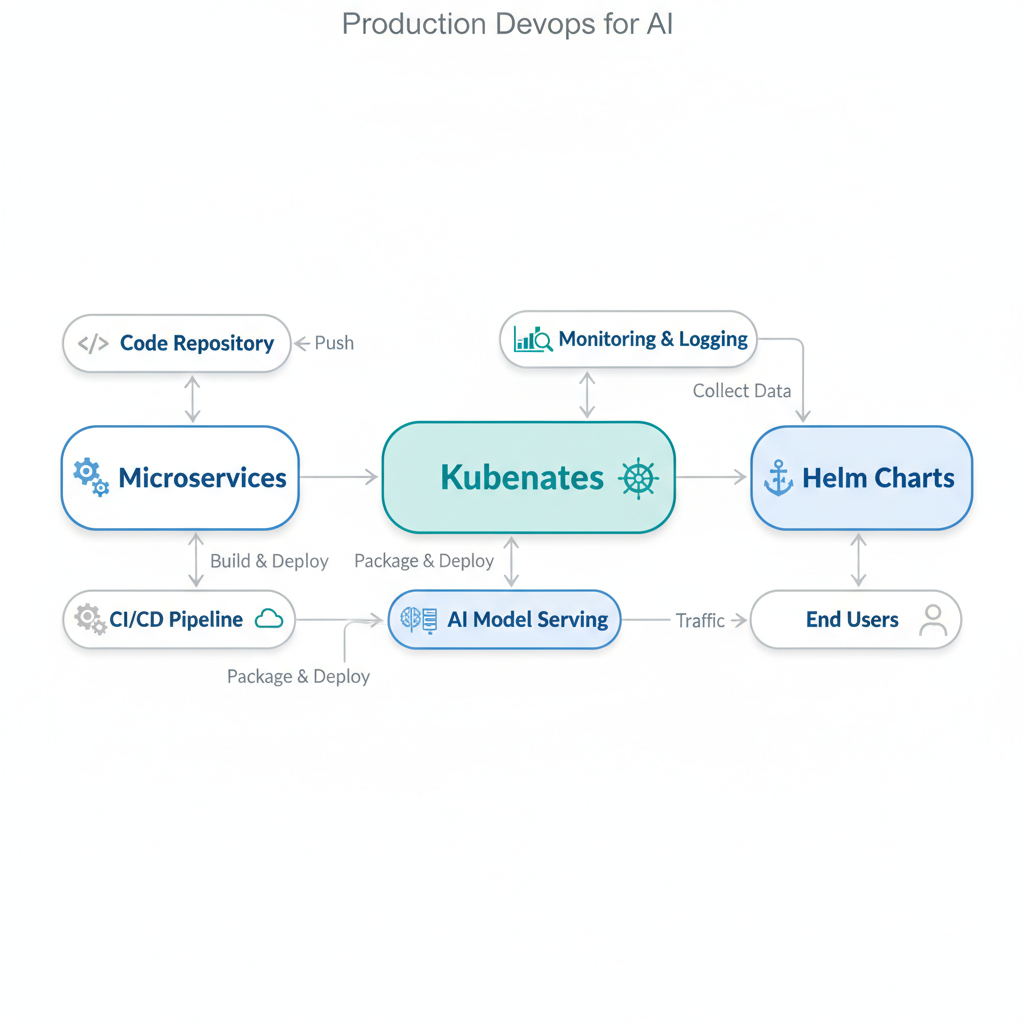
Containerized Microservices: Your AI, Packaged for Travel
Plain-English definition: A containerized microservice packages one specific piece of your AI system (like a model serving endpoint) into a portable, self-contained unit that runs the same everywhere.
How it works: Docker Images bundle your code, dependencies, runtime, and configuration into a single file. Each microservice handles one job — model inference, data preprocessing, or feature extraction. They communicate over lightweight APIs.
Analogy: Think of a shipping container at a port. It has standardized dimensions, works on any ship or truck, and protects its contents. Your microservice is the container; Docker is the shipping company.
Code example: A Flask-based model inference service
# app.py - A minimal AI microservice
from flask import Flask, request, jsonify
import joblib
import numpy as np

app = Flask(__name__)
model = joblib.load('model.pkl')  # Your trained model

@app.route('/predict', methods=['POST'])
def predict():
    data = request.get_json()
    features = np.array(data['features']).reshape(1, -1)
    prediction = model.predict(features)
    return jsonify({'prediction': prediction.tolist()[0]})

if __name__ == '__main__':
    app.run(host='0.0.0.0', port=5000)
The Dockerfile packages this service:
FROM python:3.9-slim
COPY app.py model.pkl requirements.txt /app/
WORKDIR /app
RUN pip install -r requirements.txt
CMD ["python", "app.py"]
Kubernetes: Your Container Orchestra
Plain-English definition: Kubernetes (K8s) automatically manages where your containers run, keeps them healthy, and scales them based on demand.
How it works: You declare your desired state — “run three copies of my model service” — and Kubernetes ensures reality matches. It schedules containers across machines, restarts failed ones, and routes traffic to healthy instances.
Analogy: Kubernetes is the hotel concierge. You tell them you need three rooms ready for guests (your containers). They ensure rooms are clean, fix broken elevators, and direct new guests to available rooms.
Non-obvious insight: Kubernetes doesn’t run containers directly — it uses a container runtime like containerd or Docker under the hood. This abstraction lets you swap runtimes without changing your deployment config.
Example deployment YAML:
apiVersion: apps/v1
kind: Deployment
metadata:
  name: model-v1
spec:
  replicas: 3  # Run 3 identical copies
  selector:
    matchLabels:
      app: model
  template:
    metadata:
      labels:
        app: model
    spec:
      containers:
      - name: model-inference
        image: myregistry/model:v1
        ports:
        - containerPort: 5000
Helm Charts: Reusable Infrastructure Recipes
Plain-English definition: Helm Charts are packages of pre-configured Kubernetes resources — a single command deploys your entire AI system.
How it works: A Chart contains YAML templates combined with user-configurable values. You define defaults, then override specific settings per environment (development vs. production). Helm generates the final Kubernetes manifests.
Analogy: Think of Helm Charts as a recipe box. You pull out the “Chocolate Cake” recipe (your AI service), adjust quantities for 10 guests (production scaling) instead of 2 (development), and the recipe tells you exactly what ingredients to combine.
Example Chart structure:
model-chart/
├── Chart.yaml          # Metadata
├── values.yaml         # Default configuration
└── templates/
    ├── deployment.yaml # Kubernetes Deployment template
    └── service.yaml    # Network access template
Values file example:
replicaCount: 3
image:
  repository: myregistry/model
  tag: v1
resources:
  requests:
    memory: "512Mi"
    cpu: "500m"
Helm merges these values into the templates. Change replicaCount: 5 and re-run helm upgrade to scale.
CI/CD & Autoscaling: Ship Fast, Scale Smart
CI/CD Pipelines: Automated workflows that test, build, and deploy your code.
Plain-English: Every time you push code, the pipeline builds a new Docker image, runs tests, and deploys to Kubernetes.
How it works: A tool like GitHub Actions or GitLab CI watches your branch. On push, it:
- Checks out your code
- Runs tests (unit tests, model validation)
- Builds a Docker Image with a unique tag (e.g.,
model:abc123) - Pushes to a registry
- Updates the Helm Chart’s image tag
- Deploys to Kubernetes
Annotated example:
# .github/workflows/deploy.yml
name: Deploy AI Model
on:
  push:
    branches: [main]
jobs:
  build-and-deploy:
    runs-on: ubuntu-latest
    steps:
    - uses: actions/checkout@v3
    - run: docker build -t myregistry/model:$GITHUB_SHA .
    - run: docker push myregistry/model:$GITHUB_SHA
    - run: helm upgrade --install model-release ./model-chart \
           --set image.tag=$GITHUB_SHA  # Use unique tag
Autoscaling: Kubernetes Horizontal Pod Autoscaler automatically adds or removes container copies based on CPU, memory, or custom metrics.
Plain-English: When more users hit your API, Kubernetes fires up extra model instances. When traffic drops, it removes them.
Gotcha: AI models strain memory, not just CPU. Set memory-based scaling thresholds — CPU-only scaling leaves you blind to OOM crashes.
apiVersion: autoscaling/v2
kind: HorizontalPodAutoscaler
metadata:
  name: model-hpa
spec:
  scaleTargetRef:
    apiVersion: apps/v1
    kind: Deployment
    name: model-v1
  minReplicas: 2
  maxReplicas: 10
  metrics:
  - type: Resource
    resource:
      name: memory   # Scale based on memory
      target:
        type: Utilization
        averageUtilization: 70
How Everything Connects
| Concept | What It Does | Analogy | Key Tool |
|---|---|---|---|
| Docker Image | Packages your AI code + dependencies | Shipping container | Docker |
| Containerized Microservice | Single, focused service (e.g., inference) | One specialized worker | Flask + Docker |
| Kubernetes | Schedules and manages containers | Hotel concierge | k8s |
| Helm Chart | Templated Kubernetes configs | Recipe box | Helm |
| CI/CD Pipeline | Automated build-test-deploy workflow | Assembly line | GitHub Actions |
| Autoscaling | Add/remove containers based on demand | Smart traffic management | HPA |
Key Takeaways
- Docker Images package AI code into portable units
- Microservices split your system into focused, independent services
- Kubernetes orchestrates containers — restarting, scaling, routing
- Helm Charts version and templatize your Kubernetes configs
- CI/CD Pipelines automate building and deploying new versions
- Autoscaling adjusts capacity based on real-time demand
- Memory scaling > CPU scaling for AI workloads
Your laptop model works. Now go make it work for everyone else.

Comments