Native Function Calling: A Guide to Least-Privilege Access for Enterprise Data
Introduction
Imagine you’re a security guard at a massive office building. You receive calls from employees in different departments saying, “I need to get into the server room,” or “Can I access the finance database?” Your job is to determine who can do what and when. You need rules. In the world of software, especially when building AI applications that interact with real enterprise data, you face the exact same challenge. This tutorial will demystify how to grant precise, controlled access to sensitive data using Function Calling, Tool Schemas, API Invocation Patterns, External Services, Enterprise Data Sources, and the critical security principle of Least-Privilege Access. By the end, you’ll know how to build a system that gives AI models exactly the power they need—and nothing more.
Function Calling: The AI’s Phone
Plain-English Definition: Function Calling is the ability of a large language model (LLM) to request a specific piece of code (like a function in your program) to be executed on its behalf. It’s the AI saying, “I need to run this code.”
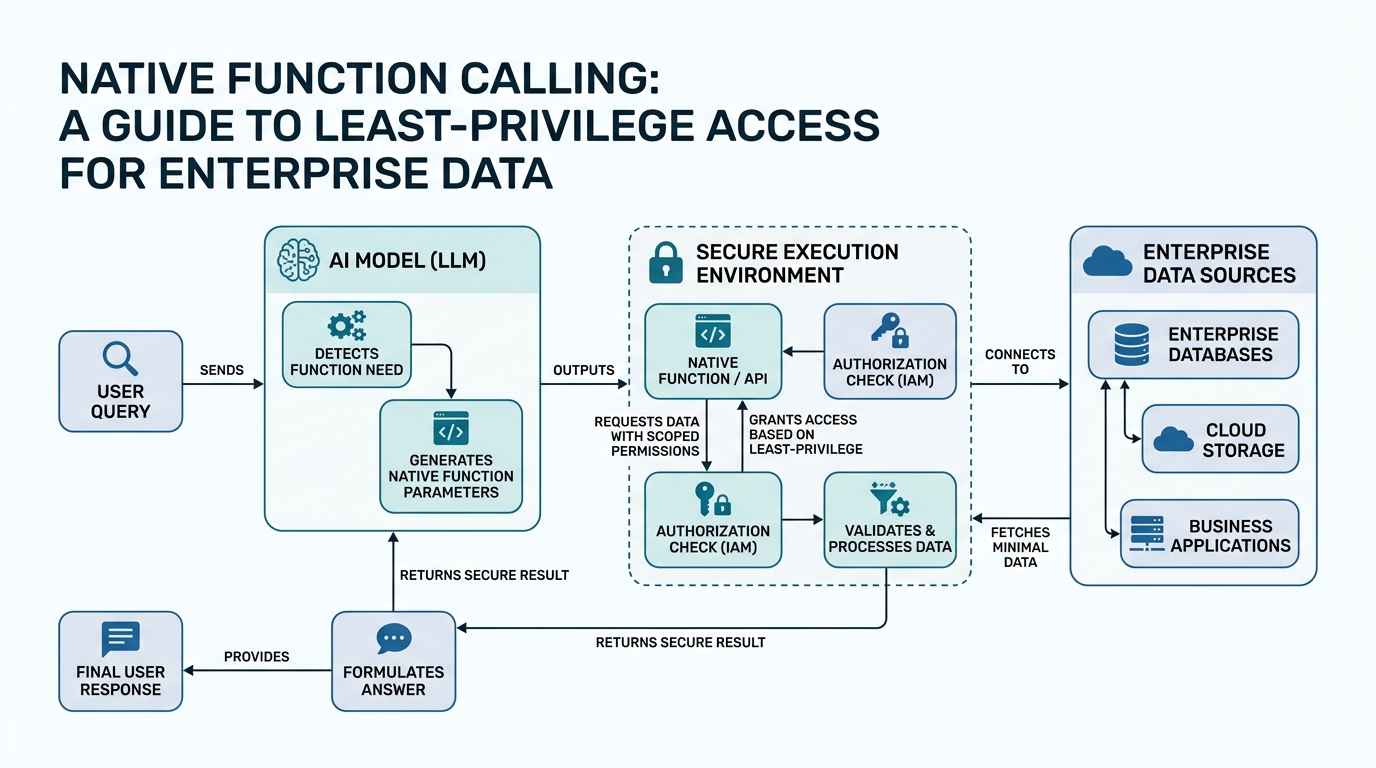
How it works under the hood: You, the developer, define a set of functions your LLM can call. When you send a user’s query to the LLM, the model can respond with a structured request (not just text) that includes the function’s name and its parameters. Your application then intercepts this request, executes the actual code, and sends the result back to the LLM to continue generating a response.
Real-world analogy: Think of the LLM as a personal assistant who can’t use your computer. You give them a list of actions they can ask you to perform: “Look up a contact,” “Send an email,” “Check the weather.” The assistant doesn’t do the action themselves; they call you to do it, and you give them the result.
Annotated Code Snippet:
import openai
import json

# 1. Define the function the LLM can call
def get_stock_price(ticker: str) -> str:
    """
    Retrieves the current stock price for a given ticker symbol.
    In a real app, this would call an external API.
    """
    # This is a placeholder - never hallucinate API data
    return f"The current stock price of {ticker} is $150.00"

# 2. Define the tool schema - tell the LLM about the function
tool_schema = [
    {
        "type": "function",
        "function": {
            "name": "get_stock_price",
            "description": "Get the current stock price for a ticker symbol",
            "parameters": {
                "type": "object",
                "properties": {
                    "ticker": {
                        "type": "string",
                        "description": "The stock ticker (e.g., AAPL, GOOGL)"
                    }
                },
                "required": ["ticker"]
            }
        }
    }
]

# 3. Send the model a user request and the tool schema
response = openai.chat.completions.create(
    model="gpt-4o",
    messages=[{"role": "user", "content": "What is Apple's current stock price?"}],
    tools=tool_schema,
    tool_choice="auto"  # Let the model decide if it needs a function
)

# 4. Extract the function call request from the response
if response.choices[0].message.tool_calls:
    function_call = response.choices[0].message.tool_calls[0]
    function_name = function_call.function.name
    function_args = json.loads(function_call.function.arguments)

    # 5. Execute the actual function
    if function_name == "get_stock_price":
        result = get_stock_price(**function_args)
        print(f"Function result: {result}")
Non-obvious insight: The LLM doesn’t actually run your code. It’s a request generator. Your application is the gatekeeper that decides whether to execute the function, how to execute it, and what to do with the result. This separation is the foundation of Least-Privilege Access.
Tool Schemas: The Instruction Manual
Plain-English Definition: A Tool Schema is a structured description (usually in JSON) that tells the LLM what functions are available, what each one does, and what parameters it expects. It’s the instruction manual for the AI.
How it works: The schema defines the function’s name, its description (which the LLM uses to understand its purpose), and a JSON Schema for its parameters. This includes the parameter names, data types, descriptions, and whether they are required.
Analogy: You’re giving your assistant a phone directory for a specific department. Each entry (function) has the person’s name, what they do, and the exact questions you need to ask them (parameters). The assistant can only call the people listed in that directory.
Annotated Code Snippet (from above): The tool_schema list in the previous code block is the tool schema. The description field is crucial—it’s how the LLM decides if it should call this function or ignore it. A poorly written description is a common source of errors.
Gotcha: The LLM will try to fill in parameters based on the user’s query. If a parameter is required but the user’s query doesn’t provide a clear value, the LLM will either hallucinate one or refuse to call the function. Always design your schemas to handle missing or ambiguous data gracefully.
API Invocation Patterns: Who Calls Whom?
Plain-English Definition: API Invocation Patterns are the different ways an application can structure the request-response cycle when using Function Calling. The most common pattern is the “Chat/Function/Result” loop.
How it works under the hood:
- Chat: You send the user’s message and the tool schemas to the LLM.
- Function: The LLM responds with a function call request (or a text response if it doesn’t need a function).
- Result: Your code executes the function and sends the result back to the LLM as a new message.
- Loop: The LLM uses the result (and potentially makes another function call) to generate the final answer.
Analogy: A radio dispatcher (your app) receives a call for help (user query). They broadcast a request to all available units (the LLM with functions). A unit (function) signals back, “I can take that.” The dispatcher tells the caller, “Go ahead.” The unit handles the situation and reports back. The dispatcher then relays the outcome.
Code Demonstration:
# This is a simplified, illustrative loop for the "Chat/Function/Result" pattern
conversation_history = [
    {"role": "user", "content": "What's the stock price of Apple?"}
]

# Step 1: Send to LLM
response = openai.chat.completions.create(
    model="gpt-4o",
    messages=conversation_history,
    tools=tool_schema,
    tool_choice="auto"
)

# Step 2: Check for function call
while response.choices[0].message.tool_calls:
    tool_call = response.choices[0].message.tool_calls[0]
    conversation_history.append(response.choices[0].message)  # Add the assistant's request

    # Step 3: Execute function and add result
    if tool_call.function.name == "get_stock_price":
        args = json.loads(tool_call.function.arguments)
        function_result = get_stock_price(**args)
        conversation_history.append({
            "role": "tool",
            "tool_call_id": tool_call.id,
            "content": function_result
        })

    # Step 4: Send updated history back to LLM
    response = openai.chat.completions.create(
        model="gpt-4o",
        messages=conversation_history,
        tools=tool_schema,
        tool_choice="auto"
    )

# Step 5: Final text response
print(response.choices[0].message.content)
External Services and Enterprise Data Sources
Plain-English Definition:
- External Services: Any software or API not running inside your core application’s process—like a CRM, an ERP, a database, or a third-party API.
- Enterprise Data Sources: The specific databases, file shares, and systems within an organization that contain sensitive or business-critical information.
The Connection: Function Calling is the secure bridge between an LLM and these sources. Instead of giving the LLM a direct database connection (a huge security risk), you give it a curated function that queries the data on its behalf.
Analogy: You don’t give a new intern the master key to every filing cabinet in the office. You give them a specific key to one drawer and a form to fill out to request information from that drawer. The intern tells you what they need, you look in the drawer, and you give them the answer. The function is that form and that specific key.
Least-Privilege Access Applied:
# Instead of this:
def get_all_employee_data():
    """Connects directly to the HR database - DANGEROUS"""
    # ...

# You define this:
def get_employee_email_by_name(name: str) -> str:
    """
    Retrieves the email address of an employee given their full name.
    This function only fetches email addresses - not salaries, SSNs, or reviews.
    """
    # Connect to the 'read_only_employee_emails' view in the database
    # ... database query logic ...
    return f"employee.email@company.com"
The function itself enforces the “least privilege” by design. It can only access the minimum data needed.
Comparison Table: Tying It All Together
| Concept | Role | Analogy | Security Implication |
|---|---|---|---|
| Function Calling | The mechanism for the AI to request code execution. | The AI’s phone to call for help. | It’s the request, not the execution. You control the bridge. |
| Tool Schemas | The instruction manual describing available functions. | The phone directory of available helpers. | You decide who the AI can call—the definition of scope. |
| API Invocation Patterns | The structured loop for processing requests and results. | The radio dispatcher’s protocol. | It ensures the process is predictable and auditable. |
| External Services | Any outside system the function calls. | The other departments in the building. | The function acts as a security checkpoint. |
| Enterprise Data Sources | The sensitive data repositories. | The vault, the filing cabinets. | The functions are the only keys. |
| Least-Privilege Access | The core principle of granting minimum necessary permissions. | The “need-to-know” security rule. | The function’s code is the privilege. Design it carefully. |
Key Takeaways
- Function Calling is an LLM’s way of asking your app to run a specific function—it’s not direct execution.
- Tool Schemas define the available actions an LLM can request; a clear schema is crucial for correct behavior.
- The API Invocation Pattern is a predictable loop: Chat → Function Request → Execute → Send Result → Chat.
- External Services and Enterprise Data Sources are accessed through functions, never directly by the LLM.
- Least-Privilege Access is enforced by designing each function to grant the minimum access required to fulfill its purpose. Your function’s code is your security policy.

Comments