Building Lean Workflows: Custom Orchestration and Reliable Execution
You’ve probably built a script that chains three API calls together. It works on your machine. Then it fails in production because the second call timed out, and now you’re manually retrying. This tutorial fixes that. You’ll learn how to build a custom orchestration framework that manages multi-step workflows, implements retry logic, handles reliable execution, and authenticates securely with IAM tokens and connect tokens. No buzzwords. Just clear definitions, real analogies, and code you can run today.
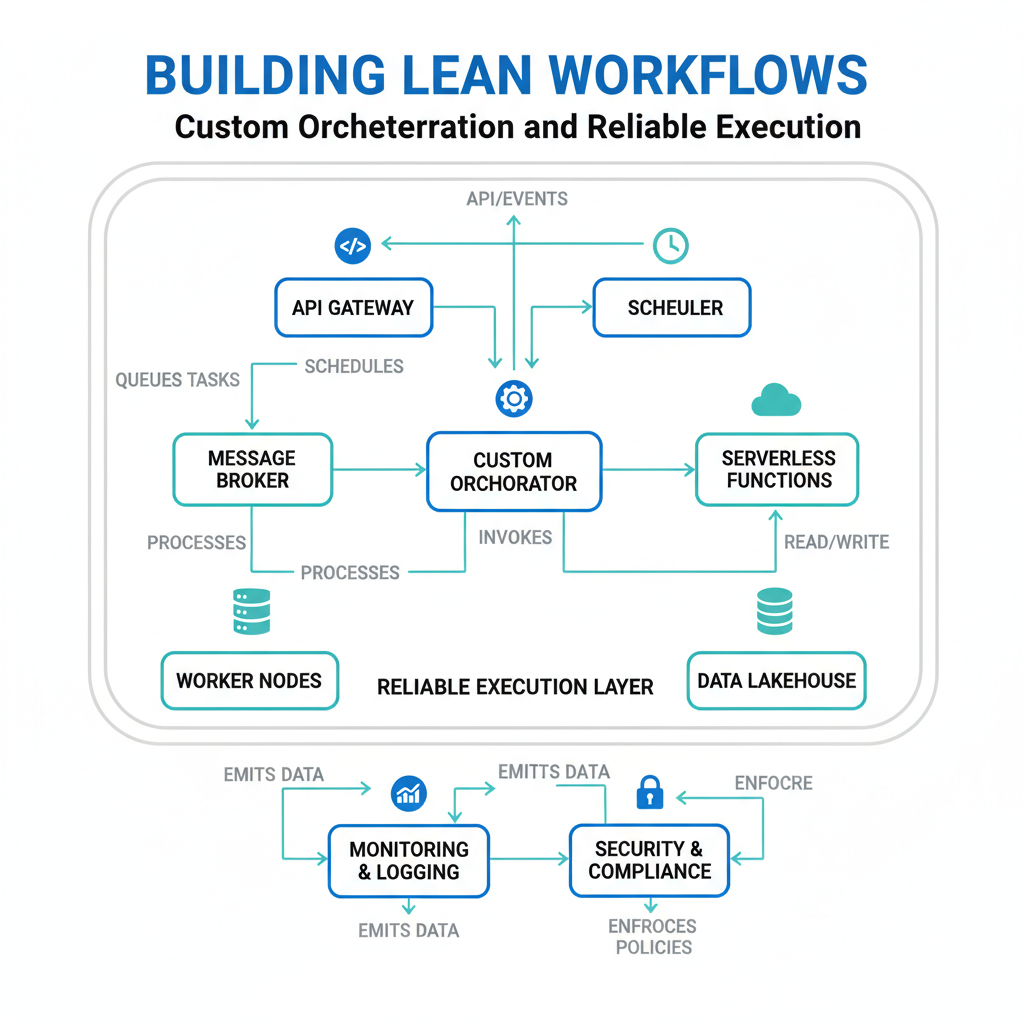
Custom Orchestration: Your Workflow’s Air Traffic Controller
Plain-English definition
A custom orchestration framework is a piece of code that coordinates multiple tasks – like an air traffic controller ensuring planes (your API calls) take off, land, and reroute without crashing into each other.
How it works under the hood
Under the hood, you define a set of “steps” (functions) and a “runner” that executes them in order. The runner manages state, passes outputs between steps, and decides what happens when a step fails. This is different from a monolithic script because you can swap steps without rewriting the whole pipeline.
Real-world analogy
Think of a restaurant kitchen. The chef (your orchestration framework) doesn’t chop every vegetable themselves. They tell the prep cook to chop, the sous chef to sear, and the expediter to plate. Each station runs independently, but the chef orchestrates the sequence.
Annotated code snippet
# A minimal custom orchestration framework
class Orchestrator:
    def __init__(self):
        self.steps = []  # Holds each step in order

    def add_step(self, name: str, fn: callable):
        self.steps.append({"name": name, "fn": fn})  # Add a step

    def run(self, initial_data: dict):
        data = initial_data
        for step in self.steps:  # Execute each step in sequence
            print(f"Running step: {step['name']}")
            data = step["fn"](data)  # Pass output to next step
        return data

# Usage
def fetch_user(data):
    # Imagine this calls an API
    data["user"] = {"id": 42, "name": "Alice"}
    return data

def send_email(data):
    # Imagine this sends an email
    print(f"Sending email to {data['user']['name']}")
    return data

orchestrator = Orchestrator()
orchestrator.add_step("Fetch User", fetch_user)
orchestrator.add_step("Send Email", send_email)
orchestrator.run({})
Expert insight
Most tutorials skip error propagation. In a custom framework, each step should return a status dict (e.g., {"success": True, "data": ...}) so the orchestrator can pause or abort cleanly. Don’t assume every step works – build for failure.
Multi-Step Workflows: Connecting the Dots
Plain-English definition
Multi-step workflows are workflows that require two or more sequential or parallel operations. Each step consumes input from the previous step and produces output for the next.
How it works under the hood
You connect steps via a data pipeline. Step A returns a result, which the orchestrator passes as an argument to Step B. If a step needs data from two previous steps, you merge dictionaries or use a shared state object.
Real-world analogy
Assembly line manufacturing. A car chassis moves down the line. Station 1 installs the engine. Station 2 adds the wheels. Station 3 paints the body. Each station only works on what it receives.
Annotated code snippet
def validate_order(data):
    # Step 1: Check order exists
    if "order_id" not in data:
        raise ValueError("Missing order_id")
    data["valid"] = True
    return data

def process_payment(data):
    # Step 2: Charge the customer
    data["payment_status"] = "paid"
    return data

def update_inventory(data):
    # Step 3: Reduce stock
    data["inventory_updated"] = True
    return data

# Chaining steps
order_data = {"order_id": "ORD-123", "amount": 49.99}
result = update_inventory(
    process_payment(
        validate_order(order_data)
    )
)
Expert insight
Parallel steps are the gotcha. If Step 2 and Step 3 can run simultaneously, don’t serialize them. Your orchestrator should support a run_parallel(steps, data) method that uses concurrent.futures. Most beginners chain everything sequentially and introduce unnecessary latency.
Retry Logic: Giving Failing Tasks a Second Chance
Plain-English definition
Retry logic is a pattern where your code automatically re-executes a failed operation, usually after waiting a bit. It’s not “hope it works this time” – it’s “networks are flaky, let me try again intelligently.”
How it works under the hood
You wrap a step in a retry loop. After a failure (e.g., network timeout), you wait (exponential backoff), then try again up to a maximum count. You stop if the error is permanent (e.g., invalid credentials).
Real-world analogy
Sending a text message. It fails. You wait 10 seconds. It fails again. You wait 30 seconds. It succeeds. If the error said “number blocked,” you wouldn’t retry – you’d stop.
Annotated code snippet
import time

def retry(max_attempts=3, backoff=1, permanent_errors=(ValueError,)):
    def decorator(func):
        def wrapper(*args, **kwargs):
            last_exception = None
            for attempt in range(max_attempts):
                try:
                    return func(*args, **kwargs)  # Success, return early
                except permanent_errors as e:
                    raise  # Don't retry if error is permanent
                except Exception as e:
                    last_exception = e
                    wait = backoff * (2 ** attempt)  # Exponential backoff
                    print(f"Attempt {attempt+1} failed. Retrying in {wait}s...")
                    time.sleep(wait)
            raise last_exception  # All attempts exhausted
        return wrapper
    return decorator

@retry(max_attempts=3, backoff=1)
def send_api_request(data):
    # Simulate network call that sometimes fails
    import random
    if random.random() < 0.7:  # 70% failure rate
        raise ConnectionError("Network timeout")
    return {"status": "ok"}

result = send_api_request({"payload": "test"})
Expert insight
Don’t retry everything forever. Add a circuit breaker pattern: if a step fails 5 times in 30 seconds, stop all retries and alert. Also, idempotency matters – a retry should be safe to repeat. If your endpoint creates a charge, only one should go through.
Reliable Execution: Making Sure the Job Finishes
Plain-English definition
Reliable execution means your workflow completes correctly even when components fail, the network drops, or the server restarts. It’s the difference between “it worked in my demo” and “it works in production at 3 AM.”
How it works under the hood
You add state persistence (save progress to a database), checkpoints (save after each step), and idempotency (running the same step twice doesn’t break things). If the server crashes, you resume from the last checkpoint.
Real-world analogy
Saving your video game every time you clear a level. If the power goes out, you don’t start from the beginning. You reload at the last save point.
Annotated code snippet
import sqlite3

class CheckpointedOrchestrator:
    def __init__(self, db_path="workflow.db"):
        self.conn = sqlite3.connect(db_path)  # Persistent storage
        self.conn.execute("CREATE TABLE IF NOT EXISTS checkpoints (workflow_id TEXT, step_name TEXT, data BLOB)")

    def save_checkpoint(self, workflow_id, step_name, data):
        import json
        self.conn.execute("INSERT OR REPLACE INTO checkpoints VALUES (?, ?, ?)",
                          (workflow_id, step_name, json.dumps(data)))
        self.conn.commit()

    def load_checkpoint(self, workflow_id):
        import json
        cursor = self.conn.execute("SELECT step_name, data FROM checkpoints WHERE workflow_id = ?", (workflow_id,))
        row = cursor.fetchone()
        if row:
            return {"step": row[0], "data": json.loads(row[1])}
        return None
Expert insight
The biggest edge case is partial completion. If Step 3 commits a database write and Step 4 sends an email, but Step 4 fails, you have a “write but no notify” state. Always make your orchestration framework support compensating transactions (undo operations) or exactly-once semantics.
IAM Tokens and Connect Tokens: Authentication, Not Magic
Plain-English definition
IAM tokens are temporary credentials that grant access to cloud resources (like AWS or GCP). Connect tokens are short-lived tokens used to authenticate with third-party APIs (like Salesforce or HubSpot) during a workflow.
How it works under the hood
IAM tokens are obtained from a cloud provider’s identity service. They’re cryptographically signed, expire in minutes, and must be refreshed. Connect tokens are often OAuth bearer tokens – you request them, store them, and include them in HTTP headers.
Real-world analogy
An IAM token is your building’s security badge. It gets you through the front door and to general floors. A connect token is a visitor pass for a specific conference room. Both expire.
Annotated code snippet
# Refreshing an IAM token before each step
def get_iam_token():
    import boto3
    client = boto3.client("sts")
    # Assume a role to get temporary credentials
    response = client.assume_role(
        RoleArn="arn:aws:iam::123456789:role/MyWorkflowRole",
        RoleSessionName="my-workflow"
    )
    return response["Credentials"]["AccessKeyId"], response["Credentials"]["SecretAccessKey"]

# Using a connect token for a third-party API
def call_external_api(endpoint, connect_token):
    import requests
    headers = {"Authorization": f"Bearer {connect_token}"}
    response = requests.get(endpoint, headers=headers)
    return response.json()
Expert insight
Tokens expire mid-workflow if steps take too long. Always refresh tokens immediately before the step that needs them, not at workflow start. Also, store connect tokens in a secrets manager (like AWS Secrets Manager or HashiCorp Vault), not in code. Version control is public; secrets are not.
Tying It All Together: How These Concepts Interrelate
| Concept | Purpose | Key Component | Real-World Analogy |
|---|---|---|---|
| Custom Orchestration | Coordinates task execution | Step runner, state manager | Air traffic controller |
| Multi-Step Workflows | Connects sequential operations | Data pipeline, step chaining | Assembly line |
| Retry Logic | Handles transient failures | Exponential backoff, max attempts | Resending a text message |
| Reliable Execution | Ensures completion despite failures | Checkpoints, idempotency, persistence | Video game saves |
| IAM Tokens | Authenticates to cloud infrastructure | STS assume role, temporary credentials | Building security badge |
| Connect Tokens | Authenticates to third-party APIs | OAuth bearer token, refresh flow | Conference room visitor pass |
Key Takeaways
- Custom orchestration lets you define, order, and manage steps without a monolithic script.
- Multi-step workflows chain operations intelligently – serial or parallel – with safe data passing.
- Retry logic uses exponential backoff and distinguishes transient from permanent errors.
- Reliable execution requires persistence and idempotency; always save progress after each step.
- IAM tokens are temporary cloud credentials; connect tokens are short-lived API keys. Refresh both before use, not at start.
Your workflows don’t have to be fragile. Start simple – wrap your first API call with retry logic tomorrow. Add a checkpoint the next day. You’ll sleep better knowing your 3 AM cron job won’t wake you up.

Comments