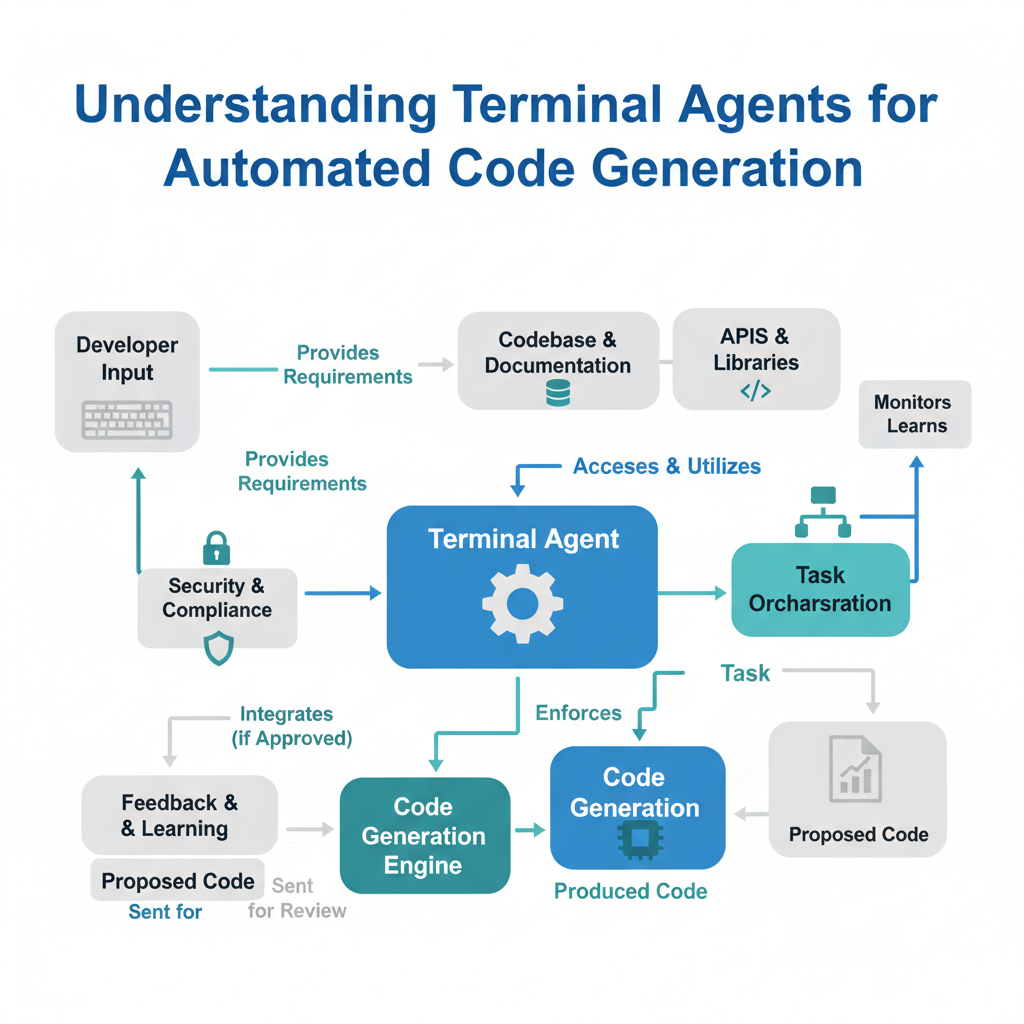
Terminal Agents: The Autonomous Developer Inside Your Command Line
Plain English Definition: A Terminal Agent is an AI program that can run commands, edit files, and react to the results inside your terminal—just like a skilled developer sitting at a keyboard.
How It Works Under the Hood: Unlike a chatbot that only generates text, a Terminal Agent has direct access to your file system and command line. It can execute commands, read stdout and stderr, and then decide what to do next. Each action is a step in a loop: observe → think → act. The agent keeps a memory of previous steps, so it can backtrack if a command fails.
Real-World Analogy: Imagine a junior developer who can only write code on a whiteboard. Now imagine a senior developer who types the code, runs python main.py, sees the red error message, fixes the import, and runs again. That’s the difference between a code generator and a Terminal Agent.
Annotated Code Example:
Below is a simplified Python script that mimics how a Terminal Agent works. It uses subprocess to run a command, reads the output, and decides the next action.
import subprocess
import re

# Step 1: Generate code (mimicking a call to a language model)
generated_code = "def hello():\n    print('Hello World!')"

# Step 2: Write the code to a file
with open("greeting.py", "w") as f:
    f.write(generated_code)

# Step 3: Run the file in a subprocess (mimicking terminal access)
result = subprocess.run(["python", "greeting.py"],
                        capture_output=True, text=True)

# Step 4: Agent observes the output
if result.returncode == 0:
    print(f"[Agent] Success: {result.stdout.strip()}")
else:
    print(f"[Agent] Error detected: {result.stderr}")
    # Agent could now ask the LLM to fix the error
In a real Terminal Agent like Hermes, step 1 is powered by a large language model, and steps 3–4 run in a loop until the code compiles and passes tests.
Non-Obvious Insight: Terminal Agents are vulnerable to infinite loops if the error being fixed keeps changing. Good agents have a maximum retry counter and a “reset” command that starts fresh after N failed attempts.
OpenCode: The Open-Source Backbone
Plain English Definition: OpenCode is an open-source framework that provides the building blocks for Terminal Agents. It defines the rules for how agents read context, run commands, and pass data back to the language model.
How It Works: Think of OpenCode as the operating system for your AI developer. It handles:
- Session Management: Tracks all commands and outputs so the model sees recent history.
- File Operations: Read, write, and edit files safely.
- Safety Guards: Blocks dangerous commands by default (like
rm -rf /).
Real-World Analogy: OpenCode is like the standardized kitchen in a restaurant. Chefs (language models) can swap in and out, but the stove, the fridge, and the cutting board all work the same way. This means any model that speaks OpenCode’s “language” can become a Terminal Agent.
Code Example (simplified OpenCode interaction):
Let’s say a user gives the instruction: “Create a Flask app with one route that returns ‘Hello’.”
# Assume OpenCode's context is already loaded
# The language model receives:
context = {
    "current_directory": "/home/user/project",
    "recent_commands": [],
    "file_contents": {},
    "instruction": "Create a Flask app with one route."
}

# The model outputs a command:
command = {
    "action": "write_file",
    "filepath": "app.py",
    "content": "from flask import Flask\napp = Flask(__name__)\n@app.route('/')\ndef home():\n    return 'Hello'\n"
}
# OpenCode executes this and returns the result.
The model doesn’t just generate text—it generates actionable commands. OpenCode interprets and executes them.
DeepCode: Long-Term Memory for Your Codebase
Plain English Definition: DeepCode is an enhanced Terminal Agent that builds a structured knowledge base of your project so it can answer questions and write code that fits your existing architecture.
How It Works: DeepCode parses your entire repository into a searchable index. It maps out file dependencies, class hierarchies, and function signatures. When you ask it to “Add a new user endpoint,” it first searches its index for existing patterns (e.g., how other API endpoints are structured) and uses those as a template.
Real-World Analogy: You wouldn’t ask a new developer to “fix the payment system” without giving them access to the codebase. DeepCode builds that understanding automatically—like a new hire who reads every single file overnight and comes to stand-up ready to contribute.
Annotated Code Snippet (DeepCode’s Context Build):
# Pseudocode for DeepCode's context gathering
import ast

def build_project_context(root_dir):
    context = {}
    for path in glob.glob(f"{root_dir}/**/*.py", recursive=True):
        with open(path) as f:
            tree = ast.parse(f.read())
        # Extract imports, classes, and functions
        imports = [node for node in ast.walk(tree) if isinstance(node, ast.Import)]
        functions = [node for node in ast.walk(tree) if isinstance(node, ast.FunctionDef)]
        context[path] = {"imports": imports, "functions": functions}
    return context

# DeepCode's summary for the LLM might look like:
# "The project has Flask endpoints in routes/auth.py
#  The function create_user() expects a JSON body with 'email' and 'password'."
Non-Obvious Insight: DeepCode can generate code that uses internal helper functions you forgot existed. It finds your custom utility library and suggests using it, reducing code bloat and maintaining consistency.
Hermes Agent: The Autonomous, Multi-File Problem Solver
Plain English Definition: Hermes is a state-of-the-art Terminal Agent known for its ability to reason across multiple files and generate entire features from a single prompt.
How It Works: Hermes uses a sophisticated context window of up to 100k tokens (roughly 70k words of text). It can read several files at once, understand their relationships, and modify them all in one “sweep.” It uses chain-of-thought prompting internally, meaning it writes down its reasoning steps before making changes.
Real-World Analogy: Hermes is like the architect who designs the foundation, the plumbing, and the electrical plan together. It knows that changing User.create() might also need changes in UserSerializer and UserMigration. It writes all the changes at once.
Annotated Code Example (Hermes Multi-File Reasoning):
# Input to Hermes: "Add a timestamp to the blog post model"
# Hermes reasons internally:
# 1. Need to modify models.py: add DateTimeField
# 2. Need to modify serializers.py: include new field
# 3. Need to modify views.py: no change needed (serializer handles it)
# 4. Need to create migration

# Hermes outputs multi-file edit plan:
edits = [
    {
        "file": "models.py",
        "edit": "add 'created_at = models.DateTimeField(auto_now_add=True)' to BlogPost"
    },
    {
        "file": "serializers.py",
        "edit": "add 'created_at' to fields list in BlogPostSerializer"
    },
    {
        "file": None,  # No change needed
        "edit": ""
    },
    {
        "file": "manage.py",
        "command": "python manage.py makemigrations"
    }
]
Non-Obvious Insight: Hermes can get confused by circular imports or very deep file hierarchies. A well-structured project with a clear separation of concerns (MVC, for instance) drastically improves its success rate.
Comparison Table: Connecting the Concepts
| Concept | Role | User Input | Output | Best For |
|---|---|---|---|---|
| Terminal Agent | The overall concept | Natural language instruction | Executed commands & file changes | End-to-end feature creation |
| OpenCode | Framework / Protocol | Model-generated actions | Safe execution environment | Standardizing agent behavior |
| DeepCode | Context Builder | Repository path | Searchable project index | Understanding legacy code |
| Hermes Agent | Full Agent Implementation | Single prompt | Multi-file edits | Complex, multi-step tasks |
| Automated Code Gen. | The output type | High-level description | Working code files | Starting a new project |
| Context Utilization | The mechanism | Existing files & conversation | Better-tailored code | Avoiding generic answers |
| Multi-File Reasoning | The capability | Requirements for connected changes | Coordinated edits | Maintaining code coherence |
Key Takeaways (Cheat Sheet)
- Terminal Agents are AI programs that interact with your shell and file system, not just a chat window.
- OpenCode provides the standard protocol for agents to operate safely.
- DeepCode pre-indexes your codebase for contextual awareness.
- Hermes Agent excels at multi-file edits and reasoning about dependencies.
- Context Utilization means the agent reads your project files before generating code, reducing surprises.
- Multi-File Reasoning is the ability to see connections across files (like a model change needing a migration) and plan coordinated edits.
- Always set a retry limit on agents to avoid infinite loops.
- For best results with Hermes, keep your project structure clear (MVC or similar).
You now have the vocabulary and mental model to evaluate any Terminal Agent you encounter. Try Hermes or OpenCode on a small project with three files—watch it surprise you by fixing a bug in a file you didn’t mention. It’s weird, but it works.

Comments