Evolving Agent Memory: Episodic Recall Across Vector Databases
Introduction
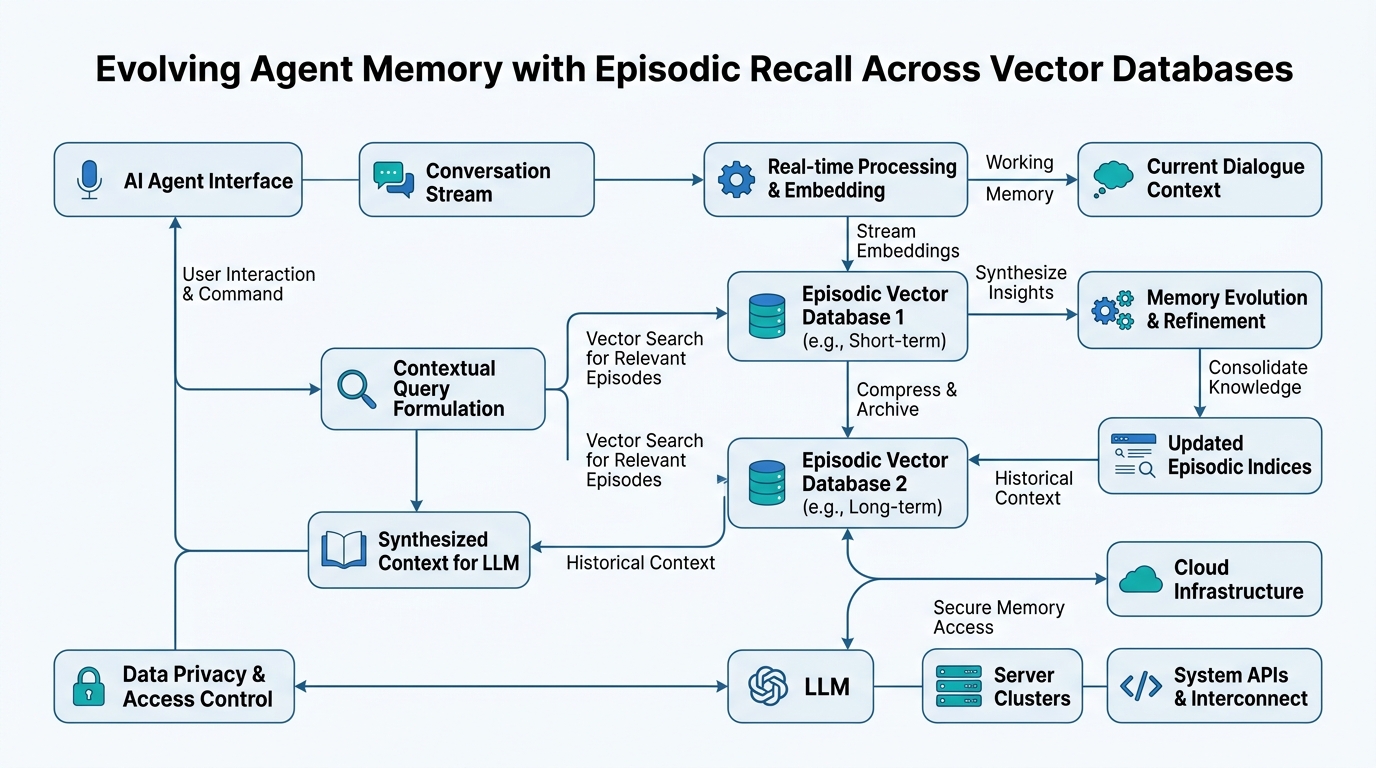
You’re building an AI agent that chats with users. It remembers what they said five minutes ago (that’s easy). But what about what they said five days ago — or the time they mentioned their dog’s birthday last month? That’s where memory architectures get interesting. In this tutorial, you’ll learn how to give your agent real memory: conversational context for short chats, long-term interaction history for lasting relationships, and episodic recall for retrieving specific past events. We’ll demystify vector databases — PgVector and Milvus — and show you how they make all this possible. By the end, you’ll know exactly how to build agents that remember, not just respond.
Memory Architectures: The Agent’s Brain
Plain-English definition: Memory architectures are the systems that decide what an agent remembers, how long it remembers it, and how it finds those memories later.
How it works: Think of your agent’s memory like your own. You have working memory (what you’re thinking about right now), short-term memory (what happened in the last hour), and long-term memory (childhood, facts, skills). An agent’s memory architecture mirrors this — but with databases instead of neurons.
Real-world analogy: Your phone has RAM for apps you’re using right now, a recent apps list, and permanent storage for photos. Each layer serves a different purpose. Same for agents.
The gotcha most tutorials skip: Memory isn’t just storage — it’s also retrieval. A perfect memory that takes 10 seconds to search is useless in a conversation. Design your architecture around how fast you can find information, not just how much you can store.
# Simple memory architecture sketch
class AgentMemory:
    def __init__(self):
        self.working_memory = {}  # Current conversation turn
        self.short_term = []      # Last 10 exchanges
        self.long_term_store = {} # Everything else

    def add(self, key, value, importance=1.0):
        # High importance items go to long-term
        if importance > 0.8:
            self.long_term_store[key] = value
        else:
            self.short_term.append((key, value))
Conversational Context: The 5-Minute Window
Plain-English definition: Conversational context is everything the agent needs to understand the current conversation — what was just said, the topic, the user’s intent.
How it works: The agent keeps a sliding window of recent messages. Usually this is the last 5-20 exchanges. This window feeds directly into the agent’s prompt, so it knows what happened two turns ago.
Real-world analogy: Imagine talking to someone at a party. You don’t remember their cousin’s name from three parties ago, but you know the last thing they said about their cat. That’s conversational context.
The gotcha: Pure sliding windows lose everything once the window shifts. If a user mentions something important 20 messages ago, the agent forgets. That’s where long-term memory comes in.
# Sliding window context in action
conversation_history = []
MAX_CONTEXT_WINDOW = 10

def add_to_context(user_message, agent_response):
    conversation_history.append(f"User: {user_message}")
    conversation_history.append(f"Agent: {agent_response}")

    # Keep only the most recent exchanges
    if len(conversation_history) > MAX_CONTEXT_WINDOW * 2:
        conversation_history = conversation_history[-20:]

# The prompt includes this context
prompt = f"Previous conversation:\n{chr(10).join(conversation_history)}\nUser: new message"
Long-Term Interaction History: Remembering Yesterday
Plain-English definition: Long-term interaction history stores everything the agent has learned across all past conversations — facts, preferences, important details.
How it works: Instead of keeping everything in the prompt (which gets expensive fast), the agent stores summaries or key facts in a database. When a new conversation starts, it queries this database for relevant information.
Real-world analogy: Your dentist keeps a file on you. They don’t re-ask your allergies every visit — they check your file. That’s long-term history.
The gotcha: More history isn’t always better. Storing ten thousand trivial messages makes retrieval slow and expensive. The trick is knowing what to keep and what to throw away.
# Store only important facts
important_events = []

def extract_and_store_significant_memories(conversation):
    # Simplified: look for keywords like "birthday", "allergy", "prefer"
    important_facts = [msg for msg in conversation
                      if any(term in msg for term in TRIGGER_WORDS)]
    important_events.extend(important_facts)
Episodic Recall: Finding That One Memory
Plain-English definition: Episodic recall is the ability to search through past experiences to find a specific event — “Remember when I told you my dog’s name three months ago?”
How it works: This is where vector databases shine. Instead of searching by exact keywords, the agent converts memories into mathematical vectors (embeddings) and finds similar ones. You ask “dog’s name,” and it finds the conversation about your pet.
Real-world analogy: It’s like flipping through a photo album, but instead of looking for “photos taken in 2023,” you’re looking for “photos that feel happy.” The search is by similarity, not exact match.
The gotcha: Episodic recall needs good embeddings. A bad embedding model is like blurry photos — you can’t find what you’re looking for because everything looks the same.
from sentence_transformers import SentenceTransformer
import numpy as np

model = SentenceTransformer('all-MiniLM-L6-v2')

def embed_memory(text):
    return model.encode(text)

def episodic_search(query, memory_store, top_k=3):
    query_vector = embed_memory(query)
    # Compare query vector to all stored vectors
    similarities = [
        np.dot(query_vector, mem['vector'])
        for mem in memory_store
    ]
    # Return the most similar memories
    top_indices = np.argsort(similarities)[-top_k:]
    return [memory_store[i] for i in top_indices]
Vector Databases: PgVector and Milvus
Plain-English definition: Vector databases store and search mathematical vectors — the numerical representations of your memories. They’re optimized for finding “similar” things, not exact matches.
How it works: Instead of SQL’s WHERE name = 'Bob', you ask “find memories similar to this query.” The database uses algorithms like HNSW (Hierarchical Navigable Small World) or IVF (Inverted File Index) to search millions of vectors in milliseconds.
Real-world analogy: It’s like having a super-organized library where books are arranged by how similar they are, not alphabetically. You walk in with a book and find the shelf of books most like it.
PgVector: PostgreSQL Gets Vectors
PgVector is a PostgreSQL extension that adds vector storage and search to your existing database. If you already use PostgreSQL, it means no new infrastructure.
-- Enable PgVector
CREATE EXTENSION vector;

-- Create a table with a vector column
CREATE TABLE memories (
    id SERIAL PRIMARY KEY,
    content TEXT,
    embedding VECTOR(384)  -- 384-dimensional vector
);

-- Search by similarity (cosine distance)
SELECT content, embedding <-> query_embedding AS distance
FROM memories
ORDER BY distance
LIMIT 5;
Milvus: Purpose-Built Vector Database
Milvus is designed entirely for vector search. It handles billions of vectors, has GPU acceleration, and offers more advanced indexing options.
from pymilvus import connections, Collection, FieldSchema, CollectionSchema

# Connect and create a collection
connections.connect(host='localhost', port='19530')

# Define schema for your memories
schema = CollectionSchema([
    FieldSchema(name="id", dtype=DataType.INT64, is_primary=True),
    FieldSchema(name="embedding", dtype=DataType.FLOAT_VECTOR, dim=384),
    FieldSchema(name="content", dtype=DataType.VARCHAR, max_length=1000)
])

collection = Collection("episodic_memories", schema)
# Index for fast search
collection.create_index("embedding", {"index_type": "IVF_FLAT", "params": {"nlist": 128}})
Comparison Table: Memory Concepts
| Concept | Storage | Retrieval | Use Case | Tool |
|---|---|---|---|---|
| Conversational Context | In-memory | Sliding window | Current chat | Python list |
| Long-Term History | Database | SQL/Key-value | User profiles, facts | PostgreSQL |
| Episodic Recall | Vector DB | Similarity search | Specific past events | PgVector, Milvus |
| Vector Database | Disk/GPU | ANN algorithms | Fast similarity search | PgVector/Milvus |
Key Takeaways
- Memory architectures layer working, short-term, and long-term storage — just like human memory
- Conversational context is a sliding window of recent messages — simple but limited
- Long-term interaction history stores important facts beyond the current conversation
- Episodic recall finds specific past events using vector similarity, not exact keyword matches
- Vector databases (PgVector, Milvus) enable fast similarity search across millions of memories
- PgVector adds vector capabilities to existing PostgreSQL; Milvus is purpose-built for scale
- Always design for retrieval speed, not just storage capacity — a slow memory is no memory at all

Comments