Mastering Context Window Engineering: Token Budgeting & Auto-Compaction
Imagine having a conversation with a friend who remembers every single word you’ve ever said, perfectly, forever. Sounds great, right? Now imagine that friend is a large language model (LLM), and its memory—the context window—is finite. It can only hold so much before it starts forgetting the beginning of your chat. This isn’t a bug; it’s a hard technical constraint. But we can outsmart it. This tutorial demystifies how to manage that limited memory through a set of techniques called Context Window Engineering. You’ll learn to budget tokens, auto-compact conversations, and build LLM experiences that feel like they have infinite memory. We’ll cover Token Budgeting, Context Window Optimization, Auto-Compaction, Session Summarization, Sliding Window Memory, and Long-Context Engineering.
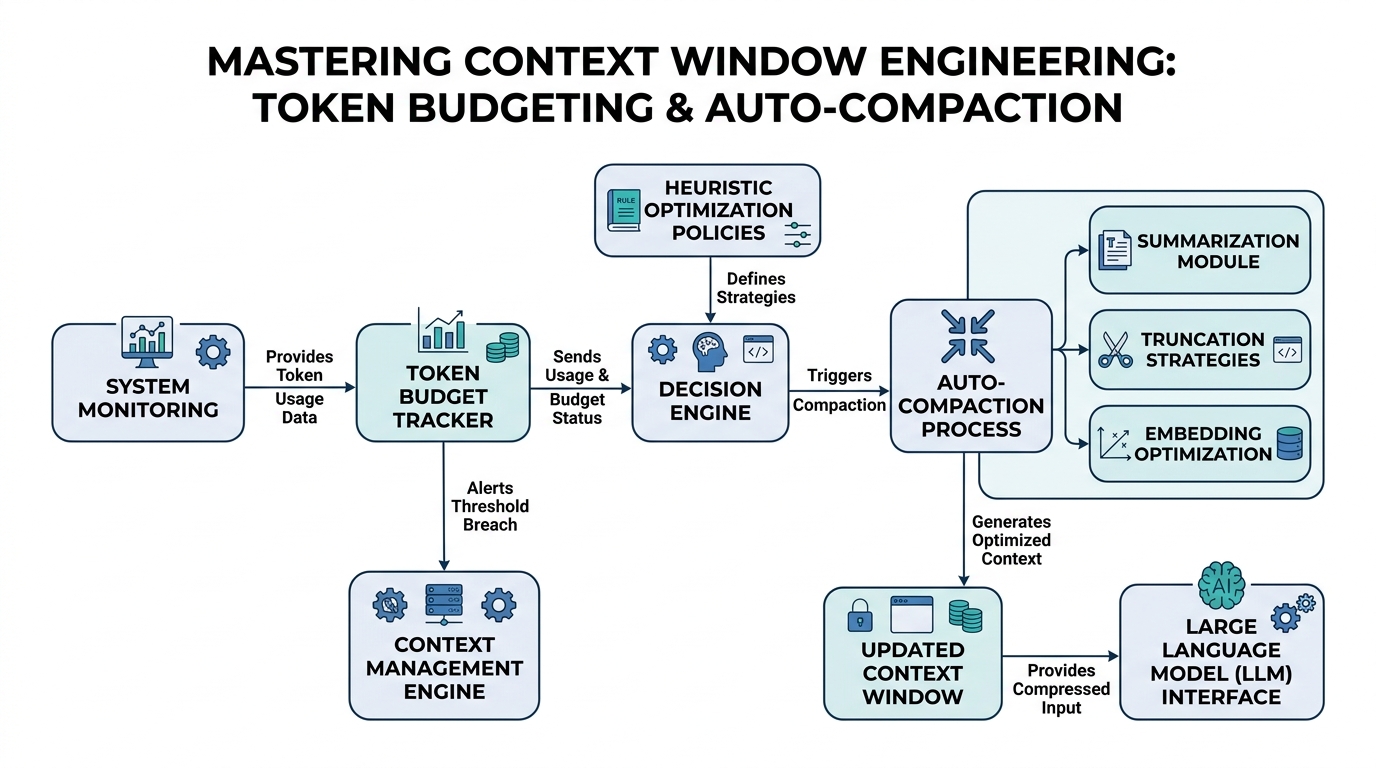
The Art of the Token Budget
First, what’s a token? Think of it as the LLM’s unit of “word.” It’s not exactly a word—"hello" might be one token, but "unbelievable" might be three ("un", "believe", "able"). The context window is the total number of tokens the model can “see” at once. A Token Budget is your plan for spending that limited resource.
Plain-English definition: A token budget is a strategy for deciding which parts of a conversation are worth keeping and which can be discarded. You’re not paying with money, but with space in the model’s memory.
How it works under the hood: Every prompt you send, plus the model’s reply, consumes tokens. The total cannot exceed the model’s context window (e.g., 4,096 tokens for GPT-3.5, 128k for GPT-4 Turbo). If you send a 3,000-token history and a 2,000-token question, you blow past the 4,096 limit in GPT-3.5, causing it to “forget” the earliest tokens.
Real-world analogy: You’re packing a suitcase for a trip. Your token budget is the suitcase size. You can’t bring everything, so you prioritize the essentials (the most important conversation history) over the nice-to-haves (tangential questions).
Code example (conceptual Python):
# Assume max_tokens = 4096
max_context = 4096
current_history_tokens = token_count(messages)  # e.g., 2500
new_prompt_tokens = token_count("My new question...")  # e.g., 800
expected_output_tokens = 500  # Reserve space for model's reply

if current_history_tokens + new_prompt_tokens + expected_output_tokens > max_context:
    # Token budget exceeded! We need to trim history.
    print("Token budget violated. Need to compact or summarize.")
else:
    print("Within budget. Proceed.")
Expert insight: The biggest gotcha is forgetting to reserve space for the model’s reply. Many novices count only input tokens, causing silent truncation of the model’s output.
Auto-Compaction: The Self-Cleaning Memory
Auto-Compaction is the automated process of shortening conversation history to stay within your token budget. It’s not just deleting old messages—it’s intelligently condensing them.
Plain-English definition: Auto-compaction automatically shrinks old conversation parts to free up space for new ones, without losing the essential meaning.
How it works under the hood: The system monitors the total token count. When it approaches a threshold (say, 80% of the budget), it triggers compaction. This can involve summarization of old turns or simply dropping low-value messages (like “Could you repeat that?”).
Real-world analogy: It’s like a whiteboard that automatically shrinks old notes to make room for new ones. Not erasing them entirely, but condensing “Meeting about Project X lasted 2 hours, discussed budget, deadline is Friday” into “Project X: Budget discussed, deadline Friday.”
Code example (pseudocode with annotation):
def auto_compact(history, max_tokens, threshold=0.8):
    """
    Compacts history if token count exceeds threshold of max_tokens.
    1. Count total tokens in history.
    2. If over threshold, trigger compaction.
    """
    total_tokens = sum(token_count(msg) for msg in history)
    if total_tokens > max_tokens * threshold:
        # Compaction strategy: summarize the oldest half of messages
        old_messages = history[:len(history)//2]
        summary = summarize(old_messages)  # Hypothetical LLM call
        # Replace old messages with the summary
        history = [{"role": "system", "content": summary}] + history[len(history)//2:]
    return history
Non-obvious insight: Aggressive compaction can create a “hallucination echo chamber.” If the summarization is lossy, errors compound over multiple compactions, leading the LLM to believe false things about the conversation’s history.
Session Summarization: The Art of Condensing
Session Summarization is a specific type of auto-compaction where you use the LLM itself to create a short summary of a long chat segment.
Plain-English definition: You ask the LLM to write a one-sentence version of the last ten exchanges, then you delete those exchanges and insert the summary.
How it works under the hood: You take a chunk of the conversation history, form a summarization prompt (“Summarize the following conversation in one sentence, preserving all key facts and decisions”), feed it to the LLM, and replace the chunk with the resulting summary.
Real-world analogy: After a marathon phone call, you send a single email recap to yourself. The email is the session summarization.
Code example:
def summarize_chunk(messages: list) -> str:
    """Use the LLM to summarize a list of messages."""
    summarization_prompt = {
        "role": "user",
        "content": "Summarize the following conversation in one sentence. "
                   "Preserve all key facts and decisions." +
                   "\n".join([m['content'] for m in messages])
    }
    response = llm_call([summarization_prompt])  # Hypothetical
    return response['content']

# In practice, you'd call this on old chunks to auto-compact
Expert insight: The summary prompt itself consumes tokens. For very short chunks (e.g., <5 messages), the cost of the summary prompt can exceed the savings. Always check the token overhead of your summarization strategy.
Sliding Window Memory: The “Forget the Oldest” Strategy
Sliding Window Memory is the simplest form of long-context management: keep the most recent N messages, drop the rest.
Plain-English definition: You only remember the last, say, 20 exchanges. Everything before that is gone forever.
How it works under the hood: You maintain a fixed-size queue of conversation turns. When a new turn comes in, it’s added to the queue. If the queue exceeds the maximum length, the oldest turn is popped off.
Real-world analogy: It’s like a scrolling text terminal. New lines appear at the bottom, and the oldest lines scroll off the top, out of sight.
Code example:
from collections import deque

# Sliding window of 10 exchanges (20 messages: 10 user + 10 assistant)
MAX_EXCHANGES = 10
conversation_history = deque(maxlen=MAX_EXCHANGES * 2)

def add_message(role: str, content: str):
    conversation_history.append({"role": role, "content": content})
    # deque automatically drops the oldest when full
Gotcha: This works well for conversations where recent context is most relevant, but fails catastrophically for tasks requiring long-term facts (e.g., “Remember my name is Bob” from the first exchange, when Bob is 50 exchanges ago).
Long-Context Engineering: The Full Toolbox
Long-Context Engineering is the overarching discipline of designing systems that handle conversations longer than the model’s native context window. It’s the wrapper that combines budgeting, compaction, summarization, and sliding windows.
Plain-English definition: It’s the entire practice of building chat systems that don’t “forget” after a few hundred words, using a mix of clever techniques.
How it works under the hood: A Long-Context Engineering pipeline combines multiple strategies. Example: Use a sliding window of the last 50 exchanges, but when a key fact is mentioned (detected via a keyword match or embedding similarity), you “pin” it into a long-term memory store that gets re-injected into the prompt.
Real-world analogy: It’s a librarian who keeps the most popular books on a table (sliding window), has a filing cabinet for important documents (session summarization), and periodically purges outdated magazines (auto-compaction).
Non-obvious insight: The most effective systems use a tiered approach: a fast, small sliding window for immediate context; a summarization layer for the last N exchanges; and a retrieval-augmented system (RAG) for truly long-term facts. No single technique covers all use cases.
Comparison Table: Spot the Differences
| Technique | What it does | Memory cost | Best for | Worst for |
|---|---|---|---|---|
| Token Budgeting | Sets limits and tracks usage | Low (simple checks) | Preventing silent fails | Handling overflow |
| Sliding Window | Keeps N most recent messages | Very low (fixed-size queue) | Real-time chat | Long-term facts |
| Session Summarization | LLM-generated summary of chunk | High (extra LLM call) | Rare mentions, key facts | Rapid, tangential chat |
| Auto-Compaction | Automatic trigger for summarization | Medium (monitoring overhead) | Handoff without engineer | Over-aggressive trimming |
Key Takeaways
- Token Budgeting is your first line of defense—always know your token count and reserve for the reply.
- Auto-Compaction frees space automatically, but watch for compounding errors from lossy summarization.
- Session Summarization is great for preserving key facts, but the summary prompt itself costs tokens.
- Sliding Window Memory is simple and fast, but drops everything old without discrimination.
- Long-Context Engineering is the art of combining these techniques, often with a tiered architecture.
- Always test edge cases: very short conversations, extremely long technical discussions, and conversations with many “I don’t know” responses that waste budget.
Now go build chats that remember just enough.

Comments