From LLMs to Autonomous Agents: Designing Goal-Driven Workflows
You know how a Large Language Model (LLM) can write you a poem, summarize a document, or even generate code. It’s impressive. But ask that same LLM to “research competitors for my startup, draft a report, and email it to my team every Monday morning” and it stares back at you blankly. Why? Because an LLM on its own has no memory of what it just did, no ability to check its work, and no concept of a goal that stretches beyond a single reply. That’s where AI agents come in. In this tutorial, you’ll learn exactly what makes an AI agent different from an LLM, and how to design workflows that turn raw generative power into autonomous, goal-driven systems. We’ll demystify reasoning loops, system prompts, goal definitions, persona constraints, and autonomous workflows — each with a concrete example you can run yourself.
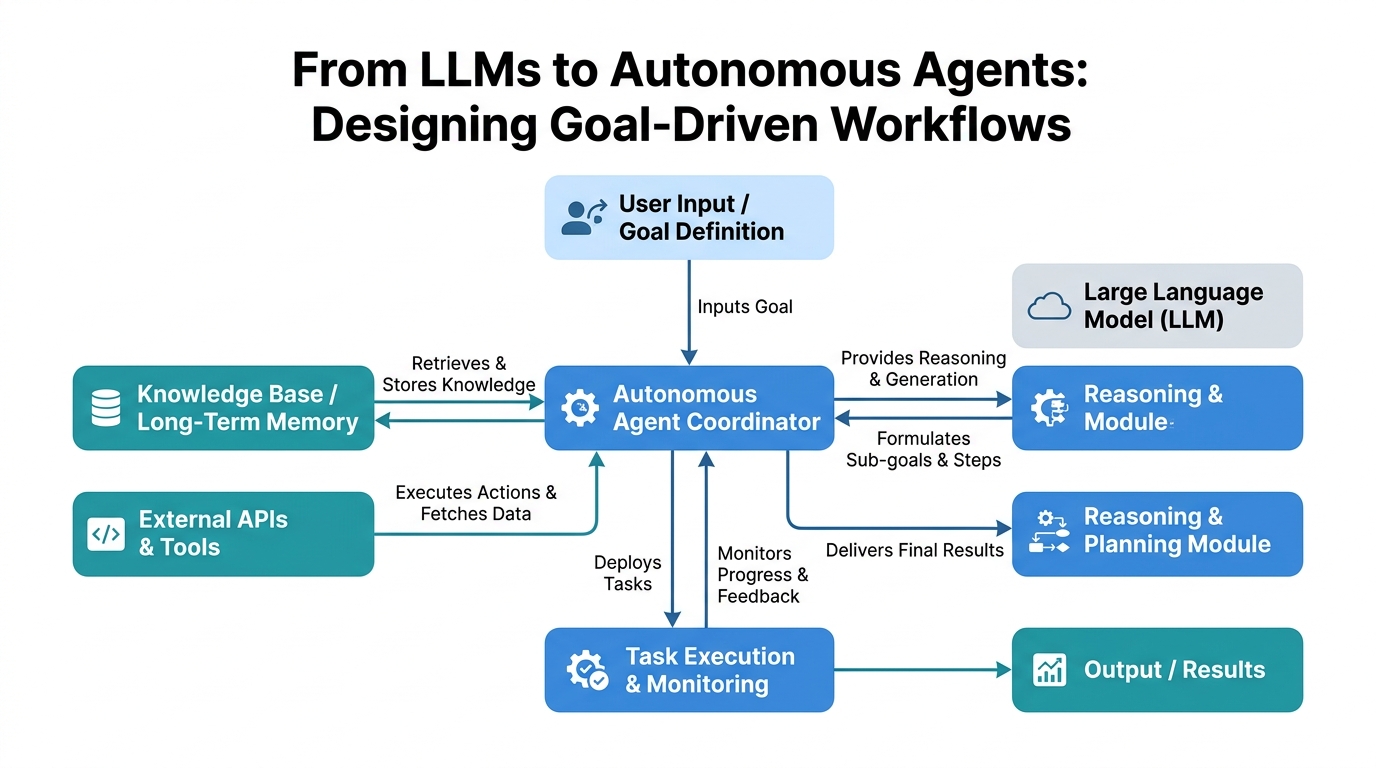
LLM vs AI Agents: The Reactive vs. The Proactive
A raw LLM is like a brilliant but forgetful assistant who answers every question as if it’s the first one you’ve ever asked. It has no context beyond your latest message unless you paste the entire history back in. It never asks clarifying questions, never loops back to double-check its work, and never decides to do something on its own initiative.
An AI agent, by contrast, is that same assistant equipped with a notebook, a to-do list, and permission to act. An agent wraps an LLM with memory, tools, and a control loop that lets it decide what to do next based on its current state and a predefined goal.
How it works under the hood: An agent typically runs in a loop: perceive the current state (what’s been done so far, what new information has arrived), decide what action to take next (using the LLM to reason about it), execute that action (call a tool, send a message, fetch data), observe the result, and repeat until the goal is met.
Analogy: Think of an LLM as a calculator that can answer math problems. An agent is a spreadsheet that can model an entire budget, ask “what if the interest rate changes?”, recalculate everything, and email you the results.
Code example (Python with LangChain):
from langchain.agents import create_react_agent, AgentExecutor
from langchain.tools import tool
from langchain_openai import ChatOpenAI

# Define a simple tool the agent can call
@tool
def get_weather(city: str) -> str:
    """Look up weather for a given city."""
    # In reality, this would call an API
    return f"The weather in {city} is sunny, 72°F."

llm = ChatOpenAI(model="gpt-4o", temperature=0)

# The agent is created with the LLM, a list of tools, and a system prompt
agent = create_react_agent(llm, [get_weather], prompt=...)
agent_executor = AgentExecutor(agent=agent, tools=[get_weather])

# Here's where you see the difference from a raw LLM:
result = agent_executor.invoke({"input": "What's the weather in Tokyo? Then in London."})
# The agent will call get_weather twice, reasoning through each step.
Autonomous Workflows: The Agent’s Operating Schedule
An autonomous workflow is the sequence of steps an agent follows without human intervention at each decision point. It’s the difference between “pilot the plane manually” and “set the autopilot.”
How it works: You define a high-level goal (e.g., “generate a weekly newsletter”), and the agent decides the granular steps: research topics, draft articles, format them, check for errors, schedule the send. It might use different tools or even sub-agents for each step.
Analogy: A recipe is a workflow. A chef following it without asking the head chef for permission at every step is an autonomous chef. An autonomous workflow is that recipe, plus the chef having all ingredients and tools ready.
Code snippet (simplified workflow outline):
def run_newsletter_workflow(agent, topic):
    # Step 1: Research (autonomous)
    research = agent.run(f"Find 3 trending articles about {topic}")
    # Step 2: Draft (autonomous)
    draft = agent.run(f"Draft a 500-word summary of: {research}")
    # Step 3: Rewrite for tone (autonomous)
    final = agent.run(f"Rewrite this in a professional but friendly tone: {draft}")
    # Step 4: Publish (autonomous, calls a tool)
    agent.run(f"Schedule this email to go out tomorrow at 8am: {final}")
    return final
The key insight? The agent makes decisions autonomously within each step, but the overall workflow structure is still a linear sequence you designed.
Reasoning Loops: The Agent’s Inner Monologue
A reasoning loop is the process by which an agent breaks a problem into smaller sub-problems, solves them, and evaluates whether its solution is good enough. It’s not a single pass — it’s iterative.
How it works: The agent generates a “thought” (e.g., “I need to calculate total revenue first”), then an “action” (call a tool to get data), then an “observation” (the result), then another thought (“Now I can calculate profit margin”). This cycle repeats until the agent decides it has enough information to answer the original question.
Analogy: Solving a jigsaw puzzle. You don’t just put all pieces together in one try. You pick up a piece, look at its shape, try it in a spot, see if it fits, and if not, you pick up another piece. Each attempt is a loop iteration.
Annotated code example (LangChain’s ReAct agent):
from langchain.agents import tool
import json

@tool
def calculate(expression: str) -> str:
    """Evaluate a mathematical expression. Input must be a valid math expression."""
    try:
        return str(eval(expression))
    except:
        return "Error"

# The agent's reasoning loop is visible in its log:
agent_executor.invoke({
    "input": "If revenue was $500k and costs were $350k, what's the profit margin as a percentage?",
})
# The agent will:
# 1. Think: "I need profit margin = (revenue - costs) / revenue * 100."
# 2. Act: calculate("500000 - 350000") => "150000"
# 3. Think: "Now divide that by revenue."
# 4. Act: calculate("150000 / 500000") => "0.3"
# 5. Think: "Multiply by 100 for percentage."
# 6. Act: calculate("0.3 * 100") => "30.0"
# 7. Answer: "The profit margin is 30%."
Non-obvious insight: Reasoning loops can fall into infinite loops if the agent keeps generating flawed plans. Always set a max_iterations limit (e.g., 15) to prevent runaway costs.
System Prompts: The Agent’s Constitution
A system prompt is the set of instructions that define how an LLM or agent should behave. It’s not part of the user’s question — it’s the rules of the game.
How it works: The system prompt is prepended to every conversation turn, but the LLM doesn’t see it as part of the “chat history.” It treats it as immutable context. The agent’s behavior is shaped by what you put here.
Analogy: If the LLM is an actor, the system prompt is the script and director’s notes combined. It tells the actor what role to play, what tone to use, and what constraints to follow.
Code example:
system_prompt = """You are a math tutoring agent for 5th graders.
Rules:
- Never give the answer directly. Guide the student step by step.
- Use simple language. No jargon like 'quadratic' or 'coefficient'.
- If the student asks a question not about math, politely redirect them."""
Gotcha: The system prompt is only as good as your ability to enforce it. An LLM can be “jailbroken” if a user’s prompt overrides it. Agents mitigate this by using tools as guardrails (e.g., a “redirect” tool that terminates off-topic conversations).
Goal Definition: The Destination
Goal definition is the act of specifying what the agent must achieve, in a way the agent can understand and measure progress toward.
How it works: A goal isn’t just a sentence. For an agent, it often needs to be structured: a primary objective, success criteria, and failure conditions. Some agents use a “goal stack” where sub-goals can be added and removed.
Analogy: “Make me a sandwich” is a vague goal. “Make a turkey and cheese sandwich on sourdough, with lettuce and tomato, no mayo” is a defined goal. It tells the agent exactly what success looks like.
Example structure:
goal = {
    "objective": "Generate a 5-day meal plan for a vegetarian",
    "success_criteria": [
        "Each day has breakfast, lunch, dinner",
        "No meat or fish in any meal",
        "Total prep time per day under 30 minutes"
    ],
    "failure_conditions": [
        "Any meal contains animal products",
        "Prep time exceeds 30 minutes for any day"
    ]
}
Non-obvious insight: Agents perform poorly with vague goals. The more specific your success criteria, the less likely the agent will produce a “good enough” but wrong answer. Always include at least one failure condition — it helps the agent recognize when to stop.
Persona Constraints: The Agent’s Personality Armor
Persona constraints are rules that force the agent to adopt a specific character, tone, or communication style. They’re a subset of the system prompt, but they specifically target how the agent says things, not what it does.
How it works: The persona is embedded in the system prompt. The agent’s LLM processes it as part of its context, affecting token generation probabilities. Strong personas can significantly change output style, even if the underlying goal is the same.
Analogy: Imagine asking the same question to a cheerful barista and a grumpy librarian. The barista says, “Sure thing! Let me check that for you!” The librarian says, “Shh. Let me find it.” Both answer correctly, but the tone is vastly different. Persona constraints are the instructions that turn your agent into a barista or a librarian.
Code example:
persona = {
    "role": "customer support agent",
    "tone": "empathetic and helpful",
    "constraints": [
        "Always acknowledge the customer's frustration before offering a solution",
        "Never use technical terms without explaining them",
        "End every response with an offer to help further"
    ]
}

# Combined into a system prompt:
system_prompt = f"""You are a {persona['role']}.
Your tone is {persona['tone']}.
Follow these constraints: {', '.join(persona['constraints'])}."""
Performance implication: Persona constraints reduce the model’s effective “attention budget” for the actual task. If your persona is too restrictive, the agent may forget parts of its goal. Keep persona rules under 5 items for optimal performance.
How They All Fit Together
| Concept | What It Is | What It Solves | Common Mistake |
|---|---|---|---|
| LLM | Single-response text generator | None (needs context) | Treating it as an agent |
| AI Agent | LLM + tools + memory + loop | Autonomous decision-making | Forgetting to limit iterations |
| Autonomous Workflow | Predefined sequence of agent steps | Repeatable, reliable processes | Over-structuring (no flexibility) |
| Reasoning Loop | Iterative thought-action-observation cycle | Complex problem decomposition | Not setting max iterations |
| System Prompt | Instructions for LLM behavior | Consistent output quality | Assuming it’s always followed |
| Goal Definition | Structured objective + success criteria | Clear direction for the agent | Being too vague |
| Persona Constraints | Tone and communication style rules | Brand-consistent interactions | Making them too restrictive |
Key Takeaways
- LLM ≠ AI Agent. An LLM is a component; an agent is a system that uses an LLM to plan and act.
- Autonomous Workflows give your agent a repeatable schedule, but leave room for autonomous decisions within each step.
- Reasoning Loops are how agents break down complex tasks — always set a max iteration limit.
- System Prompts are your agent’s constitution. Write them carefully and test them against adversarial inputs.
- Goal Definition must be specific. Include success criteria and failure conditions, not just a vague objective.
- Persona Constraints shape communication style but consume model attention. Keep them to 3–5 rules for best performance.
You’re now equipped to turn a raw LLM into a goal-driven agent. The real power isn’t in the model — it’s in the system you build around it. So go design something that works while you sleep.

Comments