Model Context Protocol: The Universal Connector for AI Agents
You’ve probably heard the complaint: “I built this amazing AI agent, but now I have to wire it up to ten different APIs, each with its own authentication, rate limits, and data formats.” It’s a mess. The Model Context Protocol is the clean solution to that mess. In this tutorial, you’ll learn exactly what MCP is, how its components—MCP Servers, FastMCP, Tool Schemas, Internal APIs, and Unified Access Wrappers—work together to give your AI agents universal access to any tool or data source. No jargon, no skipping steps. By the end, you’ll understand the architecture deeply enough to build your own connectors.
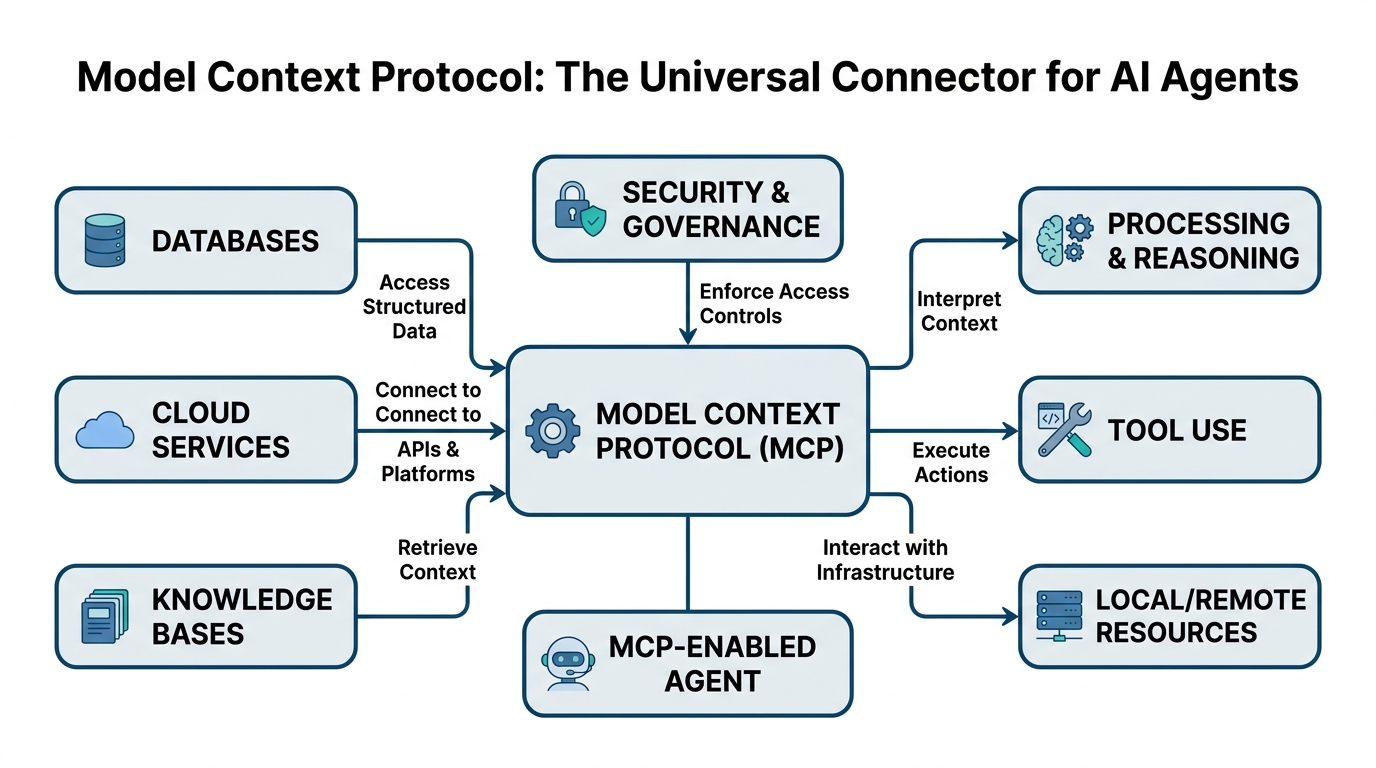
Model Context Protocol: The Wi-Fi for AI Tools
Imagine you have a universal remote that works with every TV ever made. That’s what MCP is for AI agents.
Plain-English definition: The Model Context Protocol is a standard way for AI agents to discover and use external tools, databases, and APIs. Instead of writing custom code for every service, you write one MCP server, and any MCP-compatible agent can talk to it.
How it works under the hood: MCP defines a JSON-RPC-based protocol. An agent sends a request like “list the available tools” and the server responds with a structured description of each tool and how to call it. Communication happens over standard transports—WebSocket, HTTP, or stdio (for local processes). The protocol handles authentication, error handling, and context passing automatically.
Analogy: Think of MCP as Wi-Fi. Your laptop (the AI agent) doesn’t need to know how any specific website works internally. It just sends HTTP requests over Wi-Fi. MCP is the same abstraction layer—your agent sends standardized requests, and the MCP server translates them into whatever the actual service needs.
Code example:
# A minimal MCP client connection
from mcp import ClientSession

async with ClientSession.open("ws://localhost:8000") as session:
    tools = await session.list_tools()
    for tool in tools:
        print(f"Discovered: {tool.name}")
        print(f"  Description: {tool.description}")
        # Output: "Discovered: get_weather"
        # Output: "  Description: Returns current weather for a city"
Non-obvious insight: MCP doesn’t just pass requests—it passes context. The agent sends its current reasoning state, history, and user preferences. This means the server can make smarter decisions about how to fulfill a request. Most tutorials skip this.
MCP Servers: The Translators You Need
Plain-English definition: An MCP Server is a program that sits between an AI agent and a real service (like a database, API, or file system). It speaks MCP on one side and translates to whatever the actual service needs on the other.
How it works under the hood: The server registers a set of tools, each with a name, description, and input schema. When an agent calls a tool, the server validates the inputs against the schema, executes the underlying operation (e.g., hitting an API), and returns a structured response. This is bidirectional—the server can also push updates to the agent, like “the weather just changed.”
Analogy: An MCP Server is a universal translator at the United Nations. The agent speaks MCP, the service speaks its own language (REST, GraphQL, SQL, whatever), and the server translates perfectly in real-time.
Code example:
# A simple MCP Server that wraps a weather API
from mcp.server import Server, stdio_server

app = Server("weather-server")

@app.tool()
async def get_weather(city: str) -> str:
    """Returns current weather for a city."""
    # Ideally, call an actual weather API here
    return f"25°C, sunny in {city}"

# Start server over stdio
stdio_server(app).run()
Gotcha: MCP Servers must handle partial tool calls. An agent might call get_weather with just a city name, but the real API might need country code and units. Your server needs to resolve that ambiguity gracefully.
FastMCP: Less Boilerplate, More Building
Plain-English definition: FastMCP is a Python library that dramatically simplifies writing MCP Servers. It’s what Flask is to web servers—everything you need, nothing you don’t.
How it works under the hood: FastMCP uses Python decorators to turn regular functions into MCP tools. It automatically generates the JSON schemas for inputs, handles connection management, and provides built-in support for async, rate limiting, and authentication. Under the hood, it’s still full MCP protocol—you just write less code.
Analogy: FastMCP is like Lego’s Creator sets versus building from scratch. The same pieces are there, but FastMCP gives you pre-assembled joints so you can focus on the interesting parts.
Code example:
# Same weather server in FastMCP
from fastmcp import FastMCP

app = FastMCP("weather-server")

@app.tool
def get_weather(city: str):
    """Returns current weather for a city."""
    return f"25°C, sunny in {city}"

@app.tool
def get_forecast(city: str, days: int = 2):
    """Returns weather forecast for a city."""
    return [{"day": i, "temp": 20 + i} for i in range(days)]
The magic: FastMCP auto-generates the tool list response, input validation schemas, and error handling. It also supports stateful connections, so the agent can maintain a session across multiple tool calls. Most tutorials miss the session management—it’s crucial for complex workflows.
Tool Schemas and Internal APIs: The Blueprint and The Factory
Plain-English definition: A Tool Schema is a formal description of what a tool does, what inputs it expects, and what outputs it produces. An Internal API is the actual service or function that the tool calls when invoked.
How it works under the hood: The tool schema is a JSON object that follows the JSON Schema standard. It includes the tool name, a human-readable description, and parameter definitions (type, required, default). When an agent inspects an MCP Server, it receives these schemas and uses them to construct valid calls. Internal APIs are whatever the server calls—a database query, a REST endpoint, a local function.
Analogy: The Tool Schema is the menu at a restaurant. It describes each dish (name, ingredients, price). The Internal API is the kitchen. You (the agent) order from the menu, and the kitchen (Internal API) prepares the dish.
Code example:
# Tool schema example (auto-generated by FastMCP)
{
    "name": "get_forecast",
    "description": "Returns weather forecast for a city.",
    "inputSchema": {
        "type": "object",
        "properties": {
            "city": {"type": "string"},
            "days": {"type": "integer", "default": 2}
        },
        "required": ["city"]
    }
}
Critical insight: The schema must be accurate. If you define days as optional but your Internal API crashes without it, the agent will produce errors that are hard to debug. Always test schemas against actual calls.
Unified Access Wrappers: One Ring to Rule Them All
Plain-English definition: A Unified Access Wrapper is a single MCP Server that combines multiple Internal APIs into one cohesive interface. The agent sees one service, but behind the scenes, it talks to many.
How it works under the hood: The wrapper maintains a registry of internal services. Incoming tool calls are inspected, and the wrapper routes them to the appropriate service. This could be as simple as a dictionary mapping tool names to services, or as complex as a rule-based router. The wrapper handles authentication translation, data format conversion, and error aggregation.
Analogy: A Unified Access Wrapper is the airline check-in counter that handles multiple airlines. You go to one place, show your passport, and get boarding passes for all your connecting flights. The counter does the routing behind the scenes.
Code example:
# A Unified Access Wrapper combining weather and news
from fastmcp import FastMCP

app = FastMCP("all-services")

# Internal service connections
weather_api = WeatherAPI()
news_api = NewsAPI()

@app.tool
def get_weather(city: str):
    """Weather from our weather service."""
    return weather_api.fetch(city)

@app.tool
def get_news(topic: str):
    """News from our news service."""
    return news_api.search(topic)
Expert insight: The power of Unified Access Wrappers is cross-service context. If you call get_weather and get_news in the same session, the wrapper can combine results—e.g., “20°C and sunny in New York, with breaking news about a heatwave.” Most wrappers don’t do this, but the ones that do are game-changers.
Comparison Table: Choosing the Right Approach
| Approach | Best For | Complexity | Setup Time |
|---|---|---|---|
| Direct Internal API calls | Simple, one-off integrations | Low | Minutes |
| Single MCP Server | One service, many agents | Medium | Hours |
| FastMCP Server | Quick prototyping | Low | Minutes |
| Unified Access Wrapper | Multiple services, one agent interface | High | Days |
The trade-off is clear: simplicity vs. flexibility. A Unified Access Wrapper takes longer to build but gives your agent a single, clean interface to everything.
Key Takeaways
- Model Context Protocol standardizes AI agent → tool communication, like Wi-Fi standardizes internet access
- MCP Servers translate between MCP and real services—you write one, any agent can use it
- FastMCP eliminates boilerplate with decorators and auto-generated schemas
- Tool Schemas are JSON descriptions that let agents discover and use tools dynamically
- Internal APIs are the actual services your code calls—keep them clean and well-tested
- Unified Access Wrappers combine multiple services into one MCP Server, cutting complexity
Build your first MCP server today. You’ll wonder how you ever wired agents without it.

Comments